One Moment, Many Clocks: Resolving the Core Confusion
For developers and admins: learn why one unix timestamp shows different local times, how to convert and avoid timezone bugs, and best practices for storage and
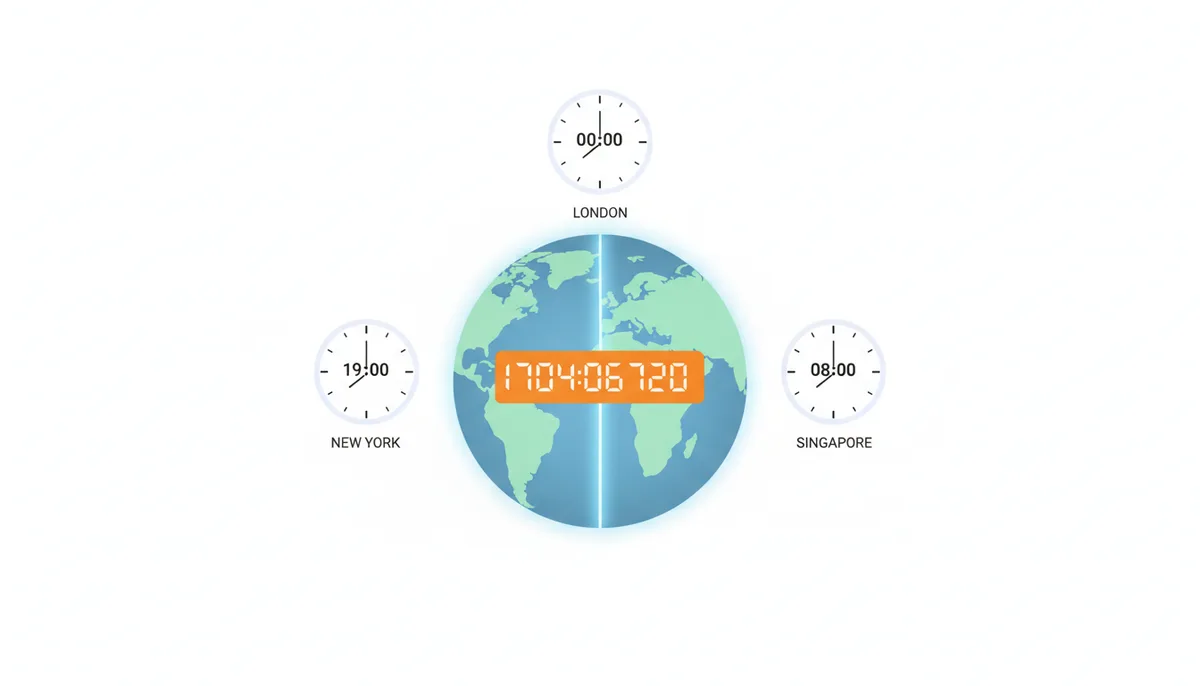
You've just converted a Unix timestamp—say, 1704067200—and discovered something puzzling. In London, it shows midnight on New Year's Day 2024. But the same number displays as 7 PM on December 31st in New York, and 8 AM on January 1st in Singapore. How can one timestamp represent three different times?
Here's what trips people up: that timestamp represents a single, absolute moment when fireworks exploded over London's Thames. Everyone on Earth experienced this instant simultaneously—New Yorkers watching on TV at dinner, Singaporeans over breakfast. The timestamp captures this universal moment. What changes is how we write it down based on where we are.
Think of a live global broadcast. The event happens at one instant, but viewers see different times on their wall clocks. A Unix timestamp works the same way. It's a universal reference point that gets translated into local time based on your location. This distinction between the absolute moment and its local representation explains why developers sometimes get wildly incorrect times in their applications.
What Is a Unix Timestamp? The Universal Standard
A Unix timestamp counts seconds since midnight UTC on January 1, 1970. That's it. The number 1704067200 means exactly 1,704,067,200 seconds have passed since that moment, which we call the Unix Epoch. This measurement always uses UTC (Coordinated Universal Time) as its reference—never your local time zone.
This timezone-agnostic nature is the whole point. Whether you're in Tokyo or Toronto, the same event produces the same timestamp. It's like measuring distance: the space between two cities doesn't change based on whether you measure it in miles or kilometers. The timestamp is the raw measurement; time zones are just different ways to express it.
Modern systems often use milliseconds instead of seconds, multiplying the value by 1000. JavaScript's Date.now() returns milliseconds, giving you something like 1704067200000.
Mixing these up causes spectacular failures—interpreting milliseconds as seconds throws you off by about 54 years. I've seen production systems display dates from 1920 because someone fed a millisecond value to a function expecting seconds.
Some systems go further with microseconds (multiply by 1,000,000) or nanoseconds (multiply by 1,000,000,000). Database systems particularly love microsecond precision. When your timestamp conversion shows a date centuries in the past or future, you're probably dealing with a precision mismatch.
How Conversion Works: From a Single Number to Your Local Time
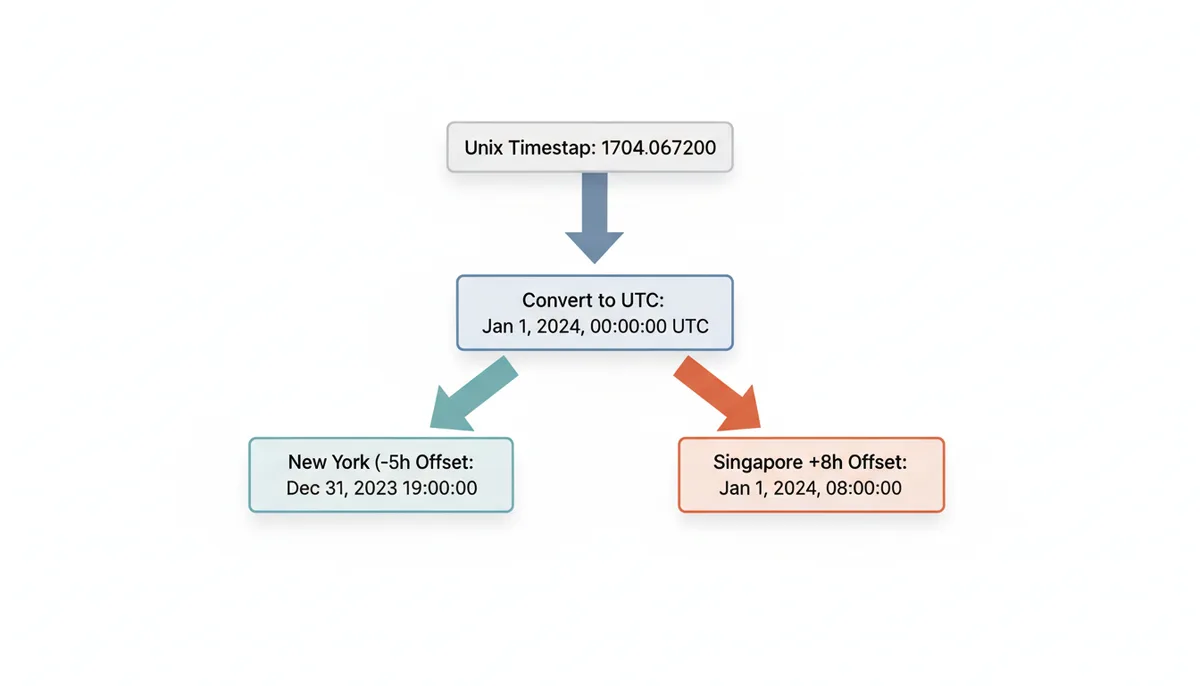
Converting a Unix timestamp to local time happens in two steps. First, the system calculates the UTC date and time. Then it applies your time zone's offset to get local time. Let's walk through this with timestamp 1704067200.
Step one: Convert to UTC. Those 1,704,067,200 seconds work out to January 1, 2024, at 00:00:00 UTC. Every system will get this same UTC time from that timestamp.
Step two: Apply the time zone offset. If you're in New York (Eastern Time), you subtract 5 hours during winter: 00:00:00 UTC - 5 hours = 19:00:00 (7:00 PM) on December 31, 2023. In Singapore, you add 8 hours: 00:00:00 UTC + 8 hours = 08:00:00 (8:00 AM) on January 1, 2024.
The offset comes from several sources. Your operating system maintains a time zone setting—on Linux, it's typically a symlink at /etc/localtime. Web browsers read this OS setting through JavaScript. Servers might have their own configured time zone, which catches developers off guard when their local machine shows different results than production.
Manual calculation helps you verify any converter. Take your timestamp, divide by 86400 (seconds per day) to get days since epoch. The remainder gives you seconds into that day. Add those days to January 1, 1970, then apply your UTC offset. When a tool gives unexpected results, walking through this calculation often reveals whether you're using the wrong offset or the tool is configured for a different time zone than you think.
The Daylight Saving Time Problem: When the Offset Changes
New York isn't always 5 hours behind UTC. During summer, it's 4 hours behind. This shift—Daylight Saving Time—breaks any system using fixed offsets. The same location needs different math depending on the date.
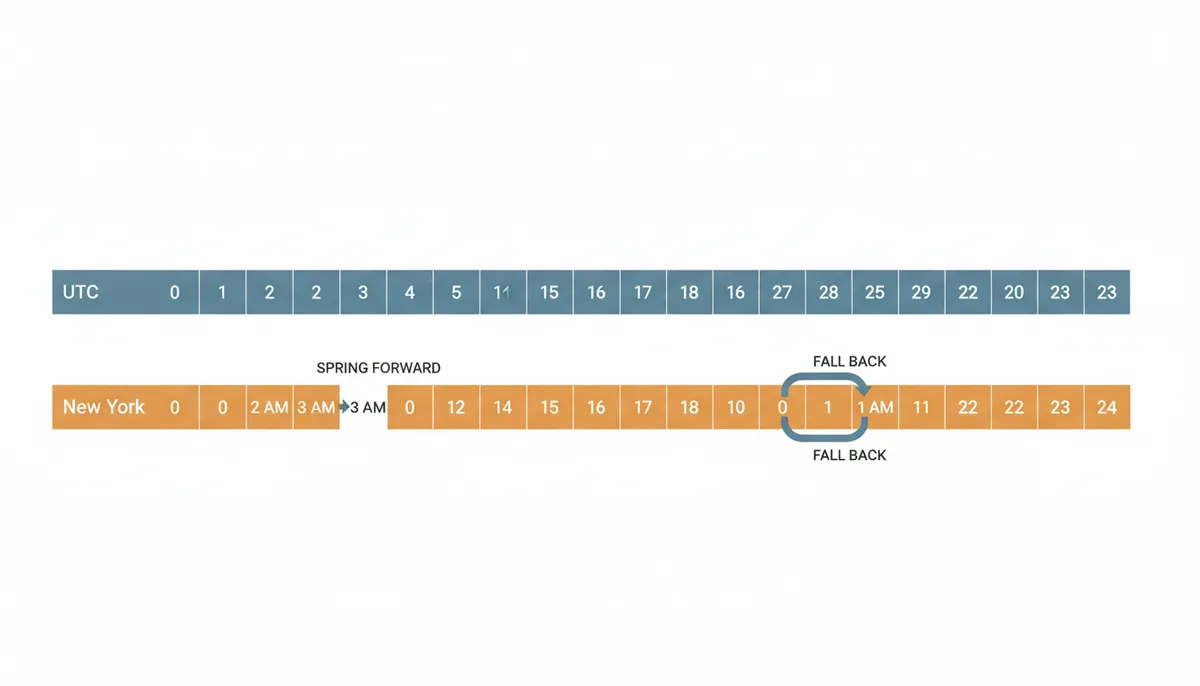
DST creates genuine ambiguity. When clocks "fall back" in autumn, 1:30 AM happens twice. If I tell you to meet at 1:30 AM on November 3, 2024, in New York, which 1:30 AM do I mean? The first one (EDT) or the second one (EST)? A timestamp resolves this—1730611800 means the first occurrence (1:30 AM EDT, which is 05:30 UTC), while 1730615400 means the second (1:30 AM EST, which is 06:30 UTC).
Spring creates the opposite problem. When clocks jump from 2:00 AM to 3:00 AM, an entire hour vanishes. Try to schedule something for 2:30 AM on March 10, 2024, in New York, and that local time simply doesn't exist. Systems handle this differently—some throw errors, others silently adjust to 3:30 AM.
The IANA Time Zone Database tracks these rules for every region on Earth, including historical changes. Brazil abolished DST in 2019. Russia has switched systems multiple times. Morocco suspends DST during Ramadan. This database, updated several times yearly, is why you should use identifiers like 'America/New_York' rather than fixed offsets. These identifiers automatically handle DST transitions, historical rule changes, and special cases.
Common Pitfalls: Why Your Timestamp Conversion Looks Wrong
Your server runs in UTC, but your code assumes local time. This implicit timezone assumption causes more bugs than any other time-related issue. You test locally in Eastern Time, everything works. Deploy to AWS (which runs in UTC), and suddenly all your timestamps are 5 hours off.
Here's how it typically breaks: Your application logs an event with timestamp 1704067200. Your local development machine interprets this as midnight EST. But your server, running in UTC, treats it as midnight UTC—a 5-hour difference. Users see events happening at the wrong time, and you spend hours debugging what looks like correct code.
| Abbreviation | Possible Meanings | UTC Offset(s) | Example Regions |
|---|---|---|---|
| CST | Central Standard Time, China Standard Time, Cuba Standard Time | UTC-6, UTC+8, UTC-5 | Chicago, Shanghai, Havana |
| IST | India Standard Time, Irish Standard Time, Israel Standard Time | UTC+5:30, UTC+1, UTC+2 | Mumbai, Dublin, Tel Aviv |
| BST | British Summer Time, Bangladesh Standard Time, Bougainville Standard Time | UTC+1, UTC+6, UTC+11 | London, Dhaka, Bougainville |
| PST | Pacific Standard Time, Philippine Standard Time | UTC-8, UTC+8 | Los Angeles, Manila |
Abbreviation ambiguity kills accuracy. "CST" could mean Chicago time (UTC-6) or China time (UTC+8)—a 14-hour difference. I've debugged systems where someone hardcoded "IST" thinking it meant Indian time, but the library interpreted it as Irish time. Your Indian users saw times 4.5 hours off.
The millisecond/second confusion appears when mixing systems. Your database stores seconds, JavaScript generates milliseconds, and someone forgets to divide by 1000. Instead of showing today's date, your app shows dates from 2055. The reverse—multiplying seconds by 1000 when milliseconds are expected—throws you back to 1970.
Best Practices for Storing and Handling Time Data
Store UTC, display local. This rule prevents most timezone-related bugs. Your database should contain either raw Unix timestamps as integers or timezone-aware types like PostgreSQL's TIMESTAMP WITH TIME ZONE. Never store local times without timezone information—you can't reliably convert them later.
Convert to local time at the last possible moment. Ideally, send UTC timestamps to the user's browser and let JavaScript convert using their system settings. This approach automatically handles users who travel between time zones or have devices set to non-local times. The conversion happens where it has the most accurate information about the user's actual timezone.
Use full IANA timezone identifiers everywhere. Replace 'EST' with 'America/New_York'. Replace 'PST' with 'America/Los_Angeles'. These identifiers handle DST automatically and update when governments change timezone rules. They're unambiguous and work consistently across different programming languages and systems.
When accepting user input, be explicit about time zones. A form asking for "3:00 PM" is ambiguous. Either show the timezone you're assuming ("3:00 PM PST") or let users specify it. For scheduling across time zones, show both times: "3:00 PM PST (6:00 PM EST)".
Choosing the Right Tool for Time Zone Conversions
Different scenarios need different tools. Online converters like unixconverter.com excel at quick manual checks. You paste a timestamp, pick your target timezone from a dropdown, and see the result instantly. They're perfect for debugging—when your code shows one time but you expect another, these tools help verify which is correct.
Command-line tools handle automation and scripting. On Linux or macOS, the date command converts timestamps with timezone support: TZ='America/New_York' date -d @1704067200 shows the timestamp in Eastern time. For Windows, PowerShell offers similar functionality. These tools integrate into deployment scripts, log processing, and automated testing.
Programming libraries provide the full solution for applications. JavaScript's Intl.DateTimeFormat handles timezone conversion with locale-appropriate formatting. Python's zoneinfo module (Python 3.9+) uses the system's IANA database. These libraries stay updated with timezone rule changes and handle edge cases like DST transitions correctly.
| Tool Type | Use Case | Key Advantage | Key Limitation |
|---|---|---|---|
| Online Converter | Quick lookups, debugging | No setup required, visual interface | Manual process, not automated |
| Command-Line Utility | Scripting, log processing | Scriptable, works in pipelines | Syntax varies by platform |
| Programming Library | Application development | Full control, handles edge cases | Requires coding knowledge |
| Database Functions | SQL queries, data transformation | Works directly with stored data | Database-specific syntax |
Choose based on your needs. One-off debugging? Use an online converter. Processing server logs? Command-line tools. Building an application? Use your language's timezone library. The key is using tools that explicitly handle timezones rather than assuming fixed offsets.
Advanced Topics: Leap Seconds and the Year 2038
Unix time deliberately ignores leap seconds, creating a subtle drift from official UTC. Since 1972, we've added 27 leap seconds to keep atomic time aligned with Earth's rotation. During a leap second, UTC clocks show 23:59:60—a 61st second that Unix time pretends doesn't exist. Your Unix timestamp continues counting as if nothing happened.
This simplification rarely matters. The discrepancy only affects systems requiring sub-second precision across leap second boundaries. GPS systems and financial trading platforms care about this difference. For typical applications showing human-readable times, the maximum 27-second drift stays invisible. Just know that Unix timestamps from before a leap second won't perfectly match official UTC records.
The Year 2038 problem looms for 32-bit systems. At 03:14:07 UTC on January 19, 2038, the 32-bit signed integer storing Unix time will overflow, wrapping around to December 13, 1901. Modern 64-bit systems pushed this problem about 292 billion years into the future—well past the sun's expected lifetime. If you're still running 32-bit systems, migration is urgent. Embedded systems, old IoT devices, and legacy databases are the main concern.
Historical timezone data gets messy before 1970. The IANA database includes historical rules, but many regions lacked standardized time before the 20th century. Each town might have kept its own solar time. Even major cities switched timezone rules frequently. Converting timestamps from the 1800s requires historical research beyond what automated tools provide. Stick to post-1970 dates unless you're prepared for serious complexity.
Real-World Debugging: Tracking Down a Production Timezone Bug
Here's a hypothetical but realistic debugging scenario. An e-commerce platform starts sending order confirmation emails with wrong times. Australian customers ordering at 2 PM receive confirmations saying "Thank you for your order placed at 3 AM." The bug only affects some customers, making it harder to track down. Here's how systematic debugging would reveal multiple timezone handling errors.
The first clue: inconsistent behavior. Orders from Sydney show correctly, but Brisbane orders are wrong by 11 hours. During summer, Sydney observes daylight saving (UTC+11) while Brisbane stays on standard time (UTC+10). This rules out a simple offset error. We start by examining the data flow: browser → API server → database → email service → customer.
Step 1: Verify the stored timestamp. The database contains Unix timestamps like 1703217600. Converting this manually: that's December 22, 2023, 04:00:00 UTC. For a Brisbane customer ordering at 2 PM local time (UTC+10), this should represent 2023-12-22T14:00:00+10:00, which converts to 04:00:00 UTC. So far correct.
Step 2: Check the API server logs. The server received the correct local time string "2023-12-22T14:00:00" but without timezone information. The JavaScript frontend used new Date("2023-12-22T14:00:00"), which interprets the string as local time in the browser's timezone. Development was done in Sydney (UTC+11), but the Brisbane user is in UTC+10. The frontend created a timestamp one hour off.
Step 3: Trace the email service. The email template used PHP's date() function without setting a timezone, defaulting to the server's configuration. The email server was configured for 'Australia/Sydney'. When formatting the timestamp for a Brisbane customer, it showed Sydney time (3 PM) instead of Brisbane time (2 PM). Combined with the frontend error, emails showed 3 AM—11 hours off.
The fix required changes at each layer. The frontend now sends timestamps as ISO 8601 with explicit timezone: "2023-12-22T14:00:00+10:00". The API converts to Unix timestamps for storage. The email service explicitly sets the customer's timezone before formatting. Testing now includes servers configured with different default timezones to catch implicit timezone assumptions.
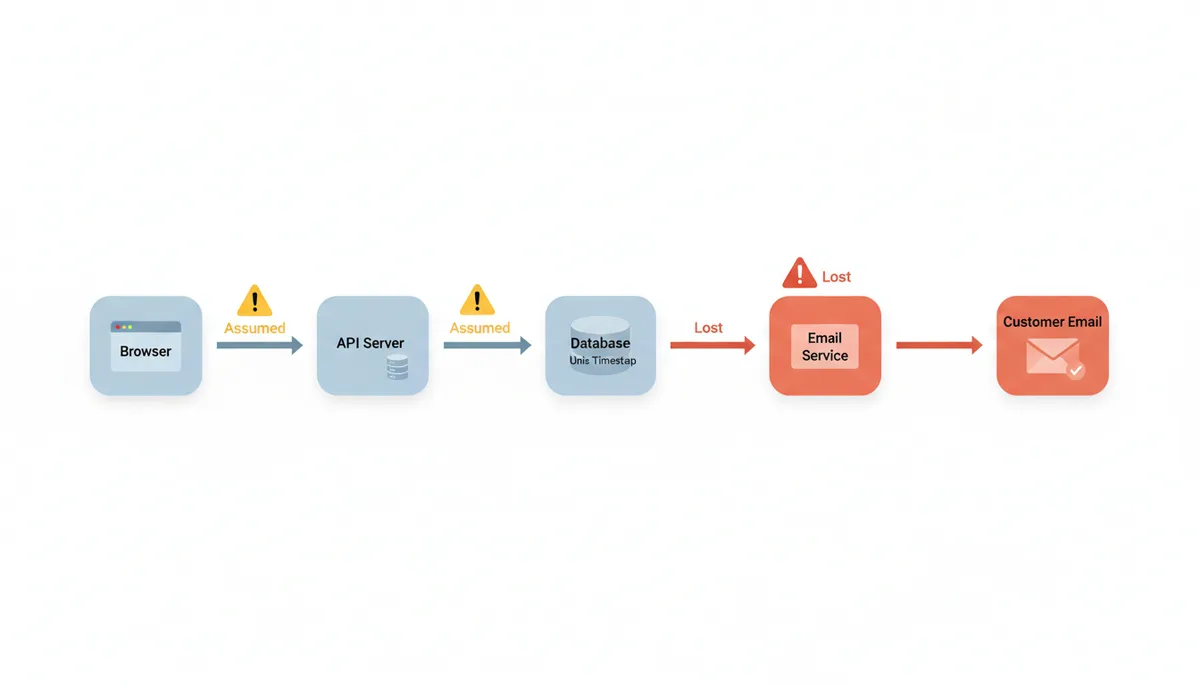
This pattern—correct behavior in development, wrong in production—happens when code implicitly uses the server's timezone. Always test with servers set to UTC. Log timezone information explicitly. When debugging, convert timestamps manually at each step to verify where the conversion goes wrong.
Comparing Approaches: Unix Timestamps vs ISO 8601 vs Database Types
You have three main options for storing time data: Unix timestamps as integers, ISO 8601 strings, or database-specific datetime types. Each approach handles timezones differently, with distinct tradeoffs for storage space, query performance, and timezone accuracy.
Unix timestamps as integers (or bigints for milliseconds) take minimal space—8 bytes for standard precision. They sort naturally, compare with simple math, and work identically across every programming language. Calculating "events in the last hour" becomes WHERE timestamp > (UNIX_TIMESTAMP() - 3600). The downside: they're not human-readable in raw database queries, and you lose timezone information unless stored separately.
ISO 8601 strings like "2023-12-22T15:00:00+11:00" preserve timezone information explicitly. They're human-readable in database exports and logs. You can see at a glance that "+11:00" means Australian Eastern Daylight Time. But they take more space (25+ bytes), require string parsing, and sort correctly only when using the same timezone offset format. Mixing "Z" suffix (for UTC) with "+00:00" breaks alphabetical sorting.
Database datetime types vary wildly. PostgreSQL's TIMESTAMP WITH TIME ZONE converts input to UTC and stores an absolute point in time. It displays this value using the current session timezone—it doesn't preserve what timezone was originally supplied. MySQL's TIMESTAMP also converts between the session timezone and UTC for storage and retrieval, while DATETIME stores exactly what you give it without any timezone conversion. SQL Server's DATETIMEOFFSET stores both local time and offset, using 10 bytes.
| Storage Method | Space Used | Timezone Handling | Best For | Main Risk |
|---|---|---|---|---|
| Unix Timestamp (bigint) | 8 bytes | None (implicitly UTC) | APIs, high-volume data | Lost timezone context |
| ISO 8601 String | 25-35 bytes | Explicit in string | Data exchange, logs | Parsing overhead |
| PostgreSQL TIMESTAMPTZ | 8 bytes | Stores UTC, displays per session | Complex queries | Original zone not preserved |
| MySQL DATETIME | 5-8 bytes | None (stores as-is) | Single timezone apps | No timezone info |
| DATETIMEOFFSET | 10 bytes | Stored with time | Audit trails | Platform-specific |
For most applications, store Unix timestamps and convert at display time. This gives you mathematical simplicity and universal compatibility. When you need to preserve the original timezone context—for audit logs or legal records—use ISO 8601 strings or database types that maintain offset information. The key mistake is storing local times without timezone information, making it impossible to reconstruct the actual moment later.
Platform-Specific Quirks: How Different Systems Handle Time
JavaScript's Date object creates subtle bugs through implicit timezone conversion. When you create new Date("2023-12-22"), it assumes UTC. But new Date("2023-12-22T00:00:00") assumes local time. This one character difference—the 'T'—changes the result by your timezone offset. Developers testing in UTC never see the bug. Users in other timezones get dates off by a day.
Python's timezone handling changed significantly between versions. Before Python 3.6, the standard library lacked timezone support, pushing everyone to third-party libraries like pytz. Now zoneinfo (Python 3.9+) provides native support, but it behaves differently than pytz for edge cases. Code migrated between versions might silently change behavior around DST transitions.
PHP's timezone database updates independently of PHP itself. Your code might reference 'America/Detroit', which worked in older PHP versions. But newer timezone databases merged Detroit into 'America/New_York'. The code still runs but now uses PHP's default timezone, typically UTC. Similar deprecations affect dozens of cities.
Excel and Google Sheets treat dates as numbers—days since their epoch. Excel uses January 1, 1900 (with a leap year bug making 1900 incorrectly a leap year). Google Sheets uses December 30, 1899. Both convert Unix timestamps by dividing by 86400 and adding their epoch offset. But Excel on Mac historically used a 1904 epoch. Spreadsheets shared between platforms showed dates 4 years off.
Mobile platforms add their own complexity. iOS respects the user's 24-hour time preference when formatting, while some Android versions ignore it for certain locales. React Native on Android sometimes uses the device timezone, other times the app's configured timezone, depending on which date formatting API you call. Flutter apps handle timezones consistently across platforms but default to local time where JavaScript developers expect UTC.
The lesson: test timezone handling on each platform you support. Don't assume behavior matches across systems. Log which platform, version, and timezone settings produced each timestamp. When bugs appear only for certain users, platform-specific timezone handling is often the culprit.
Frequently Asked Questions
Is Unix time the same as UTC?
Almost. Unix time is based on UTC but does not account for leap seconds. This means it can be off by a few seconds from official UTC, but for nearly all applications, they are treated as equivalent. Unix time provides a simplified, monotonically increasing count of seconds that makes calculations easier, while UTC includes leap seconds to stay synchronized with Earth's rotation. Unless you're doing precision timing or astronomical calculations, this difference won't affect you.
Can a Unix timestamp be negative?
Yes. A negative Unix timestamp simply represents a date and time before the epoch of January 1, 1970, UTC. For example, -86400 represents December 31, 1969, at 00:00:00 UTC. This is useful for historical dates—World War II events, birthdays of older people, or historical records. Most modern systems handle negative timestamps correctly, though some older programs might fail or produce unexpected results.
How do I get the current Unix timestamp for a specific time zone?
You can't. A Unix timestamp is a universal value that is not tied to any time zone. You get the single, current Unix timestamp and then format it for display in a specific time zone. The timestamp for "right now" is the same number whether you're in Tokyo or New York. What changes is how you display that timestamp as a local time. This is a fundamental concept: timestamps are absolute, timezone display is relative.
What is the Year 2038 Problem?
On older 32-bit systems, the integer used to store the Unix timestamp will run out of space in 2038, causing the time to 'wrap around'. Specifically, at 03:14:07 UTC on January 19, 2038, these systems will jump back to December 13, 1901. This problem is solved on all modern 64-bit systems, which can handle dates billions of years in the future. The main concern today is embedded systems, IoT devices, and legacy software that might still use 32-bit time representation.
Why should I use 'America/New_York' instead of 'EST'?
'EST' is ambiguous and only refers to standard time. The IANA identifier 'America/New_York' is unique and correctly handles the automatic switch between Eastern Standard Time (EST) and Eastern Daylight Time (EDT). It also adapts if the U.S. changes DST rules, as happened in 2007. Using the full identifier future-proofs your code and eliminates bugs around DST transitions.
Does my database automatically store timestamps in UTC?
It depends. Some data types, like PostgreSQL's TIMESTAMP WITH TIME ZONE, automatically convert and store times in UTC. Others, like TIMESTAMP in MySQL, do not. Always check your database's documentation. MySQL's basic TIMESTAMP type stores values in UTC but converts them based on the server's time zone setting, which can cause confusion. PostgreSQL's TIMESTAMP WITHOUT TIME ZONE stores exactly what you give it without any conversion. Know your database's behavior before designing your schema.
Conclusion
Understanding why the same Unix timestamp shows different local times comes down to recognizing timestamps as absolute moments that get translated for local display. The number itself never changes—only how we express it in human terms varies by location. Master this distinction, and you'll avoid the timezone bugs that plague so many applications.
The practical path forward is clear. Store times in UTC using Unix timestamps or timezone-aware database types. Convert to local time only when displaying to users. Use IANA timezone identifiers, not abbreviations. Test with multiple timezones, especially around DST transitions. With these practices, you'll handle time correctly across any system or region.
Sources
- IANA (Internet Assigned Numbers Authority) — The existence and importance of the Time Zone Database (tz database) and the practice of using full location-based names (e.g., 'America/Los_Angeles') instead of abbreviations.
- The Open Group — The official POSIX definition of 'Seconds Since the Epoch' (Unix time) and its relationship to UTC.
- NIST (National Institute of Standards and Technology) — The definition of Coordinated Universal Time (UTC) as the primary time standard by which the world regulates clocks and time.
- MDN Web Docs — Best practices for formatting dates and times in JavaScript, specifically the use of the `Intl.DateTimeFormat` object for timezone-aware conversions.
- Python Software Foundation — The modern, standard way to handle time zones in Python using the `zoneinfo` module, which implements the IANA database.
- ISO (International Organization for Standardization) — The definition of the ISO 8601 standard, a human-readable format for representing dates and times that can include timezone offset information.