How UTC Becomes a Local Date in Unix Timestamp Conversion
For developers: learn how to convert Unix timestamps to local dates, handle DST, and use IANA time zones in JavaScript, Python, and SQL.
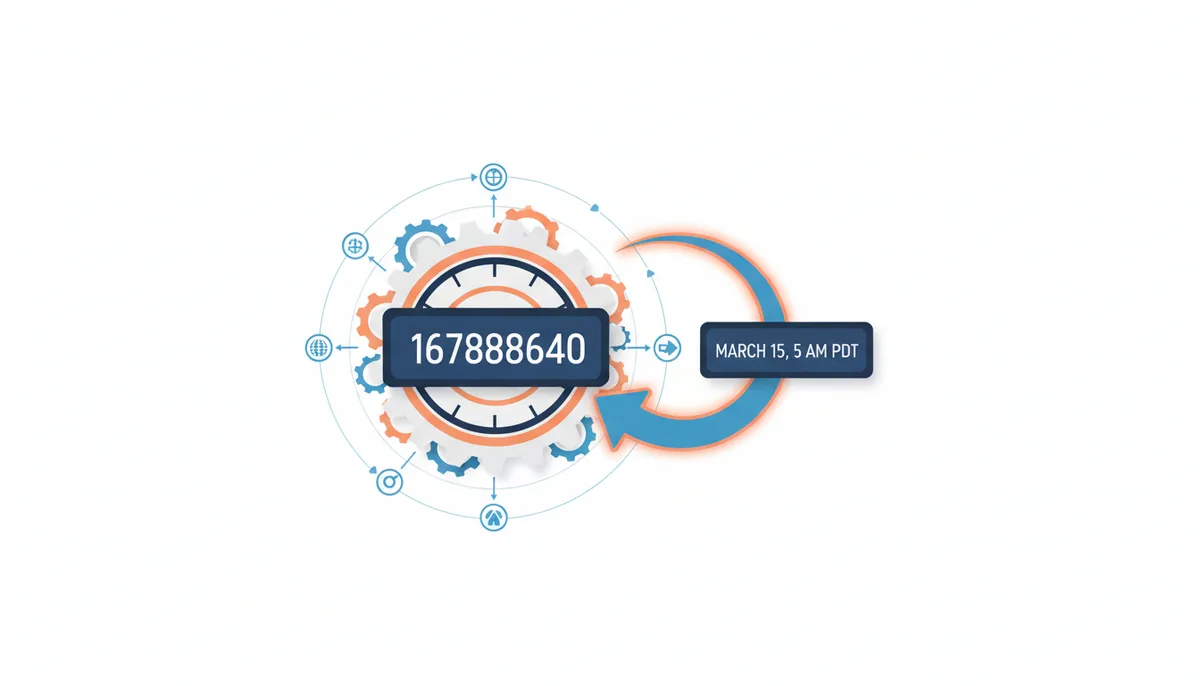
You have a Unix timestamp: 1678886400. Your user lives in Los Angeles. Their clock should show "March 15, 2023, 5:00 AM PDT" but your code displays something else entirely. Maybe it's off by an hour. Maybe it shows the wrong day. The culprit? Time zone conversion — a process most developers think they understand until they debug their first DST transition bug.
Converting a Unix timestamp to local time requires more than adding or subtracting a few hours. You need to know which offset was in effect at that exact moment in history, whether daylight saving rules applied, and how your programming language handles the ambiguous hour when clocks "fall back." This article walks through the complete conversion process, from the physics of time measurement to the specific algorithms your code executes.
Why Is a Unix Timestamp Always in UTC?
A Unix timestamp counts seconds. That's it. Specifically, it counts the seconds elapsed since midnight on January 1, 1970, in Coordinated Universal Time (UTC). The number 1678886400 means exactly 1,678,886,400 seconds have passed since that moment — no matter where on Earth you're standing. The Open Group defines this epoch and its relation to UTC.
This simplicity is the entire point. When your server in Tokyo needs to coordinate with a database in Frankfurt and a user in São Paulo, they all agree on what 1678886400 means. It represents one specific instant in the flow of time, unambiguous and universal.
Contrast this with "March 15, 2023, 2:00 PM." Which 2:00 PM? Tokyo's happens 16 hours before São Paulo's. Without specifying a location, this timestamp is meaningless for coordination. Even with a location, you'd need to know whether daylight saving time was active. A Unix timestamp sidesteps all of this by anchoring to a single, global reference point.
The epoch — that midnight in 1970 — was chosen somewhat arbitrarily when Unix was being developed. What matters isn't the specific date but that everyone uses the same one. UTC was chosen as the reference timezone because it doesn't observe daylight saving time and serves as the global standard for time coordination.
The Two Ingredients for Conversion: An Instant and a Location
Converting a Unix timestamp to local time follows a simple formula: take your instant in time (the timestamp) and apply the rules for your specific location (the time zone). The timestamp tells you when something happened in absolute terms. The time zone tells you what a wall clock would have displayed at that location.
A time zone provides two critical pieces of information. First, it specifies a base offset from UTC — how many hours and minutes to add or subtract. Pacific Standard Time, for instance, runs 8 hours behind UTC. Second, it defines rules for when that offset changes. Most of North America springs forward an hour in March and falls back in November. Some regions never change. A few switch their rules every few years.
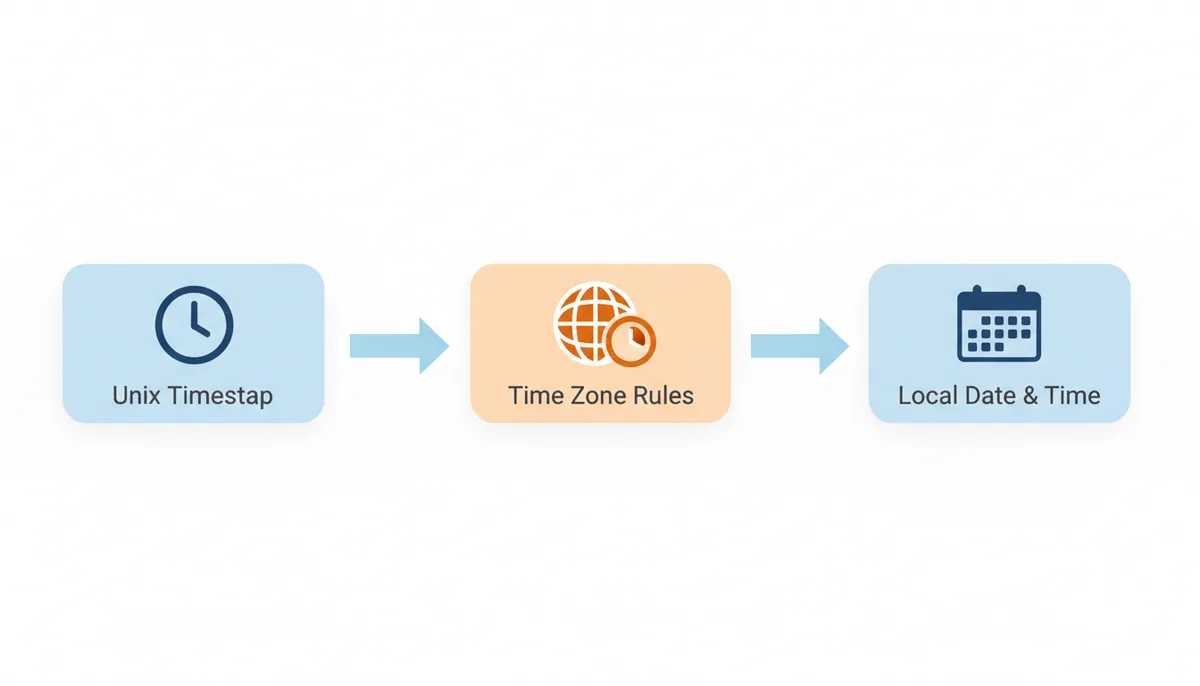
Without both pieces, conversion fails. Using just the offset gives you the wrong time for half the year. Using just the location name without historical rules gives you the wrong time for past dates. The timestamp 1678886400 represents March 15, 2023, 12:00 PM UTC. In New York, that's 8:00 AM EDT (daylight time, UTC-4). But rewind to February, and New York uses EST (standard time, UTC-5). Same city, different offset.
How Computers Know Time Zone Rules: The IANA Database
Your computer doesn't guess when Denver switches to daylight time. It consults the IANA Time Zone Database — a comprehensive record of every time zone rule change in modern history. Also called the tz database or Olson database, this dataset powers time zone conversions in virtually every operating system and programming language. The IANA database is the canonical source for these rules.
The database goes far beyond a simple list of current offsets. Take 'America/Los_Angeles' as an example. The entry includes:
- When California started observing daylight saving time (1918)
- Every change to the DST transition dates (they've shifted multiple times)
- Periods when DST was suspended (like during World War II)
- The specific hour when clocks change (2:00 AM local time)
This historical depth matters because timestamps can represent past dates. If your application processes data from 2006, it needs to know that the US changed DST rules in 2007. A timestamp from late October 2006 requires different handling than the same calendar date in 2008.
The database uses location-based identifiers like 'Europe/Paris' rather than abbreviations like 'CET'. Paris observes Central European Time in winter and Central European Summer Time in summer, but the database entry captures the full complexity: when France adopted the current system, temporary suspensions during the World Wars, and even the brief period in 1945 when different parts of France used different times.
Updates arrive several times per year as governments announce changes. Egypt canceled DST in 2011. Russia experimented with permanent daylight time from 2011-2014. Morocco suspends DST during Ramadan. Each change requires a database update, which is why your servers need regular tzdata updates just like security patches.
The Algorithm: How a Timestamp Becomes a Local Date
When you ask a programming library to convert timestamp 1678886400 to local time in Paris, here's what happens under the hood:
First, the library converts the Unix timestamp to a UTC date and time. 1678886400 seconds after the epoch equals March 15, 2023, 12:00:00 UTC. This is straightforward arithmetic — no time zones involved yet.
Next, it looks up 'Europe/Paris' in the IANA database. But it doesn't just grab the current offset. It searches for which rules were in effect at that specific UTC instant. The database might contain dozens of rule changes for Paris, but only one applies to March 15, 2023.
For this date, the lookup returns: "Paris uses Central European Time (CET), which is UTC+1." The library adds 1 hour to the UTC time, yielding March 15, 2023, 13:00:00 — or 1:00 PM in 24-hour format.
Finally, it formats this into date components. Year: 2023. Month: 3. Day: 15. Hour: 13. Minute: 0. Second: 0. The library might also note that the local abbreviation is "CET" and the offset is "+01:00" if you need those for display.
The process seems simple because libraries hide the complexity. Behind the scenes, they're performing binary searches through sorted lists of transition times, handling edge cases like time zones with 45-minute offsets (Nepal), and dealing with regions that have changed their base offset multiple times (like when Samoa jumped across the International Date Line in 2011).
The Critical Role of Daylight Saving Time (DST)
DST causes more timestamp bugs than any other factor. The core challenge: a location's offset from UTC changes twice per year, and these changes don't happen simultaneously worldwide. The US springs forward in March while the EU waits until late March. The Southern Hemisphere does the opposite — Chile springs forward in September.
Consider two timestamps for New York City:
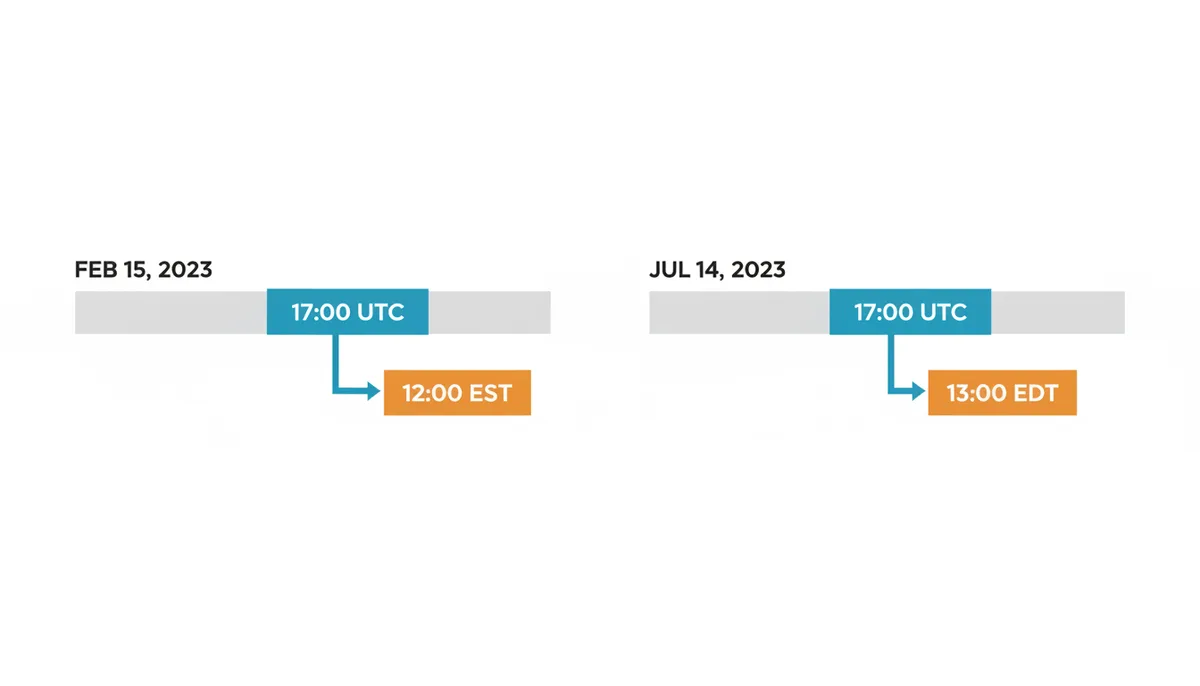
- 1676476800 (February 15, 2023, 17:00:00 UTC)
- 1689350400 (July 14, 2023, 17:00:00 UTC)
Both timestamps represent 5:00 PM UTC. But the first converts to 12:00 PM EST (UTC-5) while the second converts to 1:00 PM EDT (UTC-4). Same time zone identifier, different results, because the conversion library checks whether DST was active at each specific moment.
The transition moments create additional complexity. When US clocks "spring forward" at 2:00 AM, the time jumps directly to 3:00 AM. The entire 2:00 AM hour doesn't exist on that date. When clocks "fall back," the 1:00 AM hour happens twice. A log entry timestamped "1:30 AM" on the fall-back date is ambiguous without additional context.
Some regions make this even harder by changing their DST rules with little notice. In 2018, North Korea shifted its time zone to align with South Korea, moving from UTC+8:30 to UTC+9. Morocco suspends DST during Ramadan each year, creating multiple transitions. Turkey abolished DST permanently in 2016. Each change requires updated timezone data and can break applications making assumptions about future dates.
Front-End vs. Back-End: Where Should You Convert to Local Time?
You can convert timestamps to local time on your server or in the user's browser. Each approach has trade-offs.
| Aspect | Front-End Conversion | Back-End Conversion |
|---|---|---|
| Accuracy | Uses user's actual system time zone automatically | Requires explicitly knowing user's time zone |
| Performance Impact | Distributed across all clients | Centralized server load |
| User Experience | Instant updates when user travels | May show wrong zone if user moves |
| Development Complexity | Must handle browser inconsistencies | Consistent environment and libraries |
| Maintainability | Harder to fix bugs after deployment | Can fix issues without client updates |
Front-end conversion shines for displaying times relative to wherever the user currently is. Their browser knows their system time zone setting, updating automatically when they travel. You send raw timestamps from your API, and JavaScript handles the rest. The downside: you're trusting the user's device clock and timezone settings, which might be wrong.
Back-end conversion gives you more control. You can ensure consistent formatting, handle complex business logic around time zones, and fix bugs without deploying client updates. But you need to know each user's time zone preference, store it, and update it when they travel. You're also converting timestamps for users who might never look at them.
The best practice for most applications: send UTC timestamps to the front-end and let client code handle display. Store user time zone preferences for scenarios where you must convert server-side (like sending emails). This gives users accurate local times while keeping your API responses cacheable and your server logic simple.
Implementing Time Zone Conversion in Code (JavaScript & Python)
Most timestamp bugs come from implicit assumptions about time zones. Here's how to convert explicitly and correctly.
In JavaScript, the naive approach looks reasonable but breaks:
Wrong:
const date = new Date(1678886400 * 1000);
console.log(date.toString());
This converts to whatever time zone the JavaScript runtime is using — your server's zone in Node.js, or the user's system zone in a browser. You can't control or predict the output.
The correct approach uses the Intl.DateTimeFormat API with an explicit IANA time zone: use Intl.DateTimeFormat to format with a specified zone.
Right:
const date = new Date(1678886400 * 1000);
const options = { timeZone: 'America/Chicago', dateStyle: 'full', timeStyle: 'long' };
console.log(new Intl.DateTimeFormat('en-US', options).format(date));
This always converts to Chicago time, regardless of where the code runs. The output is predictable and testable.
Python has similar pitfalls. The naive approach:
Wrong:
from datetime import datetime
dt = datetime.fromtimestamp(1678886400)
print(dt)
This uses the system's local time zone, leading to different results on different servers.
The correct approach makes time zones explicit: use the zoneinfo module to apply IANA zones.
Right:
from datetime import datetime
from zoneinfo import ZoneInfo
dt = datetime.fromtimestamp(1678886400, tz=ZoneInfo('America/Chicago'))
print(dt)
The key insight: never rely on implicit time zone behavior. Always specify the target zone using its IANA identifier. "America/Chicago" handles DST transitions correctly. "CST" doesn't even uniquely identify a time zone — it could mean Central Standard Time (UTC-6), China Standard Time (UTC+8), or Cuba Standard Time (UTC-5).
Handling Time Zones in Databases (SQL)
Databases add another layer of complexity because they have their own time zone settings and conversion functions. The golden rule: store timestamps in UTC, convert for display.
PostgreSQL makes this straightforward with time zone-aware types:
SELECT to_timestamp(1678886400) AT TIME ZONE 'America/New_York' AS local_time;This returns "2023-03-15 08:00:00" — correctly accounting for EDT being in effect. The AT TIME ZONE operator handles all the IANA database lookups internally.
MySQL requires more care because FROM_UNIXTIME uses the server's time zone by default:
SELECT CONVERT_TZ(FROM_UNIXTIME(1678886400), 'UTC', 'America/New_York') AS local_time;Note that MySQL requires time zone data to be loaded separately. Without it, CONVERT_TZ returns NULL.
SQL Server (2016 and later) supports AT TIME ZONE:
SELECT DATEADD(SECOND, 1678886400, '1970-01-01 00:00:00') AT TIME ZONE 'UTC' AT TIME ZONE 'Eastern Standard Time' AS local_time;The double AT TIME ZONE isn't a typo — you first declare that the calculated datetime is in UTC, then convert to the target zone. SQL Server uses Windows time zone names rather than IANA identifiers, adding another translation layer.
For all databases, avoid storing pre-converted local times. A timestamp stored as "2:00 PM EST" loses critical information. You can't reliably convert it to other time zones or perform date arithmetic. Store the Unix timestamp or a TIMESTAMP WITH TIME ZONE column, preserving the full instant-in-time information.
Common Pitfalls: Why Your Conversion Is Off by an Hour (or More)
When time zone conversions go wrong, they fail in predictable ways. Here's a diagnostic guide:
| Symptom | Likely Cause | Solution |
|---|---|---|
| Off by exactly one hour | DST transition mishandled | Use IANA names, not fixed offsets |
| Correct half the year | Using timezone abbreviation like 'PST' | Use 'America/Los_Angeles' instead |
| Wrong for historical dates | Outdated tzdata | Update system/library timezone data |
| Off by strange amounts (5.5 hours) | Server in uncommon timezone | Always specify zones explicitly |
| Different results on different servers | Relying on system timezone | Use UTC internally, convert for display |
| User complains time is wrong | Showing server time not user time | Detect or ask for user's timezone |
The most insidious bug: code that works perfectly for months, then breaks during a DST transition. You tested in February when both your server (US East Coast) and your user (US West Coast) used standard time. The 3-hour difference looked correct. Come March, the East Coast springs forward first. For two weeks, the difference is 2 hours, and your code breaks.
Another classic: storing conference times. You schedule a meeting for "November 15, 2024, 2:00 PM PST." But on that date, Los Angeles observes PST (standard time), while San Francisco still uses PDT if DST rules change. Worse, "November 15, 2:00 PM America/Los_Angeles" might differ from year to year as DST rules evolve. For future events, store both the local time string and the Unix timestamp, regenerating the timestamp if timezone rules change.
The 'Wall Clock' Problem: Ambiguous Times and Gaps
Twice a year, DST transitions create times that either don't exist or happen twice. These edge cases break naive conversion code.
During "spring forward," an entire hour vanishes. In most of the US, the clock jumps from 1:59:59 AM directly to 3:00:00 AM. What happens if your code tries to create a timestamp for March 10, 2024, 2:30 AM in New York? That local time never existed.
Different libraries handle this differently. Some throw errors. Some silently adjust to 3:30 AM. Some give you 1:30 AM. When parsing user input, you need to either validate that the time exists or document which behavior your application follows.
The "fall back" creates the opposite problem. On November 3, 2024, clocks in New York show this sequence:
- 1:00:00 AM EDT (05:00 UTC)
- 1:59:59 AM EDT (05:59:59 UTC)
- 1:00:00 AM EST (06:00:00 UTC) — the clock "falls back"
- 1:59:59 AM EST (06:59:59 UTC)
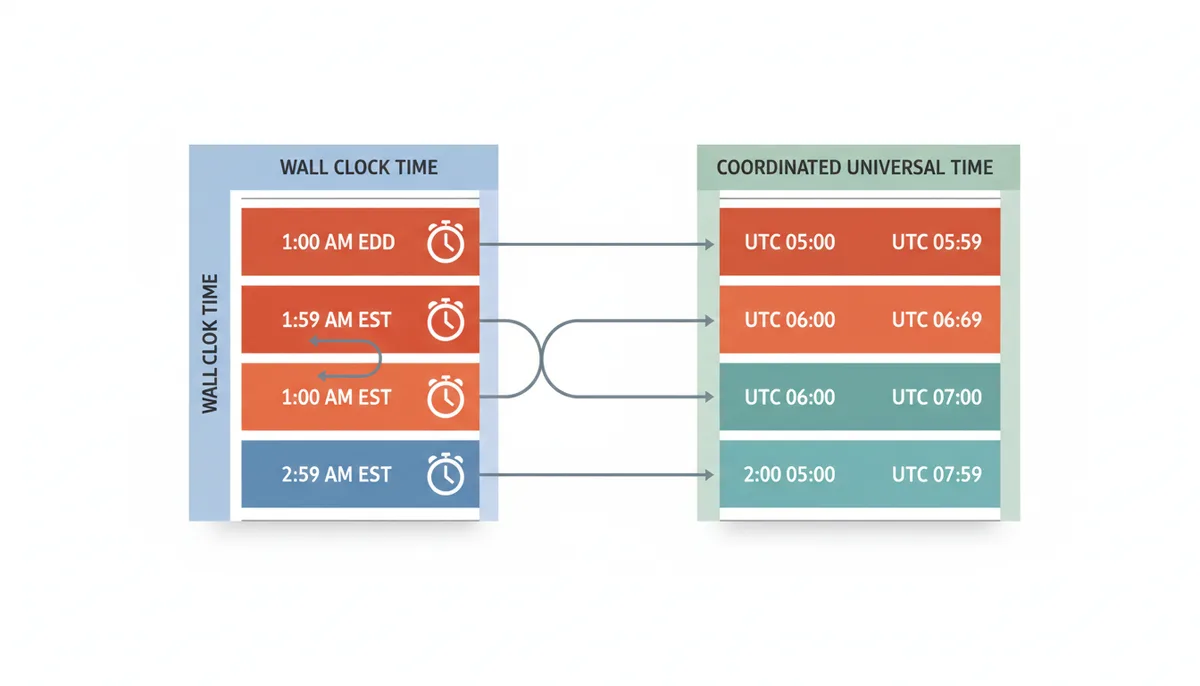
The local time "1:30 AM" happens twice, an hour apart in UTC. When a user enters "November 3, 2024, 1:30 AM New York time," which one do they mean? Most libraries default to the first occurrence (EDT) unless you explicitly specify otherwise. But for logging systems or event scheduling, this ambiguity can cause real problems.
The solution: when precision matters, have users specify UTC times or include the offset in the input. "2024-11-03 01:30:00-04:00" unambiguously means the EDT occurrence. Better yet, use Unix timestamps internally and only convert to local time for display.
Beyond Seconds: Handling Millisecond, Microsecond, and Nanosecond Timestamps
The original Unix timestamp counts seconds, but modern systems often need more precision. JavaScript's Date.now() returns milliseconds. Java's System.currentTimeMillis() does the same. Some databases store microseconds or even nanoseconds.
Identifying the precision is usually straightforward:
- 10 digits: seconds (1678886400)
- 13 digits: milliseconds (1678886400000)
- 16 digits: microseconds (1678886400000000)
- 19 digits: nanoseconds (1678886400000000000)
The conversion process remains the same — you just need to normalize to seconds first. In JavaScript:
const milliseconds = 1678886400000; const date = new Date(milliseconds); // JavaScript expects milliseconds
In Python, you divide:
microseconds = 1678886400000000; seconds = microseconds / 1_000_000; dt = datetime.fromtimestamp(seconds, tz=ZoneInfo('UTC'))
The trap comes when mixing precisions. A system expecting milliseconds might interpret a seconds timestamp as January 19, 1970 — just 19 days after the epoch. Always validate that your converted date falls within a reasonable range for your application.
For most applications, second precision suffices. Milliseconds help when ordering events that happen in quick succession. Microseconds and nanoseconds typically matter only for high-frequency trading, scientific data, or distributed systems requiring precise event ordering across machines.
What About Leap Seconds?
Every few years, scientists add a leap second to UTC to keep it synchronized with Earth's rotation. June 30, 2012, lasted 86,401 seconds instead of the usual 86,400. Yet if you subtract Unix timestamps from July 1 and June 30, you still get 86,400.
This is intentional. Unix time pretends leap seconds don't exist. During a leap second, the Unix timestamp repeats — 1341100799 represents both 23:59:59 and 23:59:60 UTC on June 30, 2012. This design choice makes time arithmetic simple: the difference between two timestamps always equals the elapsed time in seconds, ignoring leap seconds.
For business applications, this simplification rarely matters. Your server's clock, synchronized via Network Time Protocol (NTP), handles leap seconds by slightly slowing down time around the event. Instead of a sudden one-second jump, many systems "smear" the extra second over several hours.
Only specialized applications need to track leap seconds explicitly. Financial systems caring about transaction ordering during a leap second might use TAI (International Atomic Time) instead of UTC. GPS systems use their own time scale that doesn't include leap seconds. But for converting Unix timestamps to local time for display? The standard libraries handle it correctly by ignoring the complexity.
Real-World Example: Tracking Global Package Delivery
Let's trace a FedEx package from Shanghai to Memphis, showing how timestamps convert at each step. A package gets scanned at Shanghai Pudong International Airport on March 15, 2024, at 10:30 PM local time. The scanner records timestamp 1710518400.
At headquarters in Memphis, the tracking system needs to show this scan time in multiple contexts. For the Shanghai warehouse manager, it displays "March 15, 22:30 CST" (China Standard Time, UTC+8). For the Memphis operations center, it shows "March 15, 9:30 AM CDT" (Central Daylight Time, UTC-5). The customer in London sees "March 15, 2:30 PM GMT" on the tracking page.
All three displays come from the same timestamp 1710518400. The conversion happens at the presentation layer — the database stores only the Unix timestamp. When the package arrives in Anchorage for refueling, another scan creates timestamp 1710554400. The system performs these conversions:
- Anchorage handler sees: "March 15, 11:00 PM AKDT" (Alaska time, UTC-8)
- Memphis control sees: "March 16, 3:00 AM CDT" (crossed midnight)
- Shanghai origin sees: "March 16, 4:00 PM CST" (next day)
Notice how the same event appears as different calendar dates depending on the viewer's location. This is why storing pre-converted local times breaks down — you'd need to store every possible representation.
The package reaches Memphis on March 16 at 11:00 AM CDT (timestamp 1710601200). For final delivery calculations, the system must handle a complication: the customer requested Saturday delivery to Phoenix. But Phoenix doesn't observe daylight saving time — it stays on MST (UTC-7) year-round. The system calculates that 11:00 AM in Memphis equals 9:00 AM in Phoenix, leaving enough time for the connecting flight.
The tracking API serves all these timestamps as Unix integers. The web interface uses JavaScript's Intl.DateTimeFormat to show each viewer their local time. The mobile app detects the phone's timezone setting. Email notifications convert server-side because they can't run JavaScript, using the timezone from the customer's account profile.
This architecture handles edge cases cleanly. When daylight saving time ends in Memphis but not Shanghai, the timestamp math stays correct. When a customer checks tracking while traveling, they see times in their current location. The Unix timestamps also enable simple duration calculations — subtracting the Shanghai scan from the Memphis arrival gives 82,800 seconds, or exactly 23 hours, regardless of timezones.
The Hardware Clock vs. System Time Problem
Your server has two different concepts of time, and confusion between them causes subtle timestamp bugs. The hardware clock (RTC or Real Time Clock) runs continuously on battery power, keeping time even when the server is off. The system time is what your operating system and applications actually use. These two can disagree, sometimes dramatically.
On boot, Linux reads the hardware clock to set the initial system time. But here's where it gets messy: some hardware clocks store UTC, others store local time. Windows traditionally uses local time. Linux traditionally uses UTC. Dual-boot systems or virtualization can create mismatches where the hardware clock gets interpreted incorrectly.
A typical failure scenario: your server in New York has its hardware clock set to local time (EST). On boot, Linux assumes it's UTC and sets the system time 5 hours in the future. Your application starts logging timestamps that claim to be from the future. Time-based cache expiration breaks. Session timeouts fire immediately. API calls get rejected for having timestamps outside the acceptable window.
The system time drifts naturally — most computer clocks gain or lose a few seconds per day. That's why servers run NTP (Network Time Protocol) to synchronize with atomic clocks. But NTP makes gradual adjustments. If your system time is wrong by hours due to a hardware clock issue, NTP might take days to converge, or refuse to sync at all if the difference exceeds its threshold (typically 1000 seconds).
Virtual machines add another layer. The VM's virtual hardware clock might pause when the VM suspends, causing its time to lag behind reality. Container systems like Docker inherit the host's system time but can't change it, so a container can't fix its own time drift.
Best practices: configure hardware clocks to use UTC on all servers. Run NTP on physical hosts, not inside containers. Monitor time synchronization — a server with wrong time will corrupt your timestamp data. Use timedatectl on modern Linux systems to verify both clocks show UTC. And always generate Unix timestamps from system time, never by calculating from a local time string, which might come from a misconfigured clock.
Timestamps in Distributed Systems: The Synchronization Challenge
When multiple servers process the same events, their timestamps can tell different stories. Server A records a database write at timestamp 1710600000. Server B processes the resulting queue message at timestamp 1710599995. According to the timestamps, the effect preceded the cause by 5 seconds.
This happens because perfect time synchronization across machines is impossible. Even with NTP, servers typically stay synchronized within 1-50 milliseconds over a local network, or 10-100 milliseconds over the internet. For human-readable displays, this doesn't matter. For distributed systems making decisions based on timestamps, it's critical.
Consider a distributed cache where nodes use timestamps to resolve conflicts. Node A writes value "X" at timestamp 1710600000.123. Node B writes value "Y" at timestamp 1710600000.119. Which write wins? If the nodes' clocks differ by even 5 milliseconds, you might keep the wrong value. This is why systems like Cassandra use logical clocks (like vector clocks) instead of wall-clock timestamps for ordering operations.
The problem compounds with geographic distribution. A request flows from a user in Tokyo to a load balancer in California to an application server in Virginia to a database in Oregon. Each hop might add its own timestamp. Clock drift between regions can reach several seconds, making it impossible to reconstruct the true sequence of events from timestamps alone.
Some systems try to compensate by using the most accurate time source for critical timestamps. Google's TrueTime API for Spanner exposes time uncertainty explicitly — instead of a single timestamp, it returns an interval (earliest possible, latest possible) based on known clock synchronization bounds. This lets the system make guarantees like "this transaction definitely completed before that one" only when the time intervals don't overlap.
For most applications, the solution is simpler: generate timestamps at a single point. If you need to track when events occur across multiple systems, designate one system as the authoritative time source. A central API gateway or event bus can add canonical timestamps as requests flow through. For user-facing times, small discrepancies don't matter. For system coordination, avoid depending on tight timestamp comparisons across machines.
Alternative Time Representations: When Unix Timestamps Aren't Enough
Unix timestamps excel at representing instants, but some applications need different time models entirely. Understanding when to abandon Unix timestamps helps you avoid forcing them into unsuitable use cases.
Recurring events demonstrate the first limitation. "Every Tuesday at 3:00 PM Pacific Time" can't be represented as a series of Unix timestamps because DST changes the actual UTC time twice yearly. You need to store the rule ("TUESDAY", "15:00", "America/Los_Angeles") and compute the next occurrence dynamically. Calendar applications use formats like RFC 5545 (iCalendar) that express repetition rules rather than fixed times.
All-day events hit another edge case. "March 15, 2024" means different Unix timestamp ranges in different timezones. For a user in Tokyo, it starts at timestamp 1710428400. For a user in New York, it starts at timestamp 1710460800 — nine hours later. Storing a single timestamp forces you to pick one interpretation. Calendar systems often store dates separately from times, like ISO 8601's date format: "2024-03-15".
Legal and business documents sometimes need to track both the instant something occurred and the local time where it occurred. A contract signed at "March 15, 2024, 2:00 PM PDT in San Francisco" needs both pieces of information. If timezone definitions change retroactively, you still know it was 2:00 PM local time when signed. Some systems store both the Unix timestamp and the original local time string with timezone.
Duration calculations reveal another weakness. The elapsed time between two Unix timestamps gives you exact seconds, but humans think in calendar units. The difference between March 1 and April 1 is "one month" conceptually, but 31 days (2,678,400 seconds) in 2024 and 30 days (2,592,000 seconds) in 2023. Age calculations, subscription periods, and interest calculations often need calendar arithmetic that Unix timestamps make complicated.
For these cases, consider ISO 8601 strings with explicit timezones ("2024-03-15T14:00:00-07:00"), database-specific timestamp types that preserve timezone information, or domain-specific formats like cron expressions for scheduling. Unix timestamps remain ideal for logging when events occurred, coordinating between systems, and calculating precise durations. But forcing them into human-oriented use cases creates unnecessary complexity. Choose the time representation that matches your actual requirements.
Frequently Asked Questions
Why shouldn't I just store all dates in my user's local time?
Storing time in a local format is ambiguous due to Daylight Saving Time and makes it difficult to compare or perform calculations between different time zones. The global standard is to store all timestamps in UTC and convert them for display only.
What's the difference between 'America/New_York' and 'EST'?
'America/New_York' is an official IANA time zone identifier that includes all historical rules for that region, including the switch between EST (Standard Time) and EDT (Daylight Time). 'EST' is just the name for a single offset (UTC-5) and is ambiguous.
What is the 'Year 2038 problem'?
On January 19, 2038, the 32-bit signed integer used for Unix timestamps in older systems will overflow. Most modern systems and databases use 64-bit integers for timestamps and are not affected by this problem.
How do I get the current Unix timestamp?
Most programming languages provide a function for this. In JavaScript, use Math.floor(Date.now() / 1000). In Python, use time.time(). These get the time from the system clock, which is typically synchronized via the Network Time Protocol (NTP).
Can a Unix timestamp be negative?
Yes. The Unix epoch is just a reference point. A negative timestamp represents a date and time before January 1, 1970, UTC. Support for negative timestamps can vary between systems and libraries.
How often does the IANA Time Zone Database get updated?
The IANA database is updated multiple times per year as different countries and regions announce changes to their time zone boundaries or DST rules. It's important to keep your servers and software environments updated to get these changes.
Sources
- IANA Time Zone Database — The existence and purpose of the 'tzdata' database, which is the canonical source for time zone rules used in software.
- The Open Group (IEEE Std 1003.1, POSIX) — The official definition of 'Seconds Since the Epoch' (Unix time), its starting point (1970-01-01 00:00:00Z), and its relationship to UTC.
- MDN Web Docs (Mozilla) — The correct, modern API (`Intl.DateTimeFormat`) for handling timezone-aware date and time formatting in JavaScript.
- Python.org Official Documentation — The standard library implementation (`zoneinfo`) for applying IANA time zones to `datetime` objects in modern Python.
- PostgreSQL Documentation — The syntax and behavior of timezone-aware functions and operators in SQL, specifically the `AT TIME ZONE` construct.
- IETF (Internet Engineering Task Force) RFC 3339 — The specification for the ISO 8601 date format profile commonly used in APIs, which includes timezone offset information.