
How to Tell Whether a Timestamp Uses Seconds, Milliseconds, Microseconds, or Nanoseconds
For developers and analysts: quick tests and a repeatable workflow to identify whether a timestamp uses seconds, milliseconds, microseconds, or nanoseconds.
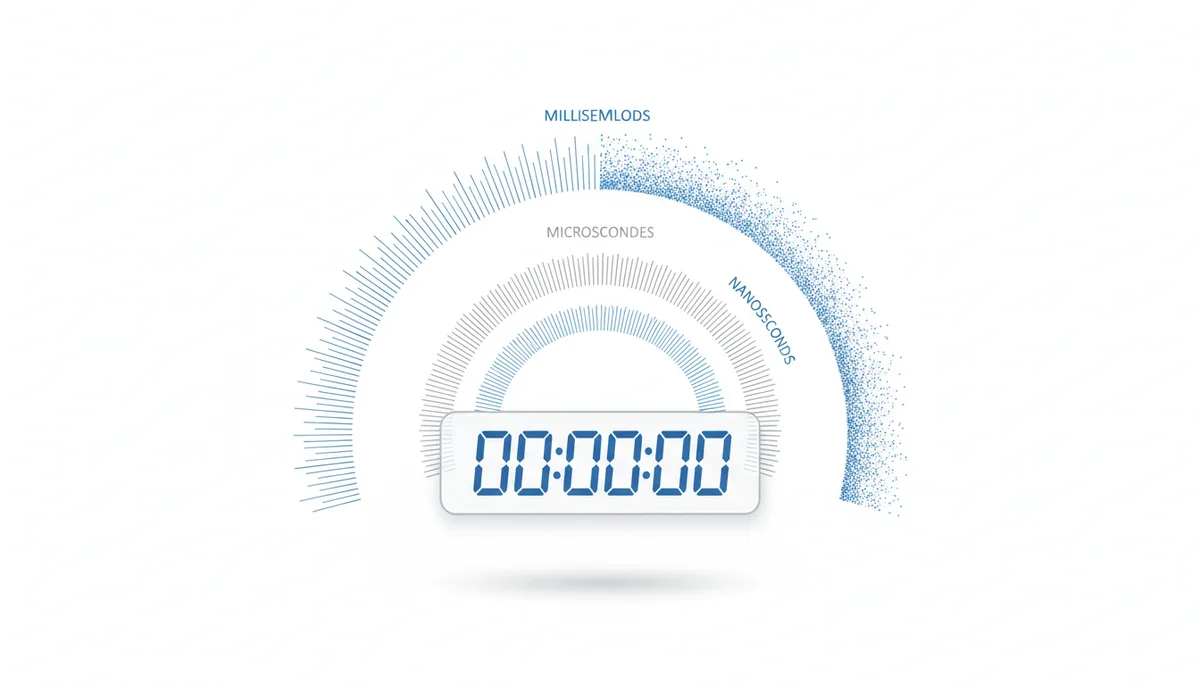
Why a Bare Number Refuses to Tell You What It Means
A colleague pastes 1717171717171 into the team chat and asks what date it corresponds to. One person says sometime in 2024. Another says roughly the year 55,800. Both of them computed a conversion correctly. The disagreement is entirely about what the number counts: seconds or milliseconds.
That thirteen-digit value is not a trick example. It looks exactly like the sort of integer that lands in an application log, a CSV export, a JSON payload, or a monitoring dashboard. Read as seconds since the Unix epoch (January 1, 1970, 00:00:00 UTC), it points to a date more than fifty-four thousand years in the future. Read as milliseconds, it collapses to a perfectly ordinary moment in 2024. The number itself carries neither answer.
Guessing wrong is not a cosmetic error. A scheduled job that treats milliseconds as seconds fires at a time decades away from the intended one. A billing pipeline that mixes units during a migration misplaces transactions by years, and the reports built on top of them silently turn wrong. Analytics filters that compare timestamps stop matching anything at all, so dashboards read as empty rather than obviously broken, which is worse: you only notice once someone complains that last month apparently never happened.
The core issue is that a timestamp, at the storage level, is just a count of elapsed units from a reference point called the epoch — for Unix time, midnight on January 1, 1970. The unit can be seconds (s), milliseconds (ms, a thousandth of a second), microseconds (μs, a millionth), or nanoseconds (ns, a billionth). A millisecond count is the second count multiplied by 1,000; microseconds by 1,000,000; nanoseconds by 1,000,000,000. Same instant, wildly different magnitudes.
That unit is metadata — knowledge about the number that lives outside the number. When a system hands you a raw integer without documentation, that metadata is gone. Everything that follows is about recovering it with the least hand-waving possible: a quick heuristic, a proper sanity test, source clues, and a repeatable workflow you can run under pressure.
How Many Digits? The Heuristic That Gets You Close
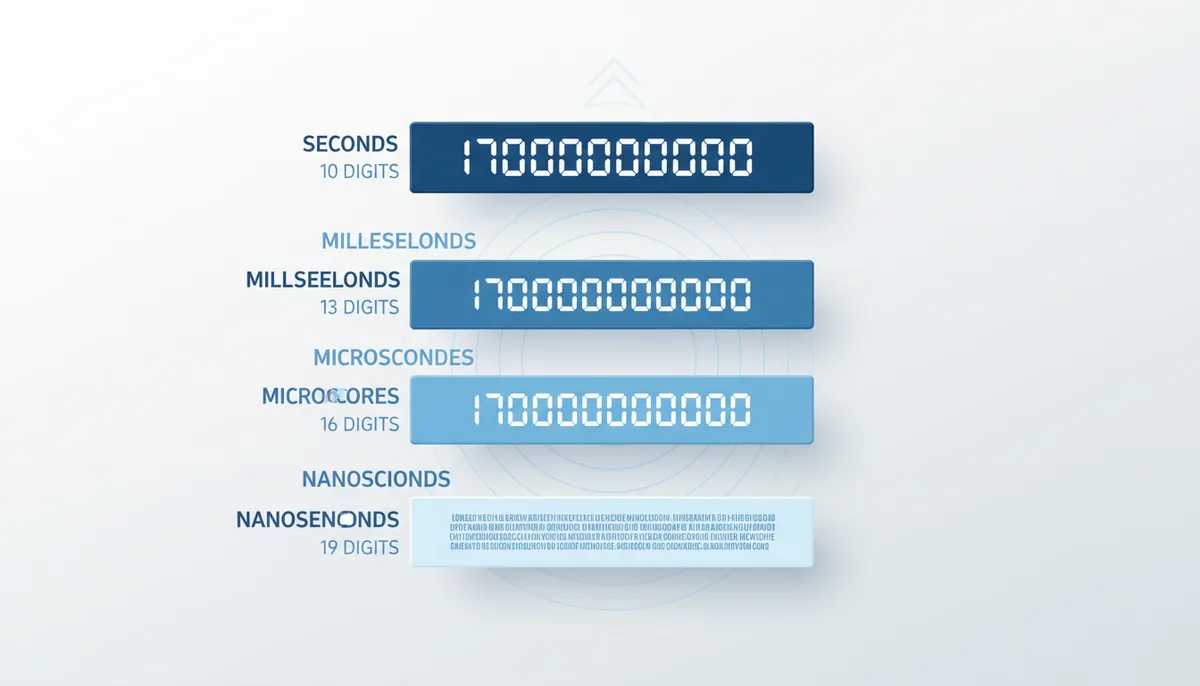
The fastest check costs you nothing at all: count the digits. For any date between the year 2001 and 2286 — which covers essentially every business event you will ever handle — the expected length is almost suspiciously tidy:
- 10 digits — the timestamp probably counts seconds. Example: 1700000000.
- 13 digits — probably milliseconds. Example: 1700000000000.
- 16 digits — probably microseconds. Example: 1700000000000000.
- 19 digits — probably nanoseconds. Example: 1700000000000000000.
The logic is simple scaling: each jump in precision multiplies the number by 1,000, which appends three digits. Whatever the current second count looks like, the millisecond version has three more digits, the microsecond version three more after that.
Strip away decoration before counting. A value written as 1,700,000,000 with commas, or as 1700000000.000 with a fractional part, or with a leading minus sign for a pre-1970 date, still counts as ten digits. Count the integer digits only.
Treat this as a hypothesis generator, not a verdict. The mapping above only holds inside the window where second counts are ten digits long. Timestamps from before September 2001 have nine-digit second counts; far-future dates have more. A thirteen-digit value can even be a nanosecond timestamp from the early 1970s. Use the digit count to decide which assumption to test first. Then actually test it.
The Plausible-Date Test: the Sanity Check That Settles Most Arguments
Here is the procedure worth memorizing, because it terminates almost every argument about timestamp units. Take the unknown number and interpret it as each candidate unit in turn. For each interpretation, ask: does the resulting date fall inside a window that makes sense for the data — typically somewhere between 1970 and about 2050 for logs, events and transactions? The interpretation that lands inside the window wins.
In a browser console or Node.js (JavaScript needs milliseconds internally, so the conversions look like this):
- Interpret as seconds: new Date(ts * 1000)
- Interpret as milliseconds: new Date(ts)
- Interpret as microseconds: new Date(ts / 1000)
- Interpret as nanoseconds: new Date(ts / 1000000)
Run all four with your value and compare the printed ISO dates. One of them will look like a real date; the others will be absurd or will fall off JavaScript's representable range entirely.
In Python the same loop is cleaner, because fromtimestamp wants seconds:
- import first: from datetime import datetime, timezone
- Seconds: datetime.fromtimestamp(ts, tz=timezone.utc)
- Milliseconds: datetime.fromtimestamp(ts / 1000, tz=timezone.utc)
- Microseconds: datetime.fromtimestamp(ts / 1000000, tz=timezone.utc)
- Nanoseconds: datetime.fromtimestamp(ts / 1000000000, tz=timezone.utc)
Using the timezone-aware call matters. A naive fromtimestamp reads in your machine's local time zone, which can shift the apparent date by a day and muddy the comparison. UTC keeps the test about magnitude, not geography.
If you would rather not open a console at all, this is exactly what UnixConverter's main tool does: it accepts seconds, milliseconds, microseconds and nanoseconds and shows the corresponding date for each reading, so spotting the plausible one takes seconds. Running it against the example from the first section returns a 2024 date under milliseconds and an absurd five-digit year under seconds. Verdict: milliseconds.
Define your plausibility window deliberately. For application logs, anything between 1970 and the next few decades qualifies. For dates of birth, "after 1970" is wrong, and you should expect values earlier than the epoch, which appear as negative counts. For expiration dates or scheduled events, future dates up to a few years out are normal. Pick the window after thinking about what the field actually records.
There is one genuinely ambiguous corner, and you should know it exists. Numbers below roughly 100,000,000,000 can pass the test in two units at once. Take 1700000000: as seconds, November 14, 2023. As milliseconds, January 20, 1970. If your window accepts both, the test cannot decide, and you fall back to the digit-count heuristic (prefer the longer-unit interpretation only when the digit count matches it; here, ten digits says seconds). When even that feels shaky, the next section — source context — becomes the tiebreaker.
Where Did It Come From? Let the Source System Answer
Digit counting works most of the time, but the reliable route is boring: find out what produced the number. One line of documentation outranks every heuristic in this article, because defaults at the source are consistent. A Java backend will keep emitting milliseconds forever; a shell script using date +%s will keep emitting seconds.
Look through the API documentation for the field first. Three signals matter: the declared data type (a string versus an integer changes the conversation completely), any example value shown in the docs (count its digits and apply the test above), and naming conventions like created_at_ms, timestamp_ms or event_time_ns. Teams that name fields this way have already answered your question; teams that name the field ts have not.
For databases, the schema tells you. In MySQL, run SHOW CREATE TABLE and check the column: a plain TIMESTAMP or DATETIME stores whole seconds, while TIMESTAMP(6) or DATETIME(6) carries up to six fractional digits — microseconds. PostgreSQL's TIMESTAMPTZ always resolves to microseconds internally. If whoever gave you the export included fractional digits, they are in the file; if not, happily, your job is one step shorter.
Log formats deserve the same treatment. Structured logging frameworks record timestamps according to a configured pattern, and the pattern usually survives in a config file somewhere in the repo. Search the codebase for the field name and you will frequently find a comment someone wrote years ago saying "epoch millis" — the unit, documented once and forgotten.
When documentation genuinely does not exist, infer from the default behavior of the generating system. The table below collects the defaults people actually run into. It will not cover every system, but it covers the everyday suspects.
| System / Language | Default Precision | Key Function(s) | Notes |
|---|---|---|---|
| JavaScript | Milliseconds | Date.now() | Date objects are millisecond-based; nanosecond values need BigInt handling. |
| Python | Seconds (as a float) | time.time() | time.time_ns() returns integer nanoseconds on modern versions. |
| Java | Milliseconds | System.currentTimeMillis() | System.nanoTime() measures elapsed time, not epoch time — never treat it as a date. |
| Go | Depends on the method | time.Now().Unix(), .UnixMilli(), .UnixMicro(), .UnixNano() | time.Time carries nanosecond resolution internally, but each epoch-method returns a different unit. UnixNano() overflows a signed 64-bit integer for dates past the year 2262. |
| PHP | Seconds | time() | microtime() returns a string holding microseconds followed by seconds, so parse it as two parts. |
| PostgreSQL | Microseconds | now(), extract(epoch from ...) | Stores microseconds internally, counted from its own epoch of January 1, 2000, not 1970. |
| MySQL | Seconds by default | NOW(), UNIX_TIMESTAMP() | TIMESTAMP(6), DATETIME(6) and NOW(6) enable microsecond fractions. |
| Prometheus | Milliseconds | Storage timestamps | The time-series database fixes millisecond resolution for all samples. |
| Unix shell | Seconds | date +%s | GNU date also accepts %N for nanoseconds of the current second, but %s alone counts whole seconds. |
One practical shortcut when the "source" is a CSV dump or a log extract containing thousands of values: don't test them one at a time. Paste the column into UnixConverter's Batch Converter, run it under each unit assumption, and see which interpretation produces sane dates for the whole file. Conversion errors that would hide in a single value show up immediately across ten thousand.
A Repeatable Workflow for Any Mystery Timestamp
When you are stuck with an unknown number and no helpful colleague, run the checks in this exact order. The sequence prefers authoritative evidence over educated guesses.
- Check the producer's documentation. Look for a declared type, an example value, or a unit-laden field name. If documented, stop here and record the unit in your own notes.
- Check the schema or log format. Database columns and logging configurations state their resolution explicitly. A TIMESTAMP(6) column settles the question.
- Identify the generating system. Match it against the defaults table above. A Go backend emitting nanoseconds is a consistent fact, not a guess.
- Run the plausible-date test. Convert under each candidate unit and keep the interpretation that lands inside your window, usually 1970 to about 2050.
- Use digit count as the tiebreaker. When two interpretations survive the window — the under-100-billion overlap case — let the digit count pick, and mark the conclusion as a hypothesis rather than a fact.
- If nothing fits, suspect a non-Unix epoch. FILETIME, NTP and other systems count from different starting points; the later section on alternative epochs covers them.
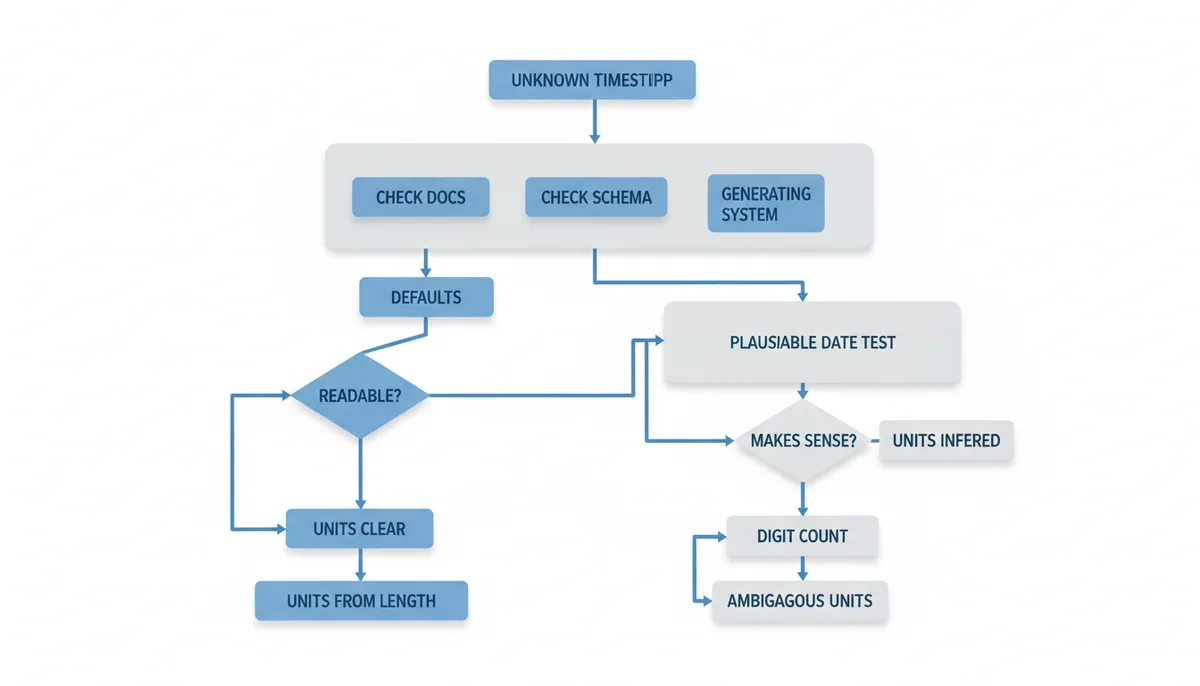
Whatever conclusion you reach, treat it as a hypothesis until one real-world cross-check confirms it. Find a record with a timestamp you can tie to a known moment — a deployment time, a support ticket, a transaction also recorded elsewhere as a readable date — and verify that the converted date agrees. Five minutes of cross-checking beats a week of repairing a data import built on the wrong unit.
Why Digit Counting Eventually Lies: Rollovers and the Y2K38 Cliff
The digit heuristic breaks at rollover boundaries, and being precise about where those boundaries are tells you exactly when to stop trusting your eyes.
The Unix second count first reached ten digits — 1,000,000,000 — on September 9, 2001. Before that moment, a seconds-based timestamp had nine digits. Anyone glancing at a late-nineties timestamp and applying the "10 digits means seconds" shortcut will happily misclassify it, because 987654321 is nine digits and still means seconds. It will reach eleven digits — 10,000,000,000 — around November 2286, well past the concern of your current production systems, but the principle matters for the long-retention archives people love to invent.
The famous boundary is different in kind: the Y2K38 problem. Systems that store the Unix second count in a signed 32-bit integer run out of room at 2,147,483,647 seconds, which arrives on January 19, 2038. One second later, the value wraps to the most negative 32-bit number, and every date computed from it swings around to December 1901. Anything comparing, sorting or subtracting those timestamps gets negative durations and nonsense orderings — the same family of failures as the year-2000 bugs, minus the party.
Modern 64-bit systems put the corresponding boundary almost 292 billion years away, which is a safe distance even for infrastructure humiliated by longevity. The traps live in the things nobody upgrades: embedded firmware, ancient compiled binaries, old file formats, and databases whose schemas froze in the nineties. The rollover story is why digit counting must be a last resort: the boundaries where it fails are precisely the ones experienced engineers get burned by.
Microseconds and Nanoseconds: When Sixteen Digits Is Not Enough Precision
Some workloads genuinely need those extra digits. High-frequency trading platforms reconstruct sequences of market events that happen microseconds apart. Scientific instruments log samples at microsecond or better resolution. Distributed tracing with OpenTelemetry stamps every span in nanoseconds so overlapping requests across hundreds of machines can be ordered correctly. Time-series databases like InfluxDB default to nanosecond timestamps because their users routinely churn at that scale.
Handling these big values brings its own hazards, and the first one is integer overflow in environments that feel safe. The worst offender is JavaScript, where a regular Number is an IEEE-754 double with 53 bits of mantissa. The largest integer it can represent exactly, Number.MAX_SAFE_INTEGER, is 9,007,199,254,740,991 — sixteen digits. Match each unit against that limit before doing arithmetic:
- Seconds and milliseconds — current Unix values are ten and thirteen digits, far below the sixteen-digit ceiling. Plain Numbers handle them exactly, and Date.now() exploits this deliberately.
- Microseconds — current epoch values are sixteen digits, uncomfortably near the ceiling. They still fit inside the safe range today, but every arithmetic step risks nudging them over, and dates only a few decades out will eventually cross it. Treat them with caution.
- Nanoseconds — current epoch values are nineteen digits, well beyond the ceiling. A nanosecond timestamp parsed into a Number mutates silently: a value ending in ...001 comes back ending in ...000, and event ordering quietly breaks.
The fix is to keep the nanosecond value as a string until you load it into a BigInt, and only then do math: BigInt("1700000000123456789") — and if the value must live in source code, write the literal with an n suffix such as 1700000000123456789n. BigInt arithmetic preserves every digit, which keeps microsecond-distant events in the right sequence. Test Number.isSafeInteger on anything you load before deciding it is safe. Python has no equivalent problem: its integers grow without a fixed limit.
Storing high-precision counts in floating-point columns has the same disease with worse symptoms: the float approximates, so two events seven microseconds apart can collapse into the same stored value. If you cannot use a 64-bit integer type in your database, store the string form. Precision you cannot represent is precision you have already lost. And note the mismatch in defaults: PostgreSQL resolves to microseconds today, while Go's UnixNano() returns nanoseconds in an int64 that stops being usable past the year 2262. Pick a unit and document it; the producers section at the end returns to this.
Beyond the Unix Epoch: FILETIME, NTP, and Other Clocks
Sometimes the plausible-date test fails under all four precision guesses. When that happens, the usual culprit is that the number counts from a different epoch — a different "zero moment" than January 1, 1970. A handful of non-Unix clocks show up regularly in real systems, and each has recognizable fingerprints.
Windows FILETIME counts 100-nanosecond intervals since January 1, 1601. For current dates, FILETIME values are seventeen-to-eighteen-digit numbers, typically beginning with 13 — so an eighteen-digit integer that is too small to be Unix nanoseconds and too big to be microseconds is a strong FILETIME candidate. Converting is mechanical: divide the ticks by 10,000,000 to get seconds, then subtract the constant 11,644,473,600 — the seconds between 1601 and 1970. UnixConverter has dedicated LDAP and WebKit converters for exactly these Windows-era formats, since LDAP/Active Directory and Chrome's WebKit timestamps both descend from the 1601 epoch.
NTP, the protocol that keeps networked machines roughly in sync, counts seconds from January 1, 1900, carried classically as a 32-bit whole-second field plus a 32-bit fractional part. That 32-bit field wraps every roughly 136 years, which puts the rollover in 2036 — an old-system cliff even closer than Y2K38, and worth remembering when you inherit timekeeping code.
| System | Epoch Start | Unit / Precision | Where You Encounter It |
|---|---|---|---|
| Unix time | January 1, 1970 | Seconds by convention; ms, μs, ns common | POSIX systems, most web APIs, databases, logs |
| Windows FILETIME | January 1, 1601 | 100-nanosecond intervals | NTFS metadata, Active Directory, some browser formats |
| NTP time | January 1, 1900 | Seconds plus a fractional field | Network time synchronization and older protocols |
| GPS time | January 6, 1980 | Seconds, ignoring leap-second insertions | Navigation, telecom timing infrastructure |
GPS time deserves a footnote of its own: it began on January 6, 1980 and counts seconds without adjusting for leap seconds, which keeps it drifting steadily apart from UTC — a design choice that makes it boring on purpose, since receiver math stays simple.
UUIDs chip in too. Version 1 UUIDs embed a timestamp measured in 100-nanosecond units since October 15, 1582 — the start of the Gregorian calendar, chosen for historical reasons rather than engineering ones. Version 7 UUIDs, standardized recently, use ordinary Unix milliseconds, making them far easier to order and debug. The general lesson holds: when a timestamp resists every Unix interpretation, ask which epoch the system was built around before assuming corruption.
Producing Timestamps That Nobody Has to Guess
Everything so far has been defensive work for consumers of mysterious numbers. Producing timestamps is where you can make the mystery vanish for whoever comes next, with three habits.
First: publish ISO 8601 (or its stricter sibling RFC 3339) on every boundary. A string like 2023-11-14T22:13:20.123Z is readable, self-describing and unambiguous about the moment. Keep numeric timestamps inside your own systems if you like — but the moment data crosses an API response, a webhook, or an exported file, send the string. You trade a few extra bytes and some parsing cost for eliminating the entire guessing game this article exists to solve.
Second: store UTC internally and convert at the edges. Local time zones introduce offset bugs, daylight-saving collapses and duplicate-looking times at the autumn boundary. A UTC reference plus an explicit time zone applied at display time skips all of that. If users need a local rendering, convert at presentation, and a dedicated tool such as a time zone converter handles the math correctly.
Third: commit to one unit and write it down. Choose seconds, milliseconds or more, name your fields accordingly — created_at_ms, event_time_ns — and put the convention in the README and schema comments. Consistency beats precision: a wrong-unit integration bug disappears the day a consumer can read the answer instead of reverse-engineering the answer.
Common Questions About Timestamp Precision
What about negative timestamps?
A negative Unix timestamp simply counts backward from the epoch, so it describes a moment before January 1, 1970. The arithmetic works the same way in both directions; the risk is support, not math. Plenty of older libraries and some databases have never handled pre-1970 values correctly, so when your data can legitimately include old dates, test the full pipeline with a negative value before it hits production. The plausible-date test works for negative numbers as well — the window just extends backward.
How do leap seconds affect Unix timestamps?
They do not, by design. Unix time pretends every day contains exactly 86,400 seconds, and the occasional leap seconds inserted into UTC to account for the Earth's rotation are simply skipped over. That keeps every date arithmetic simple and monotonic within the system's assumptions, at the cost of drifting a second behind official UTC each time a leap is added. If you need true UTC alignment, you need leap-second tables and a library that consults them; generic Unix math will not get you there.
Is it safe to store a timestamp in a floating-point number?
No, and high-precision units make it worse. A double-precision float has 53 bits of usable mantissa, which stops exactly representing integers above about 9 quadrillion — sixteen digits. Microsecond and especially nanosecond timestamps cross that line immediately, so the stored value silently mutates into a nearby approximation and ordering guarantees break. Always store numeric timestamps as 64-bit integers, and use BigInt or string forms where the language's integers cannot grow, as discussed in the high-precision section.
Can I just use ISO 8601 strings everywhere instead of numbers?
Yes — and for data crossing system boundaries, it is usually the right answer. Strings like 2023-11-14T22:13:20.123Z eliminate unit ambiguity entirely and stay readable in logs and debuggers. What you give up is compactness and speed: the string costs more bytes than an integer, and parsing it costs more than an integer comparison. Inside a database or a hot loop, integers still win; across API boundaries, strings nearly always do.
What is the Y2K38 problem?
It is the overflow of the signed 32-bit integer that older systems use to store Unix seconds. The maximum positive value, 2,147,483,647, arrives on January 19, 2038; the next second wraps the counter to a large negative number, which those systems then interpret as a date in December 1901. Sorting, comparisons, scheduling and expiry logic all fail at once on affected systems. Sixty-four-bit storage solves it thoroughly, but the at-risk machines are the ones that never got a 64-bit upgrade: embedded devices, old binaries, legacy file formats.
My timestamp has 13 digits, but the date lands in the far future. What's wrong?
You may be holding nanoseconds from early in the epoch. A nanosecond count only reaches nineteen digits once the second count is sufficiently large; events from the 1970s can produce shorter nanosecond strings, including thirteen-digit ones. Divide by 1,000,000,000 and rerun the plausible-date test — thirteen digits with a billion-fold reduction may land on a 1970s date that is perfectly real. This is why digit count is a heuristic: it hands you the hypothesis, and the conversion test does the confirming.
Three Worked Examples: From Mystery Number to Confirmed Unit
Abstract procedures only stick once you have watched them run on real values, so here are three identifications from start to finish. The first two are the common cases; the third is the one that catches people precisely because it looks easy.
Example 1 — a plain millisecond export. A CSV lands in your inbox with a created column full of values like 1700000000123. Thirteen digits, so the heuristic points at milliseconds. The plausible-date test confirms it: converting as milliseconds yields November 14, 2023, while reading the same value as seconds gives something around the year 55,800. Before closing the ticket, run SHOW CREATE TABLE on the source table, and it says created TIMESTAMP(3) — fractional storage to three digits, which the export tool flattens into epoch milliseconds. The test gave the hypothesis; the schema made it certain.
Example 2 — a FILETIME from a Windows-origin system. A support log contains values like 133444444440000000. Seventeen digits, so the Unix guesses misbehave: as seconds it is absurd, as milliseconds it lands in 1974, and neither fits the plausible window properly. The value also sits near 1.3 × 10^17, the shape where FILETIME ticks live. Dividing by 10,000,000 to strip the 100-nanosecond ticks and then subtracting 11,644,473,600 — the constant between 1601 and 1970 — returns a sensible recent date. Verdict: FILETIME, not Unix at all. This is exactly the step in the workflow that asks you to suspect a non-Unix epoch.
Example 3 — the ambiguous small number. An endpoint owned by a PHP service returns event_time = 1700000000. As seconds that is November 14, 2023; as milliseconds it is January 20, 1970, which still sits inside the plausibility window. The heuristic leans seconds (ten digits fit the mapping), and the source check settles it: PHP's time() returns seconds. The record you needed was not the conversion — it was the provenance. Write the concluded unit into the repo's README before you close the investigation, because the next person to touch this field deserves an answer, not a fresh archaeology dig.
Edge Cases That Quietly Corrupt Your Conclusions
Four specific failure modes account for most of the wrong identifications I have cleaned up after. Each one looks like a unit problem and is not.
- Fractional epoch values. A value like 1700000000.123456 is seconds plus a microsecond fraction, but an import pipeline that multiplies every input by 1000 "to normalize" will happily wreck it. Read the integer part, treat it as seconds, and keep the fraction as a bonus rather than cause for reclassification.
- Spreadsheet damage. Opening a CSV in Excel or a similar spreadsheet will display large epoch values in scientific notation (1.7e9) or silently truncate trailing digits. Never measure a number's length after a spreadsheet has touched it; open the file in a plain text editor and count the original bytes.
- Thousand separators and quotes. Values like 1,700,000,000 with commas, or wrapped in JSON quotes, read as strings to some parsers. Strip the decoration first; digit counting only makes sense on the bare integer.
- Time-zone false alarms. A conversion that comes back plausible but shifted by a handful of hours is a time-zone issue, not a unit issue. Wrong units produce errors of three orders of magnitude — centuries off. Wrong zones produce errors of hours. Different flaws, different fixes, and misdiagnosing one as the other sends people back to the heuristics when they only needed an explicit UTC conversion.
- Negative numbers. The minus sign does not count toward the digit length, and some tools silently drop it or fold it away. Before counting, check for the sign; after counting, check whether the pipeline preserved it.
None of these collapse the methodology; they simply remind you to prepare the input before you judge it. Normalize first, then heuristics and tests become trustworthy again.
Choosing an Interchange Format: Epoch Integers versus ISO 8601
The honest comparison between numeric timestamps and ISO 8601 strings is not "strings are better" — it is a set of trade-offs you should pick deliberately.
| Format | Readability | Unit Ambiguity | Storage Cost | Ordering Behavior |
|---|---|---|---|---|
| Epoch integer | Poor — opaque until converted | High, unless documented | 4 to 8 bytes | Numeric sorting, cheap and reliable |
| ISO 8601 string | High — readable in raw logs | None | Roughly 20 to 32 bytes | Lexicographic sorting works only if UTC and zero-padded consistently |
| Hybrid (integer internally, ISO at boundaries) | High at the edges | None at the edges | Integer cost internally | Numeric sorting internally, string predictable externally |
Parse cost is the other variable, and its shape matters: integers parse in nanoseconds, while full ISO parsing with time-zone handling costs measurably more per record. For a low-volume API you will never notice. For sensor ingestion at a million events a second the difference compounds, and profiling might legitimately push you toward integers — in which case the unit goes into the field name and the schema comment.
So the recommendation is a hybrid applied deliberately. Emit ISO 8601 in UTC at every boundary a stranger touches: API responses, webhooks, exported files, anything leaving your system's walls. Reserve epoch integers for the parts only you see: database columns, caches, hot loops where speed matters. And for every integer field you allow to exist, name or document the unit — call it created_at_ms, comment it as epoch nanoseconds, put it in the schema. Integers are acceptable inside; ambiguous integers are acceptable nowhere.
Sources
- The Open Group Base Specifications (POSIX) — The definition of 'Seconds Since the Epoch' (Unix time) and the non-inclusion of leap seconds.
- IETF RFC 3339 — The specification for the ISO 8601 profile used for internet protocols, a best practice for exchanging time data.
- MDN Web Docs (Mozilla) — The behavior of JavaScript's `Date` object, specifically that `Date.now()` returns milliseconds since the epoch.
- Python Official Documentation — The behavior of Python's `time` module, specifically that `time.time()` returns seconds since the epoch as a float.
- PostgreSQL Documentation — The precision and storage characteristics of `timestamp` and `timestamptz` data types in PostgreSQL, which support microsecond precision.
- MySQL Documentation — The behavior of MySQL `TIMESTAMP` and `DATETIME` types, including support for fractional seconds up to microsecond precision.
- IANA Time Zone Database — The authoritative source for time zone information, relevant for converting UTC timestamps to local times.