How Daylight Saving Time Affects Unix Timestamp Conversion
For developers and ops: understand how DST interacts with Unix timestamps and follow practical patterns to prevent scheduling, logging, and billing errors.
You deploy a fix on Sunday morning, March 10th, 2024. Your logs show a user transaction at 2:17 AM Eastern Time. You check the Unix timestamp recorded in the database—1710040620—but when you convert it back for the support team, the clock reads 3:17 AM. You check your code. You check the database. The hour vanishes into thin air.
This is not a rounding error or a timezone configuration glitch. You have encountered the "spring forward" gap, where an entire hour of local time ceases to exist. Six months later, on November 3rd, 2024, you will face the mirror image: two separate transactions occurring at 1:45 AM will generate timestamps exactly one hour apart, yet your log formatter will print the identical clock time for both.
Unix timestamps are deceptively simple. They count seconds linearly from the epoch, immutable and universal. Daylight Saving Time is political, local, and non-linear. The collision between these two systems produces some of the most persistent bugs in scheduling, billing, and logging software. This guide explains the mechanics of that collision and gives you specific, tested patterns to prevent your data from drifting across the transition boundaries.
Why Do My Timestamps Seem Off By An Hour?
The confusion usually begins with a discrepancy that is maddeningly specific: exactly sixty minutes. A developer stores a local time generated by a user's browser, converts it to a Unix timestamp, stores it, and retrieves it later. Upon conversion back to local time, the appointment, log entry, or deadline has shifted by one hour.
The root cause is a category error. Unix time tracks physical seconds elapsed since 1970-01-01 00:00:00 UTC. It is a measurement of duration from a fixed point. When you ask for "2:30 AM in New York," you are asking for a civil time—a human agreement that depends on local legislation. On March 10th, 2024, the civil time 02:30 never occurred in America/New_York. On November 3rd, 2024, it occurred twice. A Unix timestamp must map to a specific instant. When the civil time you provide is ambiguous or non-existent, the conversion algorithm makes a decision you may not have intended.
The result is silent data corruption. Your database stores 1710047400, but your report reads 3:30 AM instead of 2:30 AM. Or worse, you store 1:30 AM on November 3rd without specifying whether you mean the first occurrence (during Daylight Saving Time) or the second (after Standard Time resumes), and you later retrieve the wrong absolute instant.
How Does Unix Time Relate to Time Zones and UTC?
Unix time is defined as the number of seconds since the Unix epoch in Coordinated Universal Time (UTC). The integer 0 represents 1970-01-01T00:00:00Z. The integer 1710047400 represents 2024-03-10T07:30:00Z—seven and a half hours after midnight on March 10th, 2024, if you are counting in UTC seconds.
Notice that the timestamp itself carries no offset, no timezone abbreviation, and no DST flag. It is a scalar value. Whether you are in Tokyo, London, or New York, the integer 1710047400 represents the same atomic instant. This is the feature that makes Unix time invaluable for distributed systems. Two servers can agree on the ordering of events without negotiating local time.
Time zones enter the picture only during conversion. When you render 1710047400 for a user in New York, you must apply the offset that New York observes at that specific instant. At 7:30 AM UTC on March 10th, 2024, New York had already sprung forward; local clocks read 3:30 AM EDT (UTC-04:00). If you had performed the same conversion twenty-four hours earlier, the offset would have been EST (UTC-05:00), yielding 2:30 AM.
The key insight is this: the timestamp is the invariant. The local representation is the variable. Daylight Saving Time is simply a rule that changes the offset between UTC and local civil time for a specific period. When you convert from timestamp to local time, you apply the rule. When you convert from local time to timestamp, you must account for the fact that the local timeline is not continuous—it has gaps and folds.
What Is the 'Spring Forward' Gap and How Does It Break Conversions?
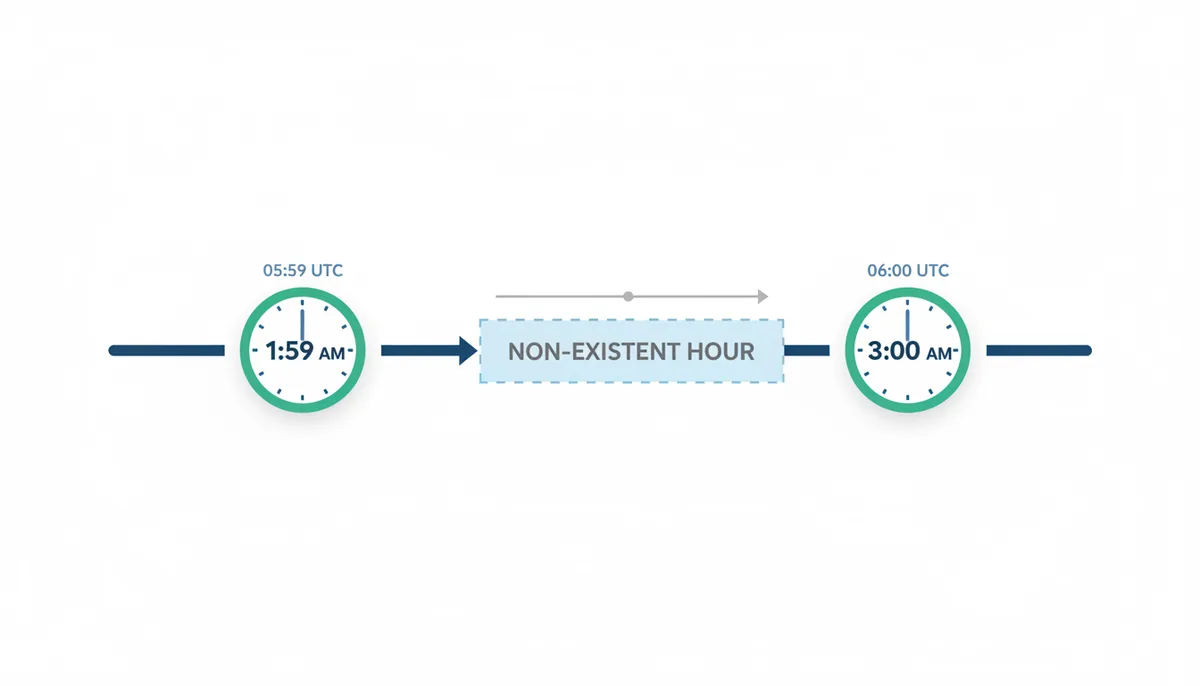
In the United States, Daylight Saving Time begins on the second Sunday of March. At 1:59:59 AM, clocks tick forward to 3:00:00 AM. The hour between 2:00 AM and 3:00 AM vanishes. This is the "spring forward" transition.
If your application accepts user input—say, a pharmacist scheduling a medication reminder for 2:30 AM—and you attempt to convert that civil time to a Unix timestamp, you are asking for something that does not exist. There is no moment in UTC that maps to 02:30 on March 10th, 2024, in America/New_York.
Different libraries handle this invalid request differently, which is the source of cross-platform inconsistency. Python's zoneinfo module, when constructing a datetime object for a non-existent time, will raise a ValueError if you attempt to convert it to a timestamp, or it may assume the time is in standard time depending on the exact construction method. Java's java.time package will throw a DateTimeException when you try to create a ZonedDateTime in a gap. JavaScript's native Date object, lacking explicit timezone support, will typically interpret the input as if the clocks had not yet changed, effectively treating it as 2:30 AM Standard Time (which maps to 07:30 UTC), or it may adjust forward to 3:30 AM depending on the browser's implementation of the Intl API.
The danger is not just the immediate error. If your code catches the exception and defaults to the current system time, you might store a timestamp for "now" instead of the intended future time. If it silently adjusts forward to 3:30 AM, the user receives their medication reminder an hour late. If it adjusts backward to 1:30 AM, they receive it early.
What Is the 'Fall Back' Ambiguity and Why Is It Dangerous?
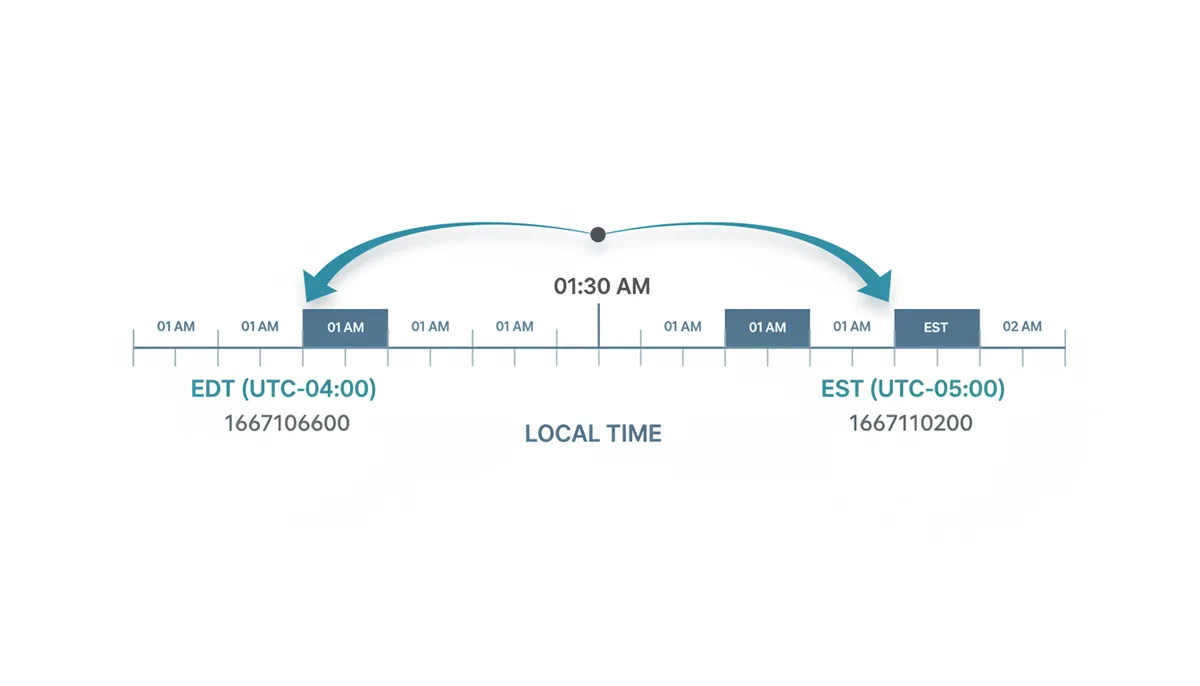
On the first Sunday of November, the United States ends Daylight Saving Time. At 1:59:59 AM, clocks jump backward to 1:00:00 AM. The hour from 1:00 AM to 2:00 AM occurs twice—once with the offset UTC-04:00 (EDT) and once with UTC-05:00 (EST).
This creates a one-to-many mapping. The local time string "2024-11-03 01:30:00 America/New_York" refers to two distinct instants in UTC:
- The first occurrence (during Daylight Saving Time): 05:30 UTC, timestamp 1730616600
- The second occurrence (during Standard Time): 06:30 UTC, timestamp 1730620200
If you store only the local time string "01:30," you have lost information. Six months later, when you convert it back to a Unix timestamp, which instant do you get? Most libraries default to the first occurrence (the earlier timestamp), but some default to the second. Without explicit disambiguation, you cannot reliably reconstruct the original moment.
Python 3.6+ introduced the fold attribute (PEP 495) to solve this. When constructing a datetime for an ambiguous time, you set fold=0 for the first occurrence (before the transition) and fold=1 for the second (after the transition). Legacy libraries like pytz required an is_dst flag. Java's java.time resolves ambiguous times to the earlier offset (the summer time) unless you explicitly query the ZoneOffsetTransition to determine if the time is in the overlap. PHP's DateTimeZone accepts a $isDst parameter in the transitional methods.
The consequence of ignoring this ambiguity is data that appears correct but sorts incorrectly. If you retrieve two events both labeled "01:30 AM" on November 3rd, and you convert them without disambiguation, the second event (which happened an hour later in real time) might receive an earlier timestamp than the first. Your logs will show event B occurring before event A.
How Do Computers Know When DST Starts and Ends?
Time zone rules are not mathematical formulas. They are legislative acts that change with new laws, energy crises, or administrative decisions. In 2024, the European Parliament voted to abolish seasonal clock changes, though implementation has been delayed. The United States considered the Sunshine Protection Act in 2023. These shifts make static calculation impossible.
Operating systems and programming environments rely on the IANA Time Zone Database, also called tzdata or the Olson database. This is a collaborative, curated dataset that maps geographical names like America/New_York or Europe/Paris to historical and future UTC offset rules. It records not only when DST starts and ends each year, but also the full history of changes—useful for querying timestamps from 1980, when rules were different.
The database uses named zones rather than offsets or abbreviations because offsets change. America/New_York currently oscillates between UTC-05:00 and UTC-04:00, but it has been UTC-04:00 year-round in the past (during World War II) and may be again. Using the string EST (Eastern Standard Time) is unreliable because it could refer to Eastern Australia or Eastern North America. Using -05:00 is wrong for half the year.
You must keep your system's tzdata current. A server running a three-year-old version of the database will apply the wrong offset to dates in 2024 if the government changed the transition dates (as the United States did in 2007). Most Linux distributions update tzdata via standard package managers, but containerized applications often bake in an outdated version. Check your base image's build date.
How Do You Correctly Convert a Unix Timestamp to a Zoned Datetime?
Converting from a Unix timestamp to a localized datetime is the safer direction. The timestamp represents a specific instant; you are simply applying a label to it. You need the timestamp and the target IANA time zone name.
First, convert the timestamp to an instant in UTC. Then, apply the time zone rules to find the local offset at that instant.
In Python 3.9+, use the standard library zoneinfo module:
from datetime import datetime
from zoneinfo import ZoneInfo

# Unix timestamp for 2024-03-10 07:30:00 UTC
timestamp = 1710058200

# Convert to New York time (will correctly show 03:30 EDT)
dt = datetime.fromtimestamp(timestamp, tz=ZoneInfo("America/New_York"))
print(dt)  # 2024-03-10 03:30:00-04:00
In JavaScript, the native Date object works in UTC internally, but formatting requires care. For Node.js or modern browsers:
const timestamp = 1710058200;
const date = new Date(timestamp * 1000);

// Use Intl to get timezone-specific components
const formatter = new Intl.DateTimeFormat('en-US', {
  timeZone: 'America/New_York',
  year: 'numeric',
  month: '2-digit',
  day: '2-digit',
  hour: '2-digit',
  minute: '2-digit',
  second: '2-digit',
  timeZoneName: 'short'
});

console.log(formatter.format(date)); // "03:30:00 AM EDT"
In Java, use the java.time package introduced in Java 8:
import java.time.Instant;
import java.time.ZoneId;
import java.time.ZonedDateTime;

long timestamp = 1710058200L;
Instant instant = Instant.ofEpochSecond(timestamp);
ZonedDateTime zdt = instant.atZone(ZoneId.of("America/New_York"));

System.out.println(zdt); // 2024-03-10T03:30-04:00[America/New_York]
In PHP, use the DateTime class with an explicit timezone:
$timestamp = 1710058200;
$dt = new DateTime();
$dt->setTimestamp($timestamp);
$dt->setTimezone(new DateTimeZone('America/New_York'));

echo $dt->format('Y-m-d H:i:s T'); // 2024-03-10 03:30:00 EDT
Notice that in all cases, you provide the geographical zone name, not an offset. This ensures that historical and future DST rules are applied correctly. If you had hardcoded UTC-05:00, the conversion would be wrong for March 10th because New York was observing UTC-04:00 at that moment.
How Do You Safely Convert a Zoned Datetime to a Unix Timestamp?
The reverse operation—local time to timestamp—is where applications break. You must handle two failure modes: the non-existent time (spring forward) and the ambiguous time (fall back).
When accepting user input or external data, validate that the local time actually exists. Then, for times that could be ambiguous, require disambiguation.
In Python with zoneinfo, you can check for the fold or use third-party libraries like dateutil or pendulum for stricter validation. For the ambiguous case in November:
from datetime import datetime
from zoneinfo import ZoneInfo

# November 3, 2024 at 1:30 AM - ambiguous
# First occurrence (still in DST, UTC-4)
first_occurrence = datetime(2024, 11, 3, 1, 30, tzinfo=ZoneInfo("America/New_York"), fold=0)
ts_first = first_occurrence.timestamp()  # 1730616600.0

# Second occurrence (in EST, UTC-5)
second_occurrence = datetime(2024, 11, 3, 1, 30, tzinfo=ZoneInfo("America/New_York"), fold=1)
ts_second = second_occurrence.timestamp()  # 1730620200.0

print(f"Difference: {ts_second - ts_first} seconds")  # 3600 seconds
For the spring forward gap in March, attempting to construct a datetime for 2:30 AM will succeed in Python, but calling timestamp() on it will raise an ValueError because the local time is invalid. You must catch this and decide whether to reject the input or adjust it:
try:
    dt = datetime(2024, 3, 10, 2, 30, tzinfo=ZoneInfo("America/New_York"))
    ts = dt.timestamp()
except ValueError as e:
    # Handle invalid time - reject or adjust to next valid time (3:00 AM)
    dt_adjusted = datetime(2024, 3, 10, 3, 0, tzinfo=ZoneInfo("America/New_York"))
    ts = dt_adjusted.timestamp()
In Java, the ZonedDateTime class provides explicit handling for local date-times that do not exist. The LocalDateTime.of() method creates a time without a zone, and atZone() applies the rules:
import java.time.LocalDateTime;
import java.time.ZoneId;
import java.time.ZonedDateTime;
import java.time.zone.ZoneOffsetTransition;
import java.time.zone.ZoneRules;

LocalDateTime localDateTime = LocalDateTime.of(2024, 3, 10, 2, 30);
ZoneId zone = ZoneId.of("America/New_York");
ZoneRules rules = zone.getRules();

// Check if valid
if (rules.isValidOffset(localDateTime, zone.getRules().getOffset(localDateTime))) {
    ZonedDateTime zdt = localDateTime.atZone(zone);
    long epoch = zdt.toEpochSecond();
} else {
    // Handle gap - typically adjust forward
    ZoneOffsetTransition transition = rules.getTransition(localDateTime);
    ZonedDateTime zdt = transition.getDateTimeAfter(); // Jumps to 3:00 AM
}
In JavaScript, the native Date constructor does not handle timezone names directly, so you typically work in UTC or use libraries like Luxon or Moment-Timezone. With Luxon:
const { DateTime } = require('luxon');

// Ambiguous time
let dt = DateTime.fromObject({year: 2024, month: 11, day: 3, hour: 1, minute: 30, zone: 'America/New_York'});
console.log(dt.ordinal); // Day of year, can check if ambiguous

// Get both possible timestamps
let before = dt.set({hour: 1, minute: 30}).setZone('UTC', {keepLocalTime: true});
// Check offset to disambiguate
The critical pattern is to separate parsing from conversion. Parse the string into a date-time object, check if it is ambiguous or invalid using the zone rules, apply your business logic (reject, adjust forward, or ask the user), then convert to the Unix timestamp.
| Language/Library | Behavior for Ambiguous Time (Fall Back) | Behavior for Non-existent Time (Spring Forward) | Disambiguation Method |
|---|---|---|---|
| Python (zoneinfo) | Defaults to first occurrence (fold=0) | Raises ValueError on .timestamp() | Use fold attribute (0 or 1) |
| Java (java.time) | Defaults to earlier offset (summer time) | Throws DateTimeException | Check ZoneOffsetTransition rules |
| JavaScript (Luxon) | Defaults to earlier offset unless specified | Adjusts forward to next valid time | Use explicit offset in constructor |
| PHP (DateTime) | Behavior depends on internal transition logic | Adjusts forward to next valid time | Use DateTimeZone with transition warnings |
What Are the Most Common DST-Related Programming Mistakes?
Mistake one: storing local time strings in your database. If you store "2024-11-03 01:30:00" without a timezone indicator or offset, you have created an unresolvable ambiguity. Six months later, you cannot tell if that was the first 1:30 AM or the second. Always store UTC timestamps (integers) or ISO 8601 strings with offset or 'Z' suffix.
Mistake two: using fixed UTC offsets. Code that hardcodes -05:00 for New York will be correct from November to March and wrong from March to November. You might write time_zone = "-05:00" in your configuration, thinking you are being explicit, but you have only captured Standard Time. Use the IANA zone name America/New_York instead.
Mistake three: relying on timezone abbreviations. EST means Eastern Standard Time in the United States, but it also means Eastern Standard Time in Australia. CST could be China Standard Time, Cuba Standard Time, or Central Standard Time in North America. Abbreviations are for display only, not for calculation. If your API accepts timezone: "EST", you have a bug.
A fourth mistake is assuming that DST transitions occur at the same time globally. In the United States, clocks change at 2:00 AM local time. In Europe, they change at 1:00 AM UTC. This means that for a few hours each year, New York is five hours behind London instead of the usual six, or seven instead of six, depending on the relative timing of the transitions. If you calculate durations between timestamps across these boundaries, you must account for the non-linear change in offset.
Which Time Format Should I Use for APIs and Databases?
For internal storage—database primary keys, indexing, sorting, and server-to-server communication—use Unix timestamps (integers). They are compact (typically 4 or 8 bytes), sort chronologically without special collation, and require no parsing. When you query a range, integer comparison is faster than string parsing.
For external APIs and human-readable logs, use ISO 8601 format with the timezone explicitly stated. The format 2024-03-10T07:30:00Z (UTC with Z suffix) is unambiguous and widely supported. If you must include local time, use the format 2024-03-10T02:30:00-05:00 or 2024-03-10T03:30:00-04:00. Never send 2024-03-10 02:30:00 without an offset.
UnixConverter and similar tools provide a quick way to verify these conversions during debugging, but your production code should rely on standard libraries that embed the IANA database.
| Format | Readability | Storage Size | Ambiguity Risk | Recommended Use |
|---|---|---|---|---|
| Unix Timestamp (integer) | Low | 4-8 bytes | None | Database indices, internal APIs, event sourcing |
| ISO 8601 UTC ('Z') | Medium | 20-24 bytes | None | External APIs, log files, wire format |
| ISO 8601 with offset | Medium | 25-29 bytes | None (if offset valid) | User data entry, cross-timezone coordination |
| Local time string (no offset) | High | 19 bytes | High | Display only, never storage |
How Does DST Affect Scheduled Tasks like Cron Jobs?
If you schedule a job to run at 2:30 AM using local time, you will observe two failure modes annually. In spring, the job will not run at all—the time 02:30 never arrives. In autumn, the job will run twice—once at the first 01:59:59+02:00 and again an hour later.
This is particularly dangerous for financial operations, data backups, or message queue consumers. A duplicate run can double-charge a customer. A missed run can leave a day's transactions unprocessed.
The solution is universal: define all cron schedules in UTC. A job scheduled for 07:30 UTC runs at 07:30 UTC every day, regardless of DST transitions in any locality. The interval is always 86,400 seconds (minus leap seconds, which Unix time ignores). If you must run a task at a specific local time, calculate the next UTC execution time dynamically using a timezone-aware library, rather than relying on the cron daemon's local time interpretation.
Modern schedulers like systemd.timers offer AccuracySec and persistent timestamps to prevent drift, but UTC remains the only portable, unambiguous reference frame.
How Can I Reliably Test My Application's DST Logic?
You cannot rely on your computer's current clock to test DST transitions. You need deterministic tests that simulate specific dates. Create a test suite that mocks the system clock or uses dependency injection to provide a "now" parameter.
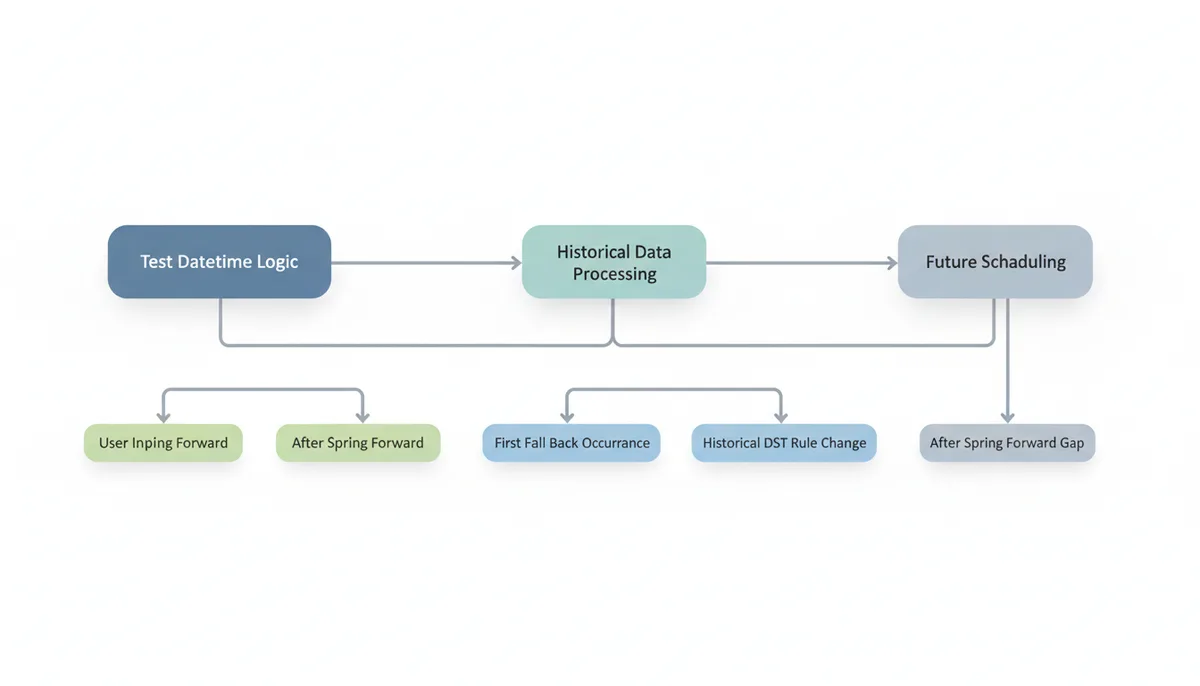
Your test cases should cover:
- A time five minutes before the spring forward transition (should resolve correctly)
- A time in the gap (should trigger your error handling or adjustment logic)
- A time five minutes after the spring forward transition
- The first occurrence of an ambiguous time during fall back (fold=0)
- The second occurrence of an ambiguous time during fall back (fold=1)
- A historical date before a recent DST rule change (to ensure your tzdata is being used)
In Python, use the freezegun library to pin the datetime:
from freezegun import freeze_time
from datetime import datetime
import unittest

class DSTTests(unittest.TestCase):
    @freeze_time("2024-03-10 07:25:00")  # 02:25 AM EST
    def test_pre_transition(self):
        # Test conversion logic here
        pass

    @freeze_time("2024-11-03 06:30:00")  # 01:30 AM EST (second occurrence)
    def test_fall_back_second_occurrence(self):
        # Verify fold handling
        pass
In Java, use the java.time.Clock class, which can be fixed to a specific instant:
Clock fixedClock = Clock.fixed(Instant.parse("2024-03-10T07:25:00Z"), ZoneId.of("America/New_York"));
// Inject fixedClock into your service instead of Clock.systemDefaultZone()
Run your CI pipeline with an explicit, recent version of the tzdata package to catch issues caused by outdated rules. If your application processes historical data, include tests for dates in the 1990s or 2000s to verify that old rules (like the pre-2007 US transition dates in April and October) are applied correctly.
How the IANA Time Zone Database Is Structured and Why It Matters for Performance
You might assume that converting a Unix timestamp to local time involves a simple calculation: determine if the date falls between the second Sunday in March and the first Sunday in November, apply the offset. This mental model works for next week, but it collapses for any date before 2007, or before 1987, or in Cairo in 2010 when they tried DST during Ramadan and then cancelled it. The IANA database does not store formulas. It stores a history of specific transition moments.
When you install the tzdata package on Linux, you are installing binary files in /usr/share/zoneinfo/. These are not text files listing rules; they are structured tzfile binaries. Open America/New_York in a hex editor and you will find a header followed by two arrays: transition times (stored as 32-bit or 64-bit Unix timestamps) and offset indices. For any timestamp you query, the library performs a binary search through the transition array to find which interval contains your instant, then returns the corresponding UTC offset and abbreviation.
This design explains why historical conversions are accurate but also why they consume memory. America/New_York contains over 140 transitions dating back to 1883, consuming roughly 4KB of mapped memory. Asia/Tokyo, which has not observed DST since 1951 and maintains a fixed offset, requires less than 200 bytes. If your application loads every zone into memory—common in geo-distributed servers that handle global traffic—you are not loading formulas; you are loading historical timelines. A JVM with pre-initialized ZoneId objects for all 500+ zones can allocate several megabytes of heap to these transition tables.
You will also notice two subdirectories: posix and right. The posix zones assume the Unix time model where every day has exactly 86,400 seconds, ignoring leap seconds. The right zones attempt to account for leap seconds by including them in the transition tables, making the timeline non-linear. Unless you are running a satellite ground station or a high-frequency trading platform that requires TAI (International Atomic Time) synchronization, you should use the posix zones. Using right/America/New_York will cause your timestamps to drift 27 seconds (the current leap second count) from every other Unix system, breaking API authentication and certificate validation.
There is a hidden complexity looming: the Year 2038 problem. Many zoneinfo files still ship with 32-bit transition timestamps for backward compatibility with legacy time_t systems. When the Unix timestamp exceeds 2,147,483,647 in January 2038, those 32-bit entries will overflow. Modern tzdata builds now include 64-bit transition times, but if your embedded device or Docker image uses an old libc or a "slim" tzdata installation, conversions of future dates will fail or wrap to 1901. You can verify your system's range by converting a timestamp for January 2040; if it returns garbage or crashes, you are using 32-bit zoneinfo tables.
The performance implication is search cost. Every conversion requires a binary search through the transition array for that zone. For high-throughput systems—logging billions of events per hour—this lookup cost dominates CPU profiles. The optimization is to cache the current offset for active zones and only fall back to the full table lookup when crossing a known transition boundary, something modern libraries like Java's java.time do automatically, but older C libraries using localtime_r do not.
Why Adding 86,400 Seconds Does Not Give You "Tomorrow"
You need to schedule a daily report. It ran today at 14:00 local time. You calculate the next runtime by taking the current Unix timestamp, adding 86,400, and storing the result. On Monday, this works. On Saturday March 9th, 2024, at 14:00 EST, your calculation yields 1710014400 + 86400 = 1710100800. When you convert that back for display, the clock reads 15:00 EDT, not 14:00. Your users receive their report an hour late, and on the day they need it most—Sunday morning—they are confused.
You have conflated absolute duration with civil time. Eighty-six thousand four hundred seconds is exactly twenty-four hours in UTC, but civil days are defined by local legislation, not physics. When clocks spring forward, the day contains only 82,800 seconds; when they fall back, it contains 90,000. Timestamp arithmetic is continuous; civil time is discontinuous.
The correct approach is to convert to local civil time, perform calendar arithmetic, then convert back to Unix time. In Python:
from datetime import datetime, timedelta
from zoneinfo import ZoneInfo

now_ts = 1710014400  # 2024-03-09 14:00 EST
dt = datetime.fromtimestamp(now_ts, ZoneInfo("America/New_York"))
next_run = dt + timedelta(days=1)  # Civil time addition
next_ts = next_run.timestamp()  # Correctly handles the gap
Notice that timedelta(days=1) is not the same as timedelta(seconds=86400). The former adds one day to the civil calendar, resolving to the same wall-clock time if possible, or to the next valid time if the original time falls in a gap. The latter adds raw seconds, drifting across DST boundaries.
Java makes this explicit with two separate classes: Duration represents seconds and nanoseconds on the timeline, while Period represents years, months, and days in civil time. Adding a Duration.ofDays(1) to a ZonedDateTime adds exactly 86,400 seconds, skipping over the gap and landing at 3:00 AM instead of 2:00 AM. Adding a Period.ofDays(1) adjusts the date field first, then resolves the time, preserving the 2:00 AM wall-clock time or adjusting to 3:00 AM if 2:00 AM is invalid. Choose Period for user-facing schedules; choose Duration only for physics, network timeouts, or caching TTLs.
This distinction becomes critical in billing systems. If you charge customers by the "day" of service, you cannot bill 86,400 seconds of usage. On the 23-hour spring day, you undercharge; on the 25-hour fall day, you overcharge. You must calculate the service period by comparing the local date boundaries, not the timestamp difference. Calculate the start of the service day in local time, convert to UTC timestamp, calculate the start of the next local day, convert to UTC timestamp, and bill for the difference in seconds. This yields 82,800 seconds for March 10th, 2024, in New York, which is the actual duration of that civil day.
Database intervals suffer the same confusion. PostgreSQL's interval type distinguishes between "1 day" and "24 hours". The former respects the session timezone when added to a timestamp; the latter does not. If you store '24 hours'::interval in a configuration table for job scheduling, you will drift. Store '1 day'::interval or, better, store the intended local time and recalculate the next UTC timestamp after each execution using the civil time + 1 day method.
The 2007 US DST Extension and the Data Corruption It Caused
In 2005, the United States Congress passed the Energy Policy Act, extending Daylight Saving Time by four weeks: starting three weeks earlier in March and ending one week later in November. The change took effect in 2007. For any system running tzdata from 2006 or earlier, March 11, 2007 was a Sunday like any other—a Standard Time day. In reality, it was the second day of DST. The result was the largest coordinated timestamp corruption event of the decade.
Consider a telemedicine platform in early 2007. A doctor in Chicago scheduled a follow-up appointment for March 12, 2007 at 09:00. The web application converted this to Unix timestamp using a PHP 4 installation with 2005-era tzdata. Because the old rules said DST started in April, the conversion applied the offset UTC-06:00 (CST), storing timestamp 1173709200. When the hospital upgraded to PHP 5 with 2007 tzdata and displayed the appointment, the conversion applied UTC-05:00 (CDT), rendering the time as 10:00 AM. The patient arrived at 9:00 AM; the doctor was in another meeting. The timestamp was immutable, but the interpretation had shifted.
The corruption was silent. No exceptions were thrown. The integer in the database was "correct" for the logic that created it, but "wrong" for the logic that read it. Worse, the error propagated. If the system generated an iCalendar invitation (.ics file) with the timestamp, Outlook on a patched Windows machine interpreted it as 10:00 AM, while Outlook on an unpatched machine showed 9:00 AM. The same meeting existed at two different times depending on the viewer's operating system patch level.
Russia performed a similar maneuver in 2011, canceling DST permanently but keeping summer time year-round, then reversing that decision in 2014. Egypt abolished DST in 2011, reintroduced it in 2014, and abolished it again in 2016. Each change creates a "fold" in history where the same local time string maps to different timestamps depending on which year you query. If your application archives data from these regions, you must tag each record with the tzdata version used for conversion, or store the UTC offset explicitly for historical queries. Otherwise, retrospective analysis—calculating how long a factory was offline in Cairo in 2014—will be wrong by an hour if you use 2024 tzdata rules retroactively.
Detecting this corruption today requires heuristics. If you have historical data from 2007 with timestamps that, when converted with modern tzdata, fall between March 11 and April 1 at offsets that suggest Standard Time, you have suspect records. You must re-parse the original local time strings (if you preserved them) using the 2007 rules, or flag the records for manual review. If you only stored the integer timestamps, you have lost the original intent; you cannot distinguish a 9:00 AM CDT appointment from a 9:00 AM CST appointment without external context.
The lesson is not merely to keep tzdata updated—though that is essential. It is to store the local time string and the zone name alongside the timestamp for any scheduled future event. When the rules change, you have the source material to recalculate. A UnixConverter batch process can help audit your 2007-era data: export timestamps, convert with modern rules, and look for appointments that land in the "impossible" hours of the old Standard Time during the new DST period.
Frequently Asked Questions
Is Unix time affected by leap seconds?
No. The POSIX standard defines Unix time as a linear count of seconds, assuming every day contains exactly 86,400 seconds. When a positive leap second is inserted into UTC (the last minute of the day has 61 seconds), Unix time either repeats the last second or counts through it, depending on implementation, but it does not insert a 61st second. This means Unix time can briefly differ from true UTC by up to a second, but it preserves the simplicity of the timestamp calculation.
Should I store timestamps or formatted date strings in my database?
Store UTC timestamps, preferably as 64-bit integers or native timestamp types (like PostgreSQL TIMESTAMPTZ or MySQL DATETIME with UTC conversion). They are compact, unambiguous, and indexed efficiently. Convert to local time strings only in your application's presentation layer when displaying to users. A UnixConverter batch tool can help validate your migration if you are converting legacy string data to timestamps.
Why is my timestamp conversion off by a few minutes, not a full hour?
Before standardization in the mid-20th century, many locations used offsets that were not whole hours. For example, Amsterdam observed UTC+00:19:32 until 1937, and India used UTC+05:53:28 until 1906. If you are processing historical dates from the 1800s or early 1900s, the IANA database includes these odd offsets. Your conversion is correct; the assumption of hourly offsets is wrong.
Can I just use UTC for everything and ignore time zones?
For servers, logs, and databases, yes—use UTC exclusively. However, the moment you display a time to a user, you must convert to their local time zone. A meeting scheduled for "14:00 UTC" is meaningless to a user without knowing if that is morning or evening in their city. You still need the DST logic, but you apply it at the edge of your system, not in your core data storage.
What's the difference between GMT and UTC?
For software development, they are effectively synonymous. Technically, GMT (Greenwich Mean Time) is a solar-based time standard that is no longer used for precise timekeeping. UTC (Coordinated Universal Time) is an atomic time standard with leap seconds inserted to keep it aligned with Earth's rotation. Unix time is defined against UTC. When you see "GMT" in legacy systems, treat it as UTC unless you are dealing with historical British timekeeping.
How do I get the user's correct IANA time zone name?
The most reliable method is to ask the browser via JavaScript: Intl.DateTimeFormat().resolvedOptions().timeZone. This returns a string like "America/Los_Angeles". Store this string with the user's profile. Asking users to select their zone from a dropdown is also reliable. Avoid IP geolocation services; they fail for VPN users, mobile travelers, or corporate networks routed through distant data centers.
Do all countries use Daylight Saving Time?
No. Countries near the equator typically do not observe DST because daylight hours vary little throughout the year. Japan, India, and China do not use DST. Furthermore, the start and end dates vary significantly: the United States and Canada change on different dates than Europe, and Brazil and Australia observe DST in their summer months (the opposite of the northern hemisphere). This variability is why you must use a maintained database like IANA tzdata rather than hardcoding transition dates.
Sources
- IANA Time Zone Database — The claim that the 'tz database' is the authoritative, standard source for worldwide time zone and daylight saving time rules.
- IETF RFC 8536 — The technical specification for the Time Zone Information Format (TZif) used by the IANA Time Zone Database.
- The Open Group Base Specifications (POSIX) — The definition of 'Seconds Since the Epoch' (Unix time), its relationship to UTC, and the specific exclusion of leap seconds.
- Python Official Documentation (zoneinfo) — Code examples and claims about the modern, correct way to handle time zones and DST in Python, including the use of the `fold` attribute.
- MDN Web Docs (Intl.DateTimeFormat) — Code examples and claims about the standard, correct way to handle time zone conversions in modern JavaScript.
- Oracle Java Documentation (java.time) — Claims about the capabilities of Java's modern date and time API for handling time zones, DST, and ambiguity.
- NIST Time and Frequency Division — Authoritative definitions of UTC, standard time, and the role of leap seconds in official timekeeping.