Does a Unix Timestamp Include a Time Zone?
For developers: a clear explanation of whether Unix timestamps include time zones, with practical conversion and storage guidance.
The Direct Answer: A Point in Time, Not a Place
No, a Unix timestamp does not and cannot include a time zone. This isn't a limitation—it's the entire point. A Unix timestamp is nothing more than a counter, tracking seconds that have passed since midnight UTC on January 1, 1970. That's it. No location data, no regional offsets, no complexity.
Think of it like a universal stopwatch that started ticking at one specific moment and hasn't stopped since. When you check this stopwatch, it shows the same number whether you're in Tokyo, London, or New York. The number 1698345600 means exactly the same thing everywhere: 1,698,345,600 seconds have passed since the epoch. What time that translates to on your local clock—that's a separate question entirely.
This design choice makes Unix timestamps perfect for computers. They're just numbers. You can sort them, subtract them, store them efficiently. No parsing required, no ambiguity about what "EST" means (Eastern Standard Time? Eastern Summer Time in Australia?). The timestamp 1698345600 occurred at one precise moment in the universe's timeline, and that's all it represents.
UTC: The Unseen Anchor of Every Timestamp
Unix timestamps are anchored to UTC (Coordinated Universal Time), the global time standard maintained by a network of atomic clocks. UTC isn't a time zone—it's the reference point from which all time zones are defined. When we say the Unix epoch started at "00:00:00 UTC on January 1, 1970," we're defining a specific instant that occurred simultaneously everywhere, even though clocks in different places showed different times.
You'll sometimes see UTC confused with GMT (Greenwich Mean Time). While they're usually identical, GMT is technically a time zone used in the UK, subject to regional decisions. UTC is a scientific standard, politically neutral and precisely defined. Modern systems use UTC exclusively.
There's one quirk worth knowing: Unix time pretends leap seconds don't exist. While UTC occasionally adds a leap second to keep atomic time aligned with Earth's rotation, Unix time simply ignores these adjustments. During a leap second, the same Unix timestamp represents two different seconds in UTC. For most applications, this simplification is worth the tiny drift it causes—about 27 seconds since 1970.
How a Timestamp Becomes a Local Time: The Two-Step Conversion
Converting a Unix timestamp to a human-readable time always requires two pieces of information: the timestamp itself and a target time zone. Without both, you can't produce a meaningful local time.
Here's what happens under the hood. First, your system converts the timestamp to a UTC date and time. The timestamp 1698345600 becomes "2023-10-26 20:00:00 UTC". This step is purely mathematical—dividing seconds into years, months, days, hours, and minutes since the epoch.
Second, the system applies a time zone offset to shift from UTC to local time. For "America/New_York" in October, that's UTC-4 due to daylight saving time, giving us "2023-10-26 16:00:00 EDT". For "Europe/London", it's UTC+1, resulting in "2023-10-26 21:00:00 BST".
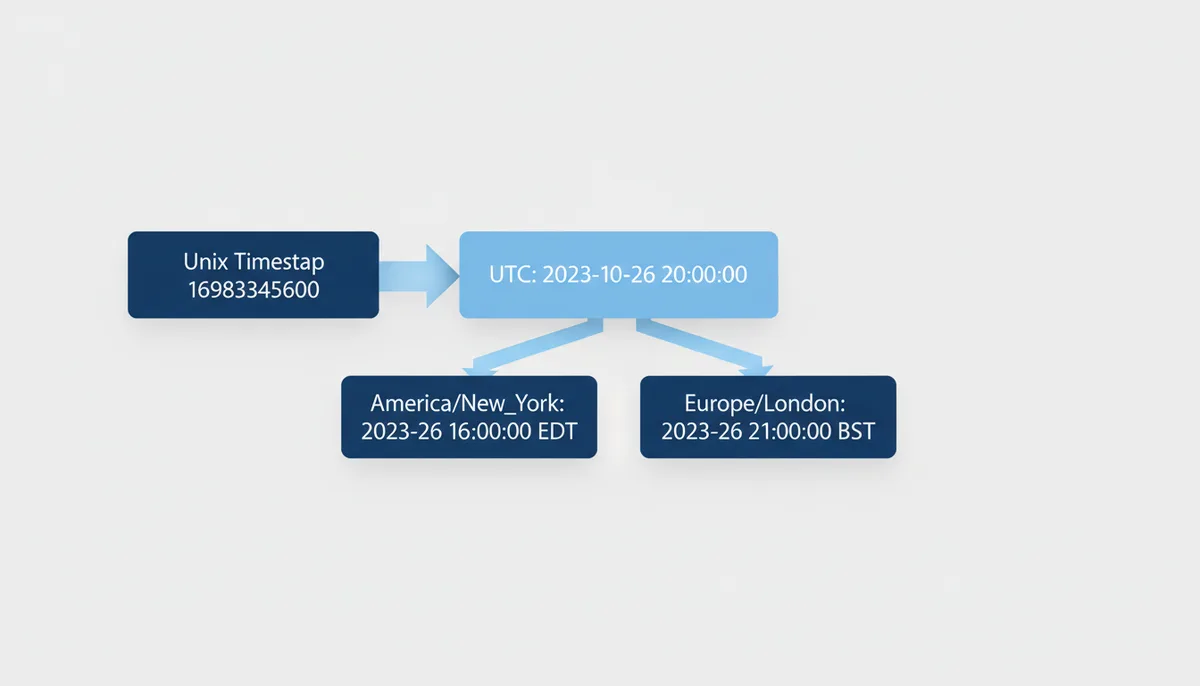
When you don't specify a time zone, most programming languages and databases fall back to the system's default zone. This invisible default is responsible for countless bugs. Your laptop might use "America/Chicago", your server "UTC", and your user's browser "Asia/Shanghai". Same timestamp, different displayed times, confused users.
Handling Timestamps and Time Zones in Code
Every major programming language handles the timestamp-to-local-time conversion differently. Understanding these differences prevents the kind of bugs that surface at 2 AM during a daylight saving transition.
JavaScript's Date object automatically uses the browser's time zone, which sounds convenient until you realize you have no control over it:
const timestamp = 1698345600000; // milliseconds
const date = new Date(timestamp);
console.log(date.toString()); // Uses browser's timezone
The modern Intl.DateTimeFormat API gives you explicit control:
const formatter = new Intl.DateTimeFormat('en-US', {
  timeZone: 'America/New_York',
  dateStyle: 'short',
  timeStyle: 'short'
});
console.log(formatter.format(new Date(timestamp))); // "10/26/23, 4:00 PM"
Python's datetime module requires you to be explicit about time zones, which is good. The modern approach uses the zoneinfo module (Python 3.9+):
from datetime import datetime
from zoneinfo import ZoneInfo

timestamp = 1698345600
utc_time = datetime.fromtimestamp(timestamp, tz=ZoneInfo('UTC'))
ny_time = utc_time.astimezone(ZoneInfo('America/New_York'))
print(ny_time) # 2023-10-26 16:00:00-04:00
Java's java.time package separates concerns cleanly. An Instant represents the moment in time (always UTC), while ZonedDateTime represents that moment in a specific zone:
Instant instant = Instant.ofEpochSecond(1698345600L);
ZonedDateTime nyTime = instant.atZone(ZoneId.of("America/New_York"));
System.out.println(nyTime); // 2023-10-26T16:00-04:00[America/New_York]
| Operation | JavaScript | Python | Java |
|---|---|---|---|
| Get current timestamp | Math.floor(Date.now() / 1000) | int(time.time()) | Instant.now().getEpochSecond() |
| Create date from timestamp (default) | new Date(ts * 1000) // Browser TZ | datetime.fromtimestamp(ts) // System TZ | Instant.ofEpochSecond(ts) // Always UTC |
| Convert to specific timezone | new Intl.DateTimeFormat('en', {timeZone: 'America/New_York'}).format(date) | datetime.fromtimestamp(ts, tz=ZoneInfo('America/New_York')) | instant.atZone(ZoneId.of("America/New_York")) |
Database Storage Strategies: The Right and Wrong Ways
How you store timestamps in your database determines whether your application handles time zones correctly or turns into a debugging nightmare. The fundamental choice is whether your database column understands time zones or just stores numbers.
PostgreSQL's TIMESTAMP WITH TIME ZONE (or TIMESTAMPTZ) sounds like it stores time zone information. It doesn't. Instead, it normalizes everything to UTC on input and converts to your session's time zone on output. When you insert '2023-10-26 16:00:00-04:00', PostgreSQL stores the UTC equivalent. When you query it from a session set to 'Europe/London', you get '2023-10-26 21:00:00+01:00'.
This behavior is usually what you want. The absolute moment in time is preserved, and clients see times in their expected zone. But if you need to remember that the original input was in New York time (maybe for a recurring event), you'll need to store that separately.
MySQL's TIMESTAMP type works similarly—it stores UTC and converts based on the session time zone. But MySQL's DATETIME type stores exactly what you give it, with no zone awareness. If you store '2023-10-26 16:00:00', that's what you get back, regardless of time zones. This makes DATETIME dangerous for anything other than truly zone-agnostic data.
A third option: store Unix timestamps as BIGINT. This gives you complete control but requires you to handle all conversions in your application code. It's explicit, portable across databases, and immune to time zone configuration issues. The downside is that timestamps aren't human-readable in raw query results.
My recommendation: use TIMESTAMPTZ in PostgreSQL or TIMESTAMP in MySQL for most use cases. Store raw Unix timestamps as BIGINT when you need portability or are dealing with systems that don't handle time zones well. Never use DATETIME for moments in time—reserve it for things like store hours that genuinely are "wall clock time."
Common Pitfalls: Daylight Saving and Other Time Traps
Daylight saving time (DST) transitions break naive time handling code twice a year. During "spring forward," an hour disappears—2:30 AM simply doesn't exist on the day clocks jump from 2:00 to 3:00. During "fall back," an hour repeats—there are two different moments both called 1:30 AM.
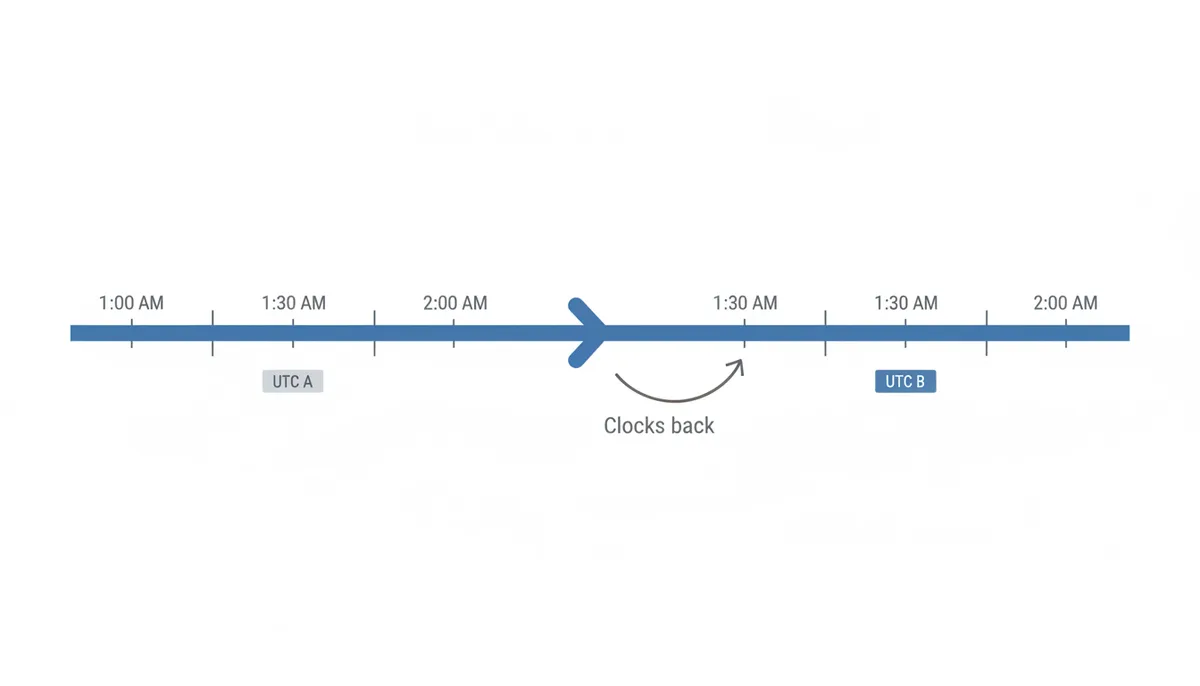
Consider scheduling a job for 2:30 AM every day. On the spring transition day, that time doesn't exist. Should your job run at 3:00 AM instead? Not run at all? Different systems make different choices. On the fall transition, should it run once or twice?
The only reliable solution: work in UTC for anything scheduled or recurring, then convert to local time only for display. A job scheduled for "07:30 UTC" runs at the same moment worldwide, regardless of DST transitions. Users might see it at different local times throughout the year, but it always runs exactly once.
Manual offset calculations are another trap. You might think "EST is always UTC-5," but that's only true in winter. During summer, Eastern time is EDT at UTC-4. The offset for any location can change based on date, and the rules change when governments adjust DST policies. Peru abolished DST in 1994. Russia used permanent DST from 2011-2014. Morocco suspends DST during Ramadan.
Always use a proper time zone library backed by the IANA Time Zone Database. This database tracks every time zone rule change in history. When you ask for "America/New_York" time on a specific date, the library knows whether DST was in effect, what the base offset was, and any special rules that applied.
When You Must Store a Time Zone (And How to Do It)
Sometimes storing just the UTC timestamp isn't enough. You need to preserve the time zone context for correct behavior or user expectations.
User preferences are the obvious case. If someone sets their profile to "America/Denver," you need to store that preference to display all times in their chosen zone. But that's just a rendering preference—the underlying timestamps remain in UTC.
Future event scheduling requires more care. If you schedule a meeting for "October 26, 2024, at 3:00 PM Pacific Time," you can't just convert that to UTC and store the timestamp. Why? Because if the US changes DST rules before 2024, your stored UTC timestamp will represent the wrong Pacific time. You must store both the intended local time and zone, then compute the UTC timestamp when needed.
Historical accuracy matters for audit logs and financial records. If a trade executed at "4:00 PM New York time," you might need to preserve that fact, not just the UTC timestamp. Regulations might require showing events in their original local context.
The pattern I recommend: always store the authoritative timestamp in UTC (as TIMESTAMPTZ or BIGINT). If you need zone context, add a separate VARCHAR column for the IANA zone name. Never store just a zone offset like "-05:00"—that loses DST information.
| Strategy | Example Storage | Pros | Cons | Best For |
|---|---|---|---|---|
| UTC Timestamp Only | 1698345600 | Simple, unambiguous, sortable | No local context preserved | Server logs, API events, sensor data |
| Local Datetime String | '2023-10-26 16:00:00' | Human-readable | Ambiguous without zone, breaks during DST | Never use for real timestamps |
| UTC + Zone Name | 1698345600, 'America/New_York' | Full context, handles DST, regulatory compliant | Requires two columns | User events, scheduling, compliance |
Beyond Seconds: Precision and the Year 2038 Problem
Not all Unix timestamps are created equal. The classic Unix timestamp counts seconds, giving you 10 digits for current dates. But modern systems often need more precision.
JavaScript's Date.now() returns milliseconds, giving you 13-digit timestamps. High-frequency trading systems might use microseconds (16 digits) or even nanoseconds (19 digits). When interfacing between systems, always verify the expected precision. Treating a millisecond timestamp as seconds will place you in the year 54,000.
The Year 2038 problem looms for 32-bit systems. A signed 32-bit integer can only count to 2,147,483,647. That many seconds after the 1970 epoch lands on January 19, 2038, at 03:14:07 UTC. After that moment, 32-bit timestamps wrap around to negative numbers, potentially jumping back to 1901.
Modern 64-bit systems don't face this issue. A 64-bit integer can represent dates until the year 292,277,026,596—by which point the sun will have long since consumed the Earth. If you're maintaining legacy 32-bit systems, migration is essential before 2038. For new systems, always use 64-bit time representations.
One edge case: some embedded systems and protocols still use 32-bit timestamps for efficiency. GPS time, for example, uses a 10-bit week counter that rolls over every 1,024 weeks (about 19.7 years). These systems require special handling to maintain correct absolute time.
The Binary Reality: How Timestamps Work at the System Level
Understanding how Unix timestamps actually work in memory and storage reveals why they're so efficient and why time zone data would destroy that efficiency. A Unix timestamp is typically a 64-bit signed integer on modern systems. That's 8 bytes of storage—compact enough to pass around in CPU registers, compare with a single instruction, and store millions of times without noticing the space.
At the processor level, comparing two timestamps is a single CMP instruction. Sorting a million timestamps takes the same time as sorting any other integers. Adding 3600 to a timestamp moves it forward exactly one hour. This mathematical simplicity is why databases can index timestamp columns efficiently and why time-series databases can handle billions of data points.
Now imagine if timestamps included time zone data. The simplest zone offset like "+05:30" needs at least 6 bytes as a string. A full IANA identifier like "America/Argentina/Buenos_Aires" needs up to 32 bytes. Your 8-byte timestamp just became 40 bytes. Worse, comparing timestamps now requires parsing, timezone rule lookups, and potentially complex DST calculations. That single CPU instruction became hundreds.
The kernel itself only knows Unix time. When you call time() in C, you're getting the system's monotonic counter, maintained by interrupt handlers that increment it based on the hardware clock. The kernel doesn't know or care about time zones—that complexity lives in userspace libraries like glibc, which read timezone files from /usr/share/zoneinfo/.
This separation goes deep. File systems store file modification times as Unix timestamps. Network protocols like NTP synchronize Unix time. TLS certificates validate against Unix time. Adding timezone awareness to any of these would require fundamental protocol changes and break backward compatibility with decades of software.
Even the hardware real-time clock (RTC) in your computer typically stores either UTC or local time as simple numeric values. On boot, the kernel reads this value and converts it to its internal Unix timestamp counter. Some older Windows systems stored local time in the RTC, leading to the classic dual-boot problem where Windows and Linux would fight over the correct time after each reboot.
A Real Migration Story: When Time Zones Go Wrong at Scale
A financial services company I worked with learned about timestamp complexity the hard way. Their trading platform stored all timestamps as DATETIME in MySQL, assuming they'd only operate in London. When they expanded to Singapore, the cracks showed immediately.
The problem surfaced during their first month-end reconciliation. London trades from 3:00 PM appeared to happen after Singapore trades from 11:00 PM the same day. The audit system, which relied on chronological ordering, flagged thousands of "impossible" trade sequences. Worse, some trades appeared to happen in the future—Singapore's morning trades showed timestamps hours ahead of the London system's current time.
The quick fix seemed obvious: add timezone columns and update the application to handle conversions. But the data model had timestamps everywhere—trade execution, order placement, confirmation times, settlement dates. Each timestamp column needed a corresponding timezone column. The trades table alone had 14 timestamp columns.
Then they discovered the historical data problem. Two years of trades had timestamps but no zone information. Was a trade at "15:00:00" logged in London time or the local time of the trader? The application logs didn't say. They had to reconstruct timezones from IP addresses in login records, cross-referenced with trader schedules.
The migration took six months. First, they added UTC timestamp columns alongside every existing DATETIME. Then a parallel-run phase where both old and new columns were populated, allowing verification. The scariest part was switching the application logic—every query touching timestamps needed updates, and missing just one would corrupt data.
The final system stored all times as BIGINT Unix timestamps in milliseconds, with a separate timezone audit table tracking each user's zone at transaction time. Queries became more complex but unambiguous. The lesson: retrofitting timezone awareness is exponentially harder than building it correctly from the start. They spent roughly $400,000 in developer time fixing a decision that would have cost nothing to make correctly initially.
Timestamp Formats in the Wild: Parsing the Chaos
While Unix timestamps are clean integers internally, the real world bombards you with dozens of time formats. Each API seems to have its own opinion on how to represent time, and parsing them correctly requires understanding the subtle differences.
Here's what you'll encounter in practice. Twitter's API returns Unix timestamps in milliseconds as JSON numbers: 1698345600000. Stripe uses Unix timestamps in seconds: 1698345600. GitHub uses ISO 8601 strings: "2023-10-26T20:00:00Z". Elasticsearch accepts both but internally stores milliseconds since epoch. Some legacy systems use Microsoft's OLE Automation dates (days since December 30, 1899) or Excel serial dates (days since January 1, 1900, with a leap year bug).
The dangerous formats are the ambiguous ones. A timestamp like "2023-10-26 20:00:00" lacks timezone information entirely. Is it UTC? Local to the server? Local to the user? Without explicit documentation, you're guessing. The string "10/11/2023" could mean October 11th (US format) or November 10th (most other countries).
JavaScript's Date constructor accepts an alarming variety of inputs, each with quirks. new Date("2023-10-26") parses as UTC midnight, but new Date("2023-10-26 20:00:00") parses as local time. Add a 'T' between date and time, and it's UTC again. This inconsistency causes bugs when developers test locally (where local might equal UTC) then deploy to servers in different zones.
When building APIs, be explicit and consistent. Document whether your timestamps are seconds or milliseconds. If accepting strings, require timezone information—either UTC denoted by 'Z' or an explicit offset like '+05:30'. Reject ambiguous formats immediately rather than guessing.
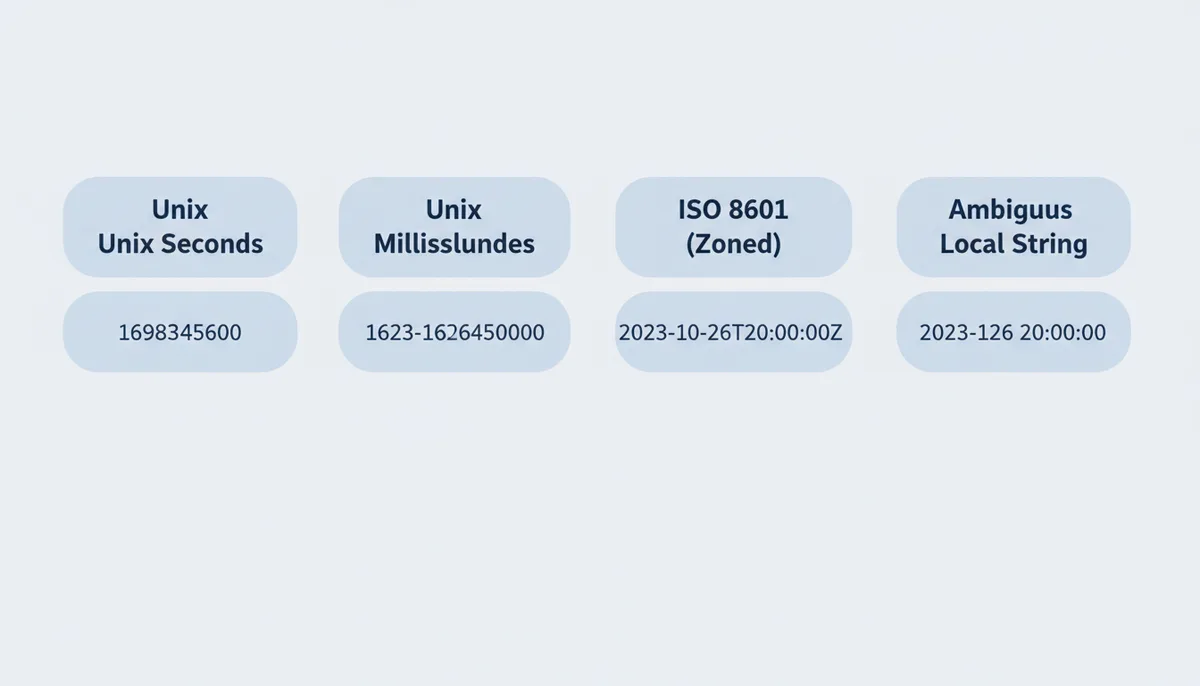
For parsing untrusted input, build a strict parsing pipeline. Try formats in a specific order, from most to least specific. Log what format succeeded for debugging. When you encounter a new source, document its format assumptions explicitly. The investment in careful parsing pays off the first time you avoid a midnight production issue.
Distributed Systems: When Every Microsecond Counts
In distributed systems, timestamps do more than record when things happened—they determine what happened. When two database replicas receive conflicting updates, timestamps often decide which one wins. Get timezone handling wrong here, and you don't just display the wrong time—you corrupt data.
Consider a distributed database with nodes in California, Virginia, and Frankfurt. A user updates their profile at exactly 15:00:00 local time in each location. Without consistent timestamp handling, these updates have different Unix timestamps—the California update appears to happen 9 hours "before" Frankfurt. If your conflict resolution uses last-write-wins based on timestamps, the wrong update might win based purely on geography.
Google's Spanner database solves this with atomic clocks and GPS receivers in each datacenter, achieving microsecond-level time synchronization globally. But most of us don't have Google's infrastructure. The practical solution: ensure every node uses NTP synchronization and handles timestamps identically. A time drift of even a few seconds between nodes can cause data inconsistencies.
Microservices add another layer of complexity. When service A in AWS us-east-1 calls service B in eu-west-1, their timestamps need to be comparable. If A logs request time as Unix milliseconds but B expects Unix seconds, you'll see requests that apparently took 50 years to complete. Standard practice: use Unix timestamps in milliseconds for all inter-service communication, log with microsecond precision for debugging.
Event sourcing systems depend critically on timestamp accuracy. Each event needs a timestamp that reflects true chronological order across the entire system. Some teams use logical timestamps (like Lamport timestamps) to ensure correct ordering even with clock skew. Others use hybrid logical clocks that combine wall-clock time with logical counters.
The hardest bugs come from timestamp precision mismatches. A service truncating microseconds to milliseconds might process events "out of order" from the perspective of a microsecond-aware service. Two events that appear simultaneous at millisecond precision might be clearly ordered at microsecond precision. Always preserve the highest precision available until you explicitly need to reduce it.
FAQ
Is Unix time the same as UTC?
They're related but different things. UTC is a time standard—the official global reference for what time it is. Unix time is a way of representing moments as numbers by counting seconds since a UTC-based reference point. You can think of UTC as defining "what time is it?" while Unix time provides "how do we store it?"
What happens to Unix time during a leap second?
Unix time pretends leap seconds don't exist. When a leap second is inserted at 23:59:60 UTC, Unix time pauses—the same timestamp represents both 23:59:59 and 23:59:60. This means Unix time gradually drifts from true UTC, currently by about 27 seconds since 1970. Most applications accept this trade-off for simplicity.
Can a Unix timestamp be negative?
Yes, negative timestamps represent dates before January 1, 1970. The timestamp -86400 represents December 31, 1969, at 00:00:00 UTC. However, support varies. Some older systems treat timestamps as unsigned integers, interpreting negative values as dates far in the future. Always test negative timestamp handling in your specific environment.
Why do some timestamps have 13 digits instead of 10?
The digit count indicates precision. 10 digits means seconds since epoch (traditional Unix time). 13 digits means milliseconds—common in JavaScript and Java. 16 digits indicates microseconds, 19 digits nanoseconds. Always match the precision your system expects. Dividing by 1000 converts milliseconds to seconds.
Should I use ISO 8601 strings or Unix timestamps in my API?
For data exchange, use ISO 8601 strings like "2023-10-26T20:00:00Z". They're human-readable, self-documenting, and explicitly include timezone information (the 'Z' means UTC). For internal storage and calculations, Unix timestamps are more efficient—they're just numbers, easy to sort and compare. Many APIs accept both formats.
How do I get the current Unix timestamp?
Every environment provides a simple method. In JavaScript: Math.floor(Date.now() / 1000). In Python: int(time.time()). In bash: date +%s. In SQL: EXTRACT(EPOCH FROM NOW()). These all return seconds since epoch. For milliseconds, use Date.now() in JavaScript or int(time.time() * 1000) in Python.
Conclusion
Unix timestamps don't include time zones because they represent absolute moments, not local times. This design—counting seconds since a fixed UTC reference—makes them ideal for computers but requires careful handling when displaying times to humans.
The key insight is separation of concerns. Timestamps handle "when" (the absolute moment), while time zones handle "where" (the local representation). Mixing these concerns leads to bugs, especially around DST transitions. Store moments as UTC timestamps, store zone preferences separately when needed, and use proven libraries for conversion.
Whether you're building a simple web app or a distributed system, the principles remain constant: respect the distinction between absolute and local time, be explicit about time zones, and never trust the system default. Get these fundamentals right, and time handling becomes just another solved problem in your codebase.
Sources
- The Open Group (POSIX standard) — The definition of the Unix Epoch as 00:00:00 UTC, January 1, 1970 and the `time_t` data type.
- IANA (Internet Assigned Numbers Authority) — The existence and authority of the Time Zone Database (tz database), which is the standard source for time zone boundary and DST rule information.
- MDN Web Docs (Mozilla) — Best practices for handling time zones in JavaScript using the `Intl.DateTimeFormat` object for reliable, cross-browser conversions.
- Python Official Documentation — The usage of the `zoneinfo` module for working with IANA time zones in modern Python applications.
- PostgreSQL Official Documentation — The behavior of the `TIMESTAMP` and `TIMESTAMP WITH TIME ZONE` data types, specifically how `TIMESTAMPTZ` normalizes values to UTC.