
Why LDAP, WebKit, and Hex Timestamps Are Not Regular Unix Timestamps
For sysadmins and developers: identify LDAP, WebKit, and hex timestamps and convert them to Unix time with clear, step-by-step instructions.

Why Does My Timestamp Fail in a Standard Unix Converter?
You paste an 18-digit number from your company’s Active Directory user export into the UnixConverter timestamp tool, and it spits out a date in 1601. You double-check the column header—it says pwdLastSet, which you know tracks when a user last changed their password. The tool isn’t broken. Your timestamp isn’t a Unix timestamp.
Most developers and system administrators default to Unix time (also called epoch time or POSIX time) because it’s the de facto standard for web development, Linux systems, and APIs. But when you pull data from enterprise directory services, Apple device backups, or binary file storage, you’ll regularly hit numeric timestamps that don’t fit the Unix mold. These non-standard formats use different starting points (called epochs), different units of measurement, or even different number bases entirely.
In this guide, we’ll break down the three most common non-standard timestamp types you’ll encounter—LDAP/Active Directory FILETIME, WebKit/Cocoa timestamps, and hexadecimal encodings—show you how to identify each, and walk through exact conversion steps to turn them into standard Unix time.
What Makes a Unix Timestamp the 'Standard'?
Unix time is defined as the number of seconds that have elapsed since 00:00:00 UTC on 1 January 1970, ignoring leap seconds. It’s designed to be a simple, linear count of time that works across any platform, with no embedded time zone or calendar logic.
The most common variants you’ll see are all based on this same 1970 epoch, just scaled to different units: 10-digit values count seconds (the original standard, sufficient for most use cases and valid until the year 2286), 13-digit values count milliseconds (1/1000 of a second, common in JavaScript and web APIs for sub-second precision), and 16-digit values count microseconds (1/1,000,000 of a second, used in high-precision logging and financial systems).
The key detail here is that all these variants share the same starting point: 1970-01-01 UTC. The non-standard formats we’re covering don’t.
The Root of the Problem: Different Epochs and Units
In computing, an epoch is an arbitrary fixed date and time that a system picks as its "zero point" for counting time. It’s the equivalent of resetting a stopwatch to 0 at a specific moment, then counting up from there.
The epoch a system uses is just a design choice—there’s no universal "correct" epoch, though Unix time’s 1970 starting point has become the most widely adopted.
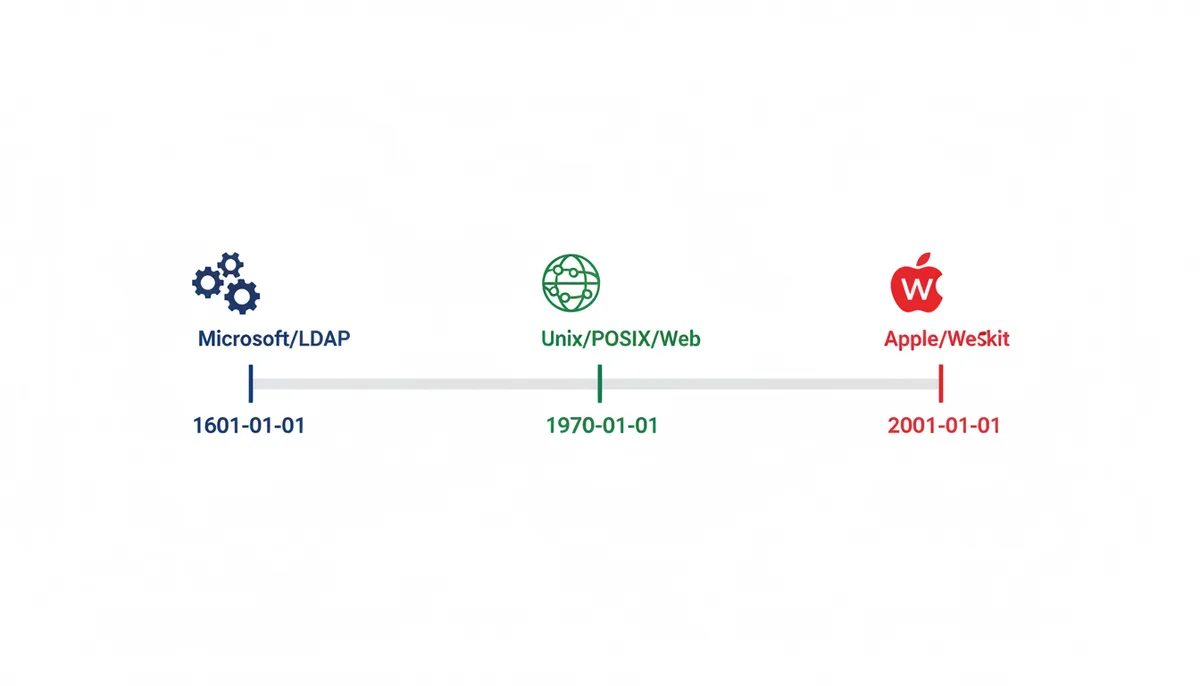
The three epochs that cause the most confusion are:
- 1601-01-01 00:00:00 UTC, used by Microsoft for Windows NT FILETIME and LDAP timestamps
- 1970-01-01 00:00:00 UTC, used for Unix, POSIX, and most web standards
- 2001-01-01 00:00:00 UTC, used by Apple for its Cocoa and Core Data frameworks, as well as the WebKit browser engine
The unit of measurement is just as important as the epoch. Unix time counts in 1-second intervals, so each increment of 1 equals one second of real time. Microsoft’s FILETIME counts in 100-nanosecond (0.0000001 second) intervals, so 10 million increments of 1 equal one second. WebKit timestamps count in 1-second intervals, same as Unix, but start from 2001 instead of 1970. If you ignore either the epoch or the unit when converting, you’ll get a completely wrong date.
Deep Dive: The LDAP / Active Directory Timestamp (FILETIME)
The most common non-standard timestamp you’ll encounter in enterprise Windows environments is the Windows FILETIME format, which is also the standard timestamp format used in LDAP (Lightweight Directory Access Protocol) queries to Microsoft Active Directory. Microsoft designed FILETIME for the original Windows NT operating system, released in 1993, long before Unix time became ubiquitous on the web.
Its core specs are fixed: epoch is 1601-01-01 00:00:00 UTC, unit is 100-nanosecond intervals, and it’s stored as a 64-bit unsigned integer, which gives it a maximum valid date of around the year 30,828. You’ll find FILETIME values in a handful of common places:
- Active Directory user and computer attributes like pwdLastSet (last password change), lastLogonTimestamp (last logon time), and accountExpires (account expiration date)
- Windows NTFS file system metadata (file creation, modification, and access times)
- Windows Event Log entries
Worked example: Let’s say you pull a pwdLastSet value of 133670208000000000 from Active Directory. To convert this to a Unix timestamp:
- Convert 100-nanosecond intervals to seconds: divide the value by 10,000,000. 133670208000000000 / 10,000,000 = 13,367,020,800 seconds since the 1601 epoch.
- Subtract the fixed offset between the 1601 epoch and the 1970 Unix epoch: 11,644,473,600 seconds. 13,367,020,800 - 11,644,473,600 = 1,722,547,200.
- Convert the Unix timestamp 1722547200 to a human-readable date: 2024-08-01 00:00:00 UTC.
If you had pasted the original 18-digit FILETIME directly into a standard Unix converter, you would have gotten a date in the year 41000, which is obviously wrong. Note that the 18-digit length is a reliable clue for FILETIME: the 100-nanosecond intervals since 1601 produce 18-digit values for all dates up to the year 30828, so any 18-digit number from a Windows or Active Directory source is almost certainly a FILETIME.
Deep Dive: The WebKit / macOS Timestamp (Cocoa)
Next up is the WebKit timestamp, also called the Cocoa timestamp, used across Apple’s ecosystem for macOS, iOS, iPadOS, and watchOS applications, as well as the WebKit browser engine that powers Safari and older versions of Google Chrome on Apple platforms. Apple introduced this format with the first release of Mac OS X in 2001, choosing a 2001 starting point as a "clean slate" for its new modern operating system, separate from the 1970 Unix epoch used by most other platforms.
Its core specs: epoch is 2001-01-01 00:00:00 UTC, unit is seconds (with optional fractional components for sub-second precision), and it’s stored as a 64-bit floating-point or integer value. You’ll find WebKit timestamps in a few common places:
- Safari browser history and bookmark databases
- Older versions of Google Chrome for macOS/iOS (pre-2012) local history and cache files
- macOS and iOS application data stored with Core Data (Apple’s object graph and persistence framework)
- iOS device backup files
Worked example: Let’s say you’re parsing a Safari history database and find a visit timestamp of 744240000. To convert this to Unix time:
- Add the fixed offset between the 2001 epoch and the 1970 Unix epoch: 978,307,200 seconds. 744,240,000 + 978,307,200 = 1,722,547,200.
- Convert the Unix timestamp 1722547200 to a human-readable date: 2024-08-01 00:00:00 UTC.
Fractional WebKit timestamps work the same way: a value of 744240000.75 would convert to Unix time 1722547200.75, which is 2024-08-01 00:00:45 UTC. A common gotcha here is that modern cross-platform Google Chrome uses Unix timestamps for all new data, so if you’re looking at a Chrome history file on Windows, the timestamps will be Unix, but the same file on an old Mac will use WebKit timestamps. As of 2024, Safari still uses WebKit timestamps for all local data stores on macOS and iOS.
Deep Dive: Hexadecimal Timestamps
Hexadecimal timestamps are not a separate time standard—they’re just a base-16 (hex) representation of any numeric timestamp, whether it’s Unix, FILETIME, WebKit, or any other format. Hex is used for timestamps in low-level systems, binary file formats, network protocols, and memory dumps because it’s more compact than decimal for binary data, and easier for machines to parse than human-readable strings. For example, a 64-bit FILETIME value stored in a binary LDAP entry will often be returned as a 16-character hex string, rather than an 18-digit decimal number.
Worked example: Let’s take a standard Unix timestamp of 1729987200 (2024-10-01 00:00:00 UTC). To convert it to hex: 1729987200 in base-16 is 0x677E3800. To convert back: parse 0x677E3800 as a base-16 integer, which gives 1729987200 in decimal, the original Unix timestamp.
The key rule for hex timestamps: you must convert the hex value to decimal first, before you can apply any epoch or unit conversion logic. A common mistake is treating a hex-encoded FILETIME as a hex-encoded Unix timestamp, which will give a result that is off by a factor of 10 million, plus the epoch offset. For example, a FILETIME of 133670208000000000 in hex is 0x1D4C800000000000. If you mistakenly convert this directly to a Unix timestamp (treating it as a decimal hex value), you’ll get a date in the year 41000, same as if you’d used the decimal value directly.
How Can I Identify Which Timestamp I Have?
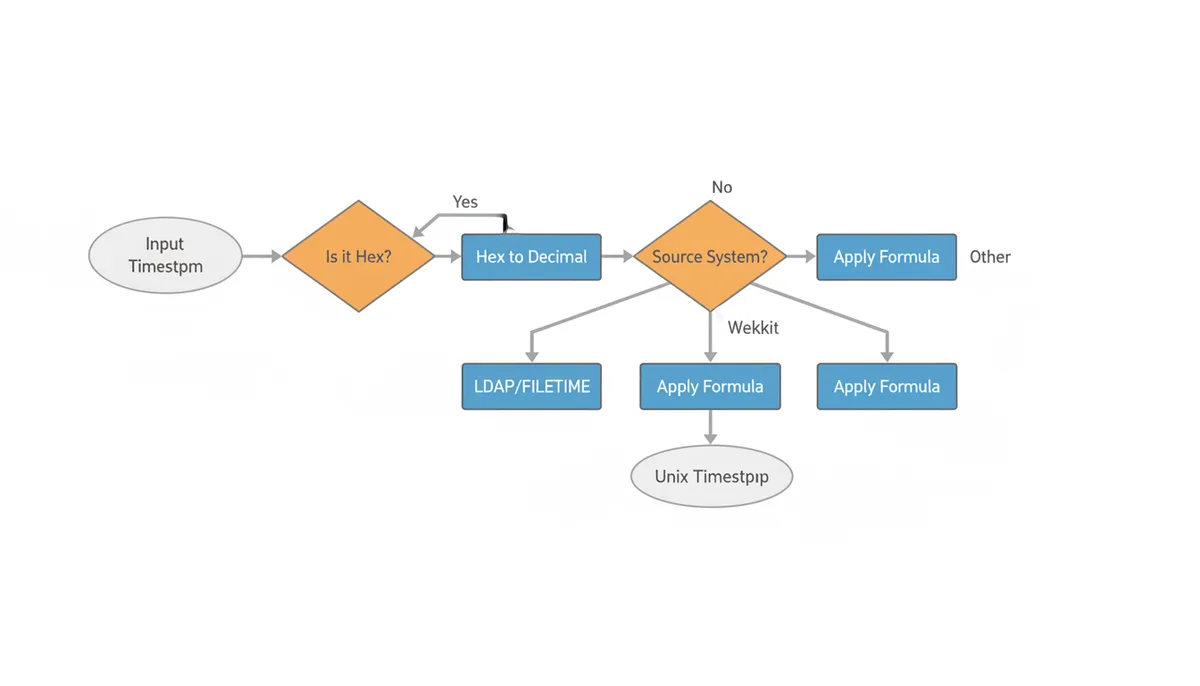
You don’t need to guess. You can identify almost any timestamp using three simple clues: the number of digits (or hex character length), the source system you pulled it from, and the rough magnitude of the value.
Start with the source: if it’s from Active Directory, Windows event logs, or NTFS metadata, it’s almost certainly a FILETIME. If it’s from Safari, old Chrome on Apple devices, or macOS/iOS app data, it’s almost certainly a WebKit timestamp. If it’s from a web API, Linux system, or database, it’s almost certainly Unix. If it’s from a network router or IoT device, it might be NTP time. If it’s from a hex string in a binary file or LDAP entry, convert it to decimal first, then use the source to narrow it down.
For decimal values, the digit count is a strong clue: 18-digit decimal values are almost always FILETIME, 9-digit decimal values are almost always WebKit timestamps for dates after 2011, 10-digit decimal values are Unix timestamps for dates between 2001 and 2286, and 13-digit decimal values are Unix millisecond timestamps. If you’re still unsure, do a magnitude check: a 10-digit value larger than 1,000,000,000 (which corresponds to 2001-09-09 UTC) is a Unix timestamp. A 10-digit value smaller than that could be a Unix timestamp from before 2001, or a WebKit timestamp from after 2011—use the source to decide.
| Format | Epoch Date | Unit of Measurement | Typical Digit Count (Decimal) | Common Sources | Example Value (2024-08-01 UTC) |
|---|---|---|---|---|---|
| Unix Time | 1970-01-01 00:00:00 UTC | Seconds (or milliseconds/microseconds for longer variants) | 10 (seconds), 13 (milliseconds), 16 (microseconds) | Linux/Unix systems, web APIs, databases, modern cross-platform apps | 1722547200 |
| LDAP/FILETIME | 1601-01-01 00:00:00 UTC | 100-nanosecond intervals | 18 | Active Directory, Windows NTFS metadata, Windows Event Logs | 133670208000000000 |
| WebKit/Cocoa | 2001-01-01 00:00:00 UTC | Seconds (with optional fractional component) | 9 (whole seconds for dates up to 2286) | Safari/older Chrome browser history, macOS/iOS app data, iOS backups | 744240000 |
Hex timestamps can be any of the above formats, so always convert hex to decimal first before using this table. If you have a 16-character hex string (8 bytes), it’s almost always a 64-bit timestamp (FILETIME, Unix microseconds, or WebKit), and the source will tell you which.
Manual Conversion Math: From Specialized Formats to Unix Time
The general formula for converting any timestamp to Unix time is: (Total elapsed units since source epoch / units per second) - seconds between source epoch and 1970-01-01 UTC. For WebKit timestamps, since the unit is already seconds, you just add the epoch offset.
Let’s walk through each format step by step. First, if your timestamp is in hexadecimal:
- Convert the hex string to a decimal integer. For example, hex 0x677E3800 converts to 1729987200 in decimal.
- Use the decimal value and your source system to apply the correct conversion below.
LDAP/FILETIME conversion steps:
- Take the 18-digit decimal FILETIME value.
- Divide by 10,000,000 to convert 100-nanosecond intervals to seconds.
- Subtract 11,644,473,600 (the fixed offset between 1601-01-01 and 1970-01-01 UTC) to get the Unix timestamp.
Worked example: FILETIME value 133670208000000000. Step 2: 133670208000000000 / 10,000,000 = 13,367,020,800 seconds since 1601. Step 3: 13,367,020,800 - 11,644,473,600 = 1,722,547,200. The resulting Unix timestamp is 1722547200, which is 2024-08-01 00:00:00 UTC.
WebKit/Cocoa conversion steps:
- Take the decimal WebKit timestamp value (already in seconds since 2001).
- Add 978,307,200 (the fixed offset between 2001-01-01 and 1970-01-01 UTC) to get the Unix timestamp.
Worked example: WebKit value 744240000 (2024-08-01 UTC). Step 2: 744240000 + 978,307,200 = 1,722,547,200. The resulting Unix timestamp is 1722547200, which is 2024-08-01 00:00:00 UTC.
If you don’t want to do this math manually, UnixConverter offers dedicated conversion tools for LDAP/FILETIME, WebKit/Cocoa, and hexadecimal timestamps that handle these steps automatically for bulk data.
Common Pitfalls and Edge Cases in Timestamp Conversion
Even with the right formulas, there are a few common mistakes that will throw off your results.
First, time zone mixups. All the timestamps covered here are UTC-native—they don’t include any time zone information, because they’re designed to represent an absolute point in time, not a local time. The most common error is applying a time zone offset twice: for example, converting a FILETIME to Unix UTC, then adding 5 hours for Eastern Time, even if your conversion tool already displays times in local time. Rule of thumb: do all conversion math in UTC, and only convert to local time when displaying the result to an end user.
Second, precision loss from incorrect unit conversion. FILETIME’s 100-nanosecond intervals are extremely fine-grained, and it’s easy to misplace a decimal when dividing. For example, dividing a FILETIME by 10,000 instead of 10,000,000 will give a result that is 10,000 times too large, corresponding to a date ~115 days in the future. Always double-check your unit conversion factors: 1 second = 10,000,000 100-nanosecond intervals, 1 second = 1,000 milliseconds, 1 second = 1,000,000 microseconds.
Third, integer overflow and the Year 2038 problem. 32-bit signed integer Unix timestamps max out at 2,147,483,647, which corresponds to 2038-01-19 03:14:07 UTC. After that, they overflow to negative values, representing dates in 1901. This doesn’t affect 64-bit timestamps like FILETIME (which overflows in 30,828) or modern 64-bit Unix time, but if you’re working with 32-bit embedded systems or old databases that use 32-bit Unix timestamps, you’ll need to plan for migration before 2038.
Fourth, ambiguous hex values. A hex string can represent any timestamp format, so never assume a hex value is Unix time. For example, the hex value 0x1D4C800000000000 is 133670208000000000 in decimal, a FILETIME for 2024-08-01, not a Unix timestamp for the year 41000. Always use the source context to determine the underlying format before converting hex.
Fifth, truncated 32-bit FILETIME values. Some very old systems or legacy APIs return only the lower 32 bits of a 64-bit FILETIME, which wraps around every 429 seconds. If you have a 10-digit or smaller value from a Windows source that doesn’t match the expected FILETIME range, it’s likely a truncated 32-bit value that needs to be combined with a higher 32-bit segment from system context to reconstruct the full 64-bit timestamp.
Why Do These Different Timestamp Standards Even Exist?
It’s easy to ask why we can’t just all use Unix time, but these formats exist for historical and technical reasons that made sense at the time they were created.
Unix time was developed in the early 1970s for the Unix operating system running on mainframes and minicomputers, long before the personal computer era, and long before the internet made universal time standards a necessity. Microsoft released Windows NT in 1993, and Apple released Mac OS X in 2001—both platforms had their own existing codebases, user bases, and technical requirements that predated Unix time’s dominance on the web.
Microsoft’s choice of a 1601 epoch for FILETIME was driven by two factors: first, the 1601 start date aligned with the start of the Gregorian calendar cycle used in Windows for date calculations, and second, the 100-nanosecond precision was necessary for file system operations, where you need to distinguish between multiple file changes that happen in the same second—something Unix’s 1-second precision couldn’t do reliably in the 1990s.
Apple’s choice of a 2001 epoch for Cocoa was a deliberate design decision: the company wanted a "clean slate" for its new modern operating system, and the 2001 starting point was far enough from 1970 to avoid accidental overlap with legacy Unix timestamps, while still being close enough that the offset between 2001 and 1970 was easy to calculate for interoperability with other systems.
The biggest barrier to changing these formats today is legacy lock-in. Once a timestamp format is baked into an operating system’s kernel, file system, directory services, APIs, and millions of third-party applications, changing it would break every existing piece of software and data ever written for that platform. That’s why Active Directory still uses 1601 FILETIME 30 years after Windows NT launched, and why macOS still uses 2001 WebKit timestamps for local data stores as of 2024.
Beyond the Big Three: Other Timestamps You Might Encounter
While LDAP/FILETIME, WebKit, and hexadecimal timestamps are the most common non-standard formats you’ll run into, there are a few other niche formats worth knowing about, especially if you work with legacy enterprise systems, network hardware, or satellite data.
- NTP Time: The Network Time Protocol timestamp, used for synchronizing clocks across networks. Its epoch is 1900-01-01 00:00:00 UTC, and it uses a 64-bit structure with a 32-bit seconds field and a 32-bit fractional field for sub-second precision. You’ll see NTP timestamps in responses from NTP servers, network routers, and IoT devices that sync time over the network. Note that NTP time does not account for leap seconds, so it is currently 18 seconds ahead of UTC as of 2024.
- VAX/VMS Time: A format from the old VAX minicomputer line and VMS operating system, still used in some legacy enterprise systems, especially in finance and government. Its epoch is 1858-11-17 00:00:00 UTC (the start of the Modified Julian Day count), and it uses 32-bit unsigned seconds, which overflows on 2048-01-01.
- GPS Time: The timestamp used by GPS satellites and receivers. Its epoch is 1980-01-06 00:00:00 UTC, and it also ignores leap seconds, making it 18 seconds ahead of UTC as of 2024. You’ll see GPS timestamps in GPS receiver logs, satellite navigation data, and location-tracking systems.
- Microsoft Docs — The official definition of the FILETIME structure, its 1601 epoch, and its use of 100-nanosecond intervals.
- Apple Developer Documentation — The definition of NSDate and its reference date (epoch) of 1 January 2001, which is the basis for WebKit/Cocoa timestamps.
- The Open Group (POSIX Standards) — The official POSIX standard definition of 'Seconds Since the Epoch,' which is the formal basis for Unix time.
- Mozilla Developer Network (MDN) — Documentation on how JavaScript, a core web technology, handles time, including its use of the 1970 Unix epoch with millisecond precision.
- IETF RFC 5905 (NTPv4) — The technical specification for Network Time Protocol, including its use of a 1900 epoch, relevant for the section on other timestamp formats.