
How to Convert a Unix Timestamp to a Specific Time Zone
A developer's guide to rendering Unix epoch times in any IANA zone with Python, JavaScript, and SQL examples, plus DST and common pitfalls.
Every few months, someone on a development team "solves" time zones by subtracting 18,000 seconds from a Unix timestamp. Eighteen thousand seconds is five hours — the offset for US Eastern Standard Time — and the trick works perfectly from November to March. The rest of the year it's wrong by exactly one hour, because New York observes daylight saving time and the correct offset becomes four. The bug report that eventually arrives ("times off by one???") is practically a rite of passage.
The deeper mistake isn't the arithmetic. It's assuming a timestamp needs converting at all. A Unix timestamp already describes one precise instant, completely and without ambiguity. What you're really doing when you convert a Unix timestamp to a specific timezone is choosing how to display that instant — which wall-clock reading to show a person in New York, London, or Tokyo. The number never changes. Only the rendering does.
This guide covers the full path: two minutes of theory, then working code in Python, JavaScript, and SQL, plus the daylight saving edge cases that break naive implementations. If you need one quick answer right now, paste the number into the converter on unixconverter.com — it accepts seconds, milliseconds, and microseconds — then come back for the section that matches your stack.
Why Is a Unix Timestamp 'Zoneless' by Design?
Take the number 1672531200. Ask a server in Frankfurt what moment it describes. Ask a laptop in Sydney. Ask a database in Oregon. Every one of them answers the same way: midnight at the start of January 1, 2023, on the UTC scale. The value is nothing more than a count — the number of seconds between that instant and 00:00:00 UTC on January 1, 1970, a reference moment called the Unix epoch.
UTC (Coordinated Universal Time) is the ruler that count is measured against: the modern, atomic-clock successor to GMT (Greenwich Mean Time). For conversion purposes you can treat GMT as a legacy alias for UTC+0, but APIs and databases speak UTC.
The missing zone isn't a limitation — it's the entire point. Picture two application servers, one in Virginia and one in Singapore, both writing to the same log stream. If they record events as Unix timestamps, you can merge and sort those logs without knowing anything about either machine. If they record local time strings, comparing two lines requires each server's zone, its daylight saving state at that moment, and a prayer that nobody ever touched the configuration. The zoneless count sidesteps all of it. A timestamp is the same fact everywhere on Earth, which is exactly what you want from a piece of data.
Contrast that with a "naive" local time string like 2023-11-05 01:30:00. Whose 1:30 AM is it? If the answer is New York, the string is worse than vague — on that particular date it names two different instants, because clocks there fell back and the hour repeated. Without a zone attached, a local time string isn't even wrong; it's undefined. Section 7 picks this thread back up.
So when someone asks you to handle a unix timestamp timezone conversion, reframe the request: the timestamp is the permanent record, and the time zone is a rendering choice applied at the last possible moment. Keep the number as your source of truth, and convert epoch time to local time only when a human needs to read it.
One practical note before the code: real-world timestamps arrive in different units. Seconds since the epoch run ten digits today. Milliseconds are thirteen digits (JavaScript's native unit). Microseconds are sixteen, nanoseconds nineteen. Feed a millisecond value into a function expecting seconds and you'll get a date tens of thousands of years in the future; go the other way and everything lands in January 1970. Count the digits before you convert, and divide or multiply by 1,000 as needed. There's a second, subtler caveat — the count pretends every day has exactly 86,400 seconds — and the FAQ at the end explains when that matters.
How Do Time Zones Add Context to a Timestamp?
A time zone is not a number. It's a rulebook. The tempting formula — local time equals UTC plus an offset — works only if you accept that the offset is not a constant you look up once. It's a function of two inputs: the place and the instant. New York's offset is UTC-5 in January and UTC-4 in July, because the United States moves clocks forward for daylight saving time (DST) each spring and back each autumn. The switch dates themselves are set by law, and the US last changed them in 2007.
That leaves you two ways to express a zone:
- A fixed offset, written as UTC-5, -05:00, or -18000 seconds. This is a photograph of the rulebook — accurate for some instants, silently wrong for others.
- A named IANA zone, written as America/New_York. This is the rulebook itself: which offset applies on every date, past and future, including every DST transition and historical change.
For almost every use case, the named zone is the right choice. The fixed offset gets July wrong for New York; the named zone never does. The conversion process, then, is: take the universal instant (the timestamp), open the rulebook for the target zone, find which rule was in force at that instant, and apply that offset to compute the local wall-clock reading.
Here's the same timestamp rendered three ways, to make it concrete. 1672531200 is:
- 2022-12-31 19:00:00 EST in America/New_York (UTC-5, standard time)
- 2023-01-01 00:00:00 GMT in Europe/London (UTC+0)
- 2023-01-01 09:00:00 JST in Asia/Tokyo (UTC+9; Japan has no DST)
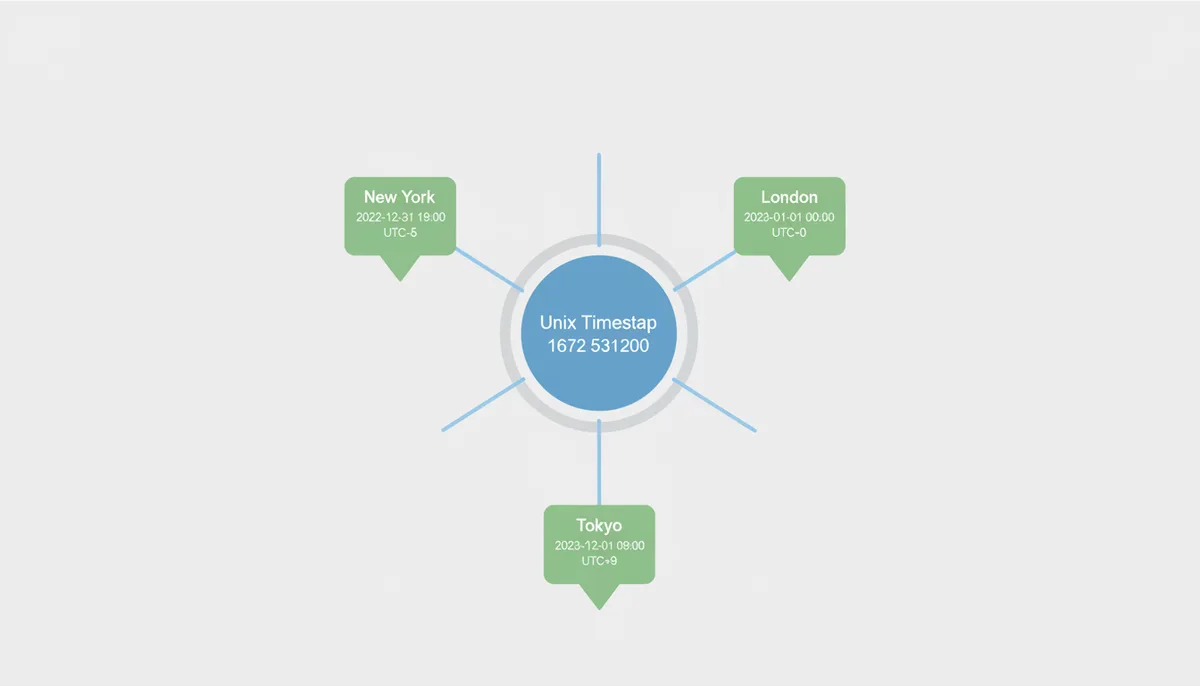
Look at those three lines again. The same instant is New Year's Eve evening in New York and New Year's morning in Tokyo. Even the year depends on the zone. Any question of the form "what day was this timestamp?" is unanswerable until you say where — which is why UTC to local time conversion is a rendering question, not a data question.
Two warnings while you're picking zone names. First, the IANA database includes fixed-offset zones like Etc/GMT+5, and their signs are inverted from the ISO 8601 convention: Etc/GMT+5 is the zone five hours behind UTC. Reach for those only when a fixed offset is genuinely what you want. Second, when you serialize a converted time for an API, an ISO 8601 string like 2022-12-31T19:00:00-05:00 pins down the instant but not the zone — nothing in "-05:00" says whether New York's rules or a hardcoded offset produced it. For one-off timestamps that's fine. For recurring events ("every Tuesday at 9 AM New York time"), you must store the zone name itself, because the offset is exactly the part that changes.
The IANA Time Zone Database: Your System's Source of Truth
Ask Python, PostgreSQL, a browser, and a Linux kernel what time 1672531200 is in Paris, and their answers all trace back to the same place: the IANA Time Zone Database, usually called the tz database or zoneinfo (a name Python's standard-library module later borrowed). It's a public, collaboratively maintained record of the world's timekeeping rules, and it ships inside virtually every operating system, language runtime, and database engine. When you convert epoch time with offset rules rather than raw arithmetic, this database is doing the work.
Three things make it trustworthy. First, the names encode regions, not offsets: Europe/Paris, America/Argentina/Buenos_Aires, Asia/Kathmandu. Zones follow political boundaries because time rules are made by governments, and a country's rules can change on a government's whim. Second, the database is a history, not a lookup table of current offsets. It records that Samoa skipped Friday, December 30, 2011 entirely when it moved across the International Date Line; that the US widened its DST window in 2007; that Egypt, having abolished DST years earlier, reinstated it in 2023. A conversion for a date in 2006 uses the rules of 2006, not today's. Third, it captures quirks you'd never guess — Asia/Kathmandu sits at UTC+5:45, and Lord Howe Island in Australia shifts its clocks by only 30 minutes for DST. Offsets are not always whole hours.
Because laws change, the database changes with them — new releases appear several times a year, sometimes on short notice when a government announces a rule change weeks before it takes effect. Every conversion you run is only as accurate as your local copy of this data. On Linux it arrives with OS updates (the tzdata package); Java vendors ship updates through their own tooling; browsers inherit it from the OS or bundle it. Windows has no system copy at all, which is why Python needs the tzdata pip package there — more on that in the next section.
The practical rule writes itself: never maintain your own offset table, never hardcode an offset for a zone that observes DST, and route every conversion through your platform's time zone API, which reads this database. The minutes you save hardcoding "-5" are repaid, with interest, every March and November.
How to Convert Timestamps in Python
Python's answer used to require a third-party library. Since Python 3.9, the standard library covers the whole job of converting a Unix timestamp to a time zone — four lines do it:
from datetime import datetime, timezone
from zoneinfo import ZoneInfo
dt = datetime.fromtimestamp(1672531200, tz=ZoneInfo("America/New_York"))
print(dt) # 2022-12-31 19:00:00-05:00
fromtimestamp() performs the two-step dance from earlier: it resolves the count of seconds into an absolute instant, then renders that instant against the zone's rules. The critical detail is passing tz at all. Call datetime.fromtimestamp(1672531200) without it and Python uses the machine's local zone — which means the same code prints different answers on your laptop, your colleague's laptop, and a Docker container where TZ happens to be unset (containers usually default to UTC). This is one of the most common "worked in dev" time bugs in production. If you find an explicit anchor clearer, the two-step form is equivalent:
dt = datetime.fromtimestamp(1672531200, tz=timezone.utc).astimezone(ZoneInfo("America/New_York"))
Same result, one extra hop: resolve in UTC first, then astimezone() re-renders into the target zone.
Formatting is strftime's job. dt.strftime("%Y-%m-%d %H:%M:%S %Z") produces 2022-12-31 19:00:00 EST, where %Z is the zone abbreviation. Two cautions here. Abbreviations aren't globally unique — CST alone can mean Central Standard Time in the US, Cuba Standard Time, or China Standard Time — so for anything a machine will parse, use %z for the numeric offset (-0500) or call dt.isoformat() for a full ISO 8601 string. And if your input arrives in milliseconds, divide by 1000 first; fromtimestamp() expects seconds.
You may inherit code built on pytz, the long-standard third-party library. It works, but it has a famous trap: attaching a pytz zone directly as tzinfo gives you a nineteenth-century "local mean time" offset like -04:56 for New York, because pytz required calling localize() on naive datetimes and normalize() after arithmetic. Miss either step and you get subtly wrong results that survive casual inspection. zoneinfo has no equivalent trap, handles ambiguous DST hours through the fold attribute, ships with the language, and is where pytz's own documentation points new projects on Python 3.9 and later. For new code, use zoneinfo.
One environment gotcha: on Windows, zoneinfo has no operating system database to read, so install the official data package (pip install tzdata) or every lookup fails with ZoneInfoNotFoundError. Linux and macOS read the system copy — which also means your container's tzdata version determines your answers, so keep it updated.
How to Convert Timestamps in JavaScript
JavaScript's Date object is a timestamp in a trench coat: inside, it's milliseconds since the epoch, and its accessor methods speak only two dialects — UTC (getUTCHours()) and whatever zone the host machine is configured for (getHours()). There is no getHoursInZone("America/New_York"). For years that gap sent everyone to libraries; the modern answer is built into the language.
const date = new Date(1672531200 * 1000); // JavaScript counts milliseconds
const formatter = new Intl.DateTimeFormat("en-US", { timeZone: "America/New_York", dateStyle: "full", timeStyle: "long" });
console.log(formatter.format(date)); // "Saturday, December 31, 2022 at 7:00:00 PM EST"
Intl.DateTimeFormat is the standard, dependency-free way to render an epoch value in any IANA zone. Pass the zone name in the options and it applies the full rulebook, DST included. If you need the pieces as numbers — to build a custom string, feed a chart library, or compare components — call formatToParts(date), which returns an array of labeled fragments (hour, minute, day, timeZoneName, and so on) you can assemble deterministically instead of regex-parsing localized output.
Know the boundary of what Intl does, though. It formats strings; it never hands back a zone-carrying object you can do arithmetic with. The moment your problem becomes "next Tuesday at 9 AM in Tokyo, then remind again 24 hours later," reach for Luxon or date-fns-tz, which provide real zone-aware objects (DateTime.fromSeconds(1672531200, { zone: "America/New_York" }) in Luxon). And if an older tutorial points you at Moment.js: Moment's own maintainers have declared it a legacy project in maintenance mode. Maintain it where it already exists; don't adopt it for new code.
Two environment notes. Every modern browser and Node.js 13 or later ships with full ICU data, so all IANA zones work out of the box; ancient Node builds with "small-icu" silently lacked most locales. And to discover the user's own zone — the best default when rendering for a human — use Intl.DateTimeFormat().resolvedOptions().timeZone, which returns the browser's IANA name. Treat it as a default to offer, not a fact to enforce: VPNs and travel make guesses wrong.
How to Handle Time Zone Conversions in SQL Databases
The cleanest schema decision is also the most boring one: store the instant and nothing else. In practice that means either a bigint column of epoch seconds, or your database's UTC-normalized timestamp type. PostgreSQL's timestamp with time zone (timestamptz) is the classic example, and its name misleads everyone exactly once: it does not store any zone. It stores the UTC instant and converts to the session's TimeZone setting for display. Epoch bigint and timestamptz capture precisely the same information; pick timestamptz for friendlier SQL, or bigint when data flows between many systems and languages. What you should not do is store local wall time in a plain timestamp column — that's the ambiguous naive string from earlier, now living in your schema.
With storage settled, here's the syntax for converting an epoch value into a zoned datetime in the four engines you're most likely to meet, starting with PostgreSQL, which does it best:
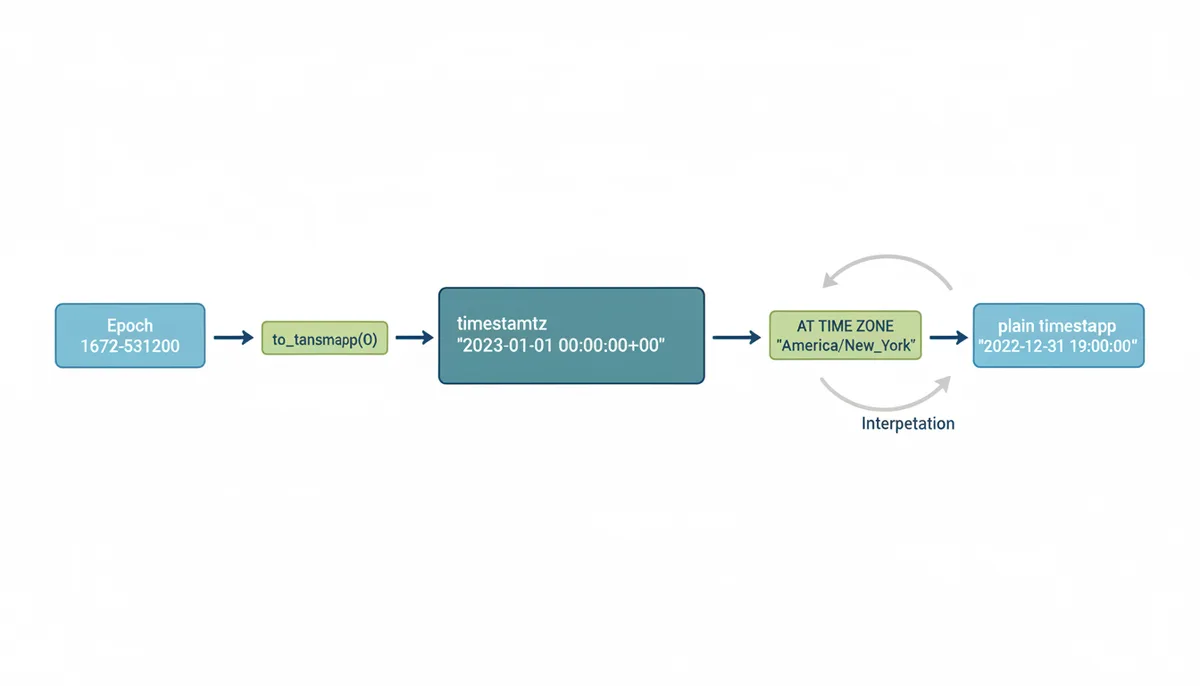
SELECT to_timestamp(1672531200);
-- 2023-01-01 00:00:00+00 (timestamptz, displayed in the session zone)
SELECT to_timestamp(1672531200) AT TIME ZONE 'America/New_York';
-- 2022-12-31 19:00:00 (plain timestamp: the New York wall clock)
to_timestamp() turns epoch seconds into a timestamptz. The interesting part is AT TIME ZONE, which changes behavior depending on its input. Applied to a timestamptz, it returns the wall-clock reading in the named zone as a zone-less timestamp. Applied to a plain timestamp, it runs in reverse — interpreting the wall time as being in that zone and returning a timestamptz. That round trip is how you get back to epoch:
SELECT EXTRACT(EPOCH FROM TIMESTAMP '2022-12-31 19:00:00' AT TIME ZONE 'America/New_York');
-- 1672531200
PostgreSQL accepts IANA names directly, with nothing to install — the pg_timezone_names view lists every zone your build knows. MySQL can do the same conversion but sits in a different category: fixed offsets like '+00:00' always work, while named IANA zones only work after someone has loaded MySQL's time zone tables from the operating system's tz database. One more piece of care: FROM_UNIXTIME() renders in the session zone, so pin the session to UTC first (or reference @@session.time_zone explicitly in the conversion) before applying CONVERT_TZ:
SET time_zone = '+00:00';
SELECT CONVERT_TZ(FROM_UNIXTIME(1672531200), '+00:00', 'America/New_York');
-- 2022-12-31 19:00:00
The silent failure mode here: if those tables were never loaded, CONVERT_TZ returns NULL instead of raising an error. A query that suddenly returns NULLs for every named zone is almost always a missing mysql_tzinfo_to_sql run.
SQL Server (2016 and later) has its own AT TIME ZONE, but no epoch function and — the big gotcha — no IANA support at all. It speaks Windows time zone names only:
SELECT DATEADD(SECOND, 1672531200, CAST('19700101' AS datetime2)) AT TIME ZONE 'UTC' AT TIME ZONE 'Eastern Standard Time';
-- 2022-12-31 19:00:00.0000000 -05:00
'Eastern Standard Time' is the Windows ID for the entire US Eastern zone, DST rules included — the "Standard" in the name is a lie the platform has told for decades. If the rest of your stack uses IANA names, you'll need a mapping table (the Unicode CLDR publishes the canonical one) or, more honestly, you should do the conversion in application code instead.
Oracle has no epoch function either, so you build the instant with an interval and attach zones explicitly:
SELECT FROM_TZ(CAST(DATE '1970-01-01' + NUMTODSINTERVAL(1672531200, 'SECOND') AS TIMESTAMP), 'UTC') AT TIME ZONE 'America/New_York' FROM DUAL;
-- 31-DEC-22 07.00.00.000000000 PM AMERICA/NEW_YORK (default NLS display)
Oracle does accept IANA region names, drawn from the time zone file installed in the database home rather than the operating system — V$TIMEZONE_NAMES lists what yours recognizes, and a heavily patched database can know newer rules than an unpatched one. Check that view before blaming a conversion.
The same conversion across all four, side by side, with each engine's stance on zone names spelled out:
| Database | Conversion approach | Example: epoch 1672531200 → New York | Zone name support |
|---|---|---|---|
| PostgreSQL | to_timestamp() then AT TIME ZONE | SELECT to_timestamp(1672531200) AT TIME ZONE 'America/New_York'; → 2022-12-31 19:00:00 | IANA names built in; result is a zone-less timestamp of the wall clock |
| MySQL | FROM_UNIXTIME() then CONVERT_TZ() | SELECT CONVERT_TZ(FROM_UNIXTIME(1672531200), '+00:00', 'America/New_York'); → 2022-12-31 19:00:00 | Fixed offsets always work; IANA names only after mysql_tzinfo_to_sql loads the tables — returns NULL if missing |
| SQL Server | DATEADD() from epoch, then AT TIME ZONE | SELECT DATEADD(SECOND, 1672531200, '19700101') AT TIME ZONE 'UTC' AT TIME ZONE 'Eastern Standard Time'; → 2022-12-31 19:00:00 -05:00 | 2016+; Windows zone names only, no IANA; result is datetimeoffset |
| Oracle | NUMTODSINTERVAL() + FROM_TZ(), then AT TIME ZONE | FROM_TZ(CAST(DATE '1970-01-01' + NUMTODSINTERVAL(1672531200,'SECOND') AS TIMESTAMP), 'UTC') AT TIME ZONE 'America/New_York' → 31-DEC-22 19:00:00 | IANA region names from the database's own installed time zone file; check V$TIMEZONE_NAMES |
One last operational warning that applies everywhere: prefer explicit per-query conversion (AT TIME ZONE, CONVERT_TZ) over changing the session zone, especially under connection pooling. A SET TimeZone that leaks into someone else's request produces "wrong for one user in fifty" reports that nobody can reproduce.
Common Pitfalls: DST Ambiguity and Historical Changes
Twice a year, in most of North America and Europe, the wall clock lies. A Unix timestamp is immune to all of it — seconds keep counting straight through every transition — which is precisely why the storage rule exists: keep UTC in the database, localize at the point of display. The bugs below appear only when local time leaks into storage, scheduling, or user input.
The fall-back ambiguity. On November 5, 2023, at 2:00 AM, clocks in America/New_York jumped back to 1:00 AM. The hour from 1:00 to 1:59 happened twice: once at UTC-4 (still EDT), then again at UTC-5 (now EST). So the local string 2023-11-05 01:30:00 corresponds to two different Unix timestamps an hour apart — 05:30 UTC and 06:30 UTC — and nothing in the string tells you which one a user meant. A log file written in local time cannot be sorted correctly through that hour, full stop.
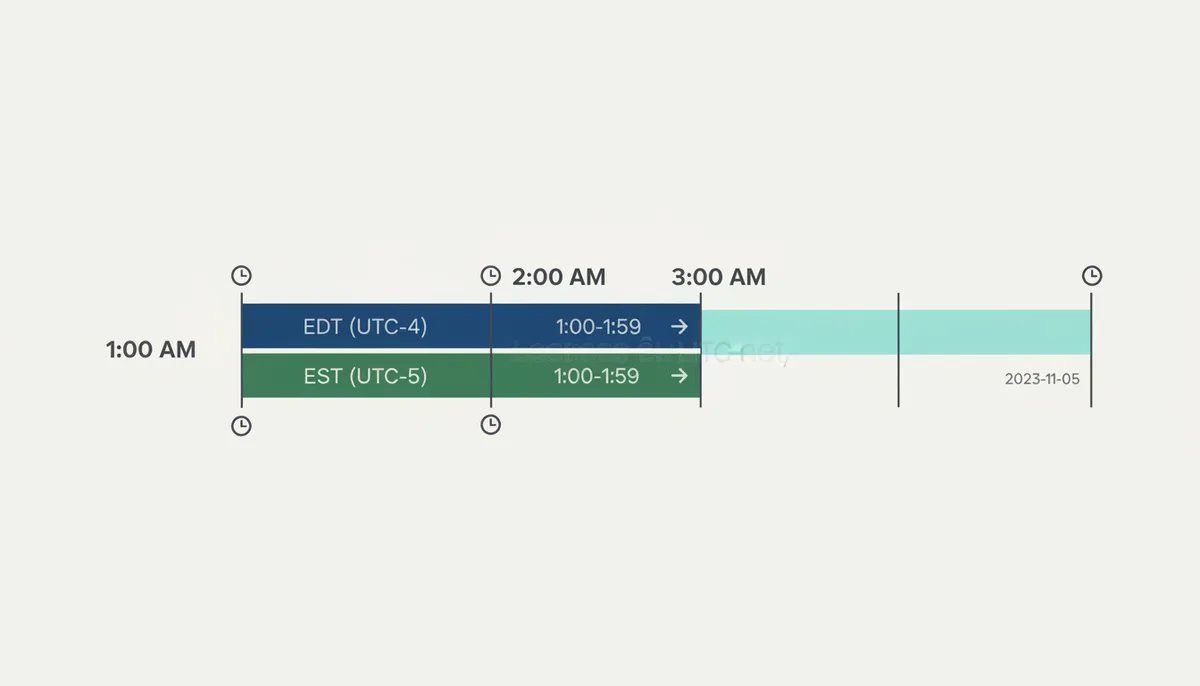
The spring-forward gap. On March 12, 2023, the same zone jumped from 2:00 AM straight to 3:00 AM. Local times from 2:00 to 2:59 never existed. A cron job scheduled for 2:30 AM may run late, run at 3:00, or not run at all, depending on the scheduler; a user who tries to book an appointment at 2:30 AM that day is asking for a moment reality skipped.
Libraries give you tools for both cases, but the defaults differ. In Python, an ambiguous wall time is resolved by the fold attribute: fold=0 picks the first (EDT) occurrence, fold=1 the second (EST). Java's java.time resolves a gap by pushing the time forward by the gap's length, and an overlap by choosing the earlier offset, unless you ask for different behavior. The dangerous assumption is that your library raises an error for these cases — most silently pick something reasonable. When you accept local-time input from users (a booking form, a scheduler), you need an explicit policy: detect the ambiguity or the gap, and ask, or document which side you chose.
The 86,400-seconds bug. Suppose you schedule a daily reminder for 9:00 AM New York by adding 86,400 seconds to yesterday's timestamp. On March 11, 2023, 9:00 AM EST is 14:00 UTC; add 86,400 seconds and you land on March 12 at 14:00 UTC, which New York now calls 10:00 AM EDT. Your reminder drifts an hour. After the November fall-back it drifts the other way. The rule: human schedules ("every day at 9 AM") need calendar arithmetic — timedelta(days=1) on an aware Python datetime, plus({ days: 1 }) in Luxon, interval '1 day' on a PostgreSQL timestamptz — all of which follow the wall clock across transitions. Machine intervals ("retry in 24 hours") should stay in absolute seconds. Mixing the two up is the most common daylight saving bug in timestamp-based systems, and it ships to production constantly.
Choosing the Right Tool for Your Programming Stack
Start with your platform's standard library. Modern runtimes have absorbed the hard lessons — Python's zoneinfo, Java's java.time, JavaScript's Intl — and they all read the same IANA data. Java follows the same two-step pattern as everything else in this guide: resolve the instant first, render it second.
Instant instant = Instant.ofEpochSecond(1672531200L);
ZonedDateTime nyTime = instant.atZone(ZoneId.of("America/New_York"));
// 2022-12-31T19:00-05:00[America/New_York]
A third-party library earns its dependency cost when it gives you something the standard library genuinely lacks: a manipulable zone-aware object in JavaScript (Luxon, date-fns-tz), fuzzy date parsing and recurrence rules in Python (python-dateutil), a stricter and more explicit API than DateTime in .NET (Noda Time), or framework integration in Rails (TimeWithZone / in_time_zone). What a third-party library cannot give you is better time zone data — every reputable one reads the same tz database. Choose on API quality and maintenance health, not on imagined accuracy differences.
| Language | Standard library solution | Worth-adding third-party library | Trade-off to know |
|---|---|---|---|
| Python | zoneinfo (3.9+), paired with datetime | python-dateutil | zoneinfo covers conversion and DST via fold; dateutil adds fuzzy parsing and recurrence rules. On Windows, install the tzdata package for zone data. |
| JavaScript | Intl.DateTimeFormat | Luxon (or date-fns-tz) | Intl formats strings for any zone but hands back no manipulable object; Luxon adds zone-aware arithmetic. Moment.js is maintenance-only — fine to keep, wrong to adopt. |
| Java | java.time (Instant, ZonedDateTime) | None for new code; Joda-Time is legacy only | java.time is immutable and complete; Joda-Time is its retired predecessor, kept alive in old codebases. |
| PHP | DateTimeImmutable + DateTimeZone | Carbon | Core classes accept IANA names directly — new DateTimeImmutable('@1672531200'), then setTimezone(). Carbon adds a fluent API and test helpers. |
| Ruby | TZInfo gem — core Time knows only UTC and the system zone | ActiveSupport's TimeWithZone (Rails) | Plain Ruby needs TZInfo for named zones; Rails apps should route through in_time_zone instead. |
| .NET | TimeZoneInfo + DateTimeOffset | Noda Time | .NET 6+ accepts IANA names on every OS; older versions on Windows need an ID-mapping helper. Noda Time makes the UTC/local boundary explicit. |
And when there is no codebase at all — a CSV export with fifty thousand event times from a partner, say — writing a script is overkill. The Batch Converter on unixconverter.com converts whole columns of timestamps in one pass, and the site's Time Zone Converter handles the quick one-offs. Save the code for the problems that actually need it.
Frequently Asked Questions
Is a Unix timestamp the same as UTC?
No, and the difference is worth keeping straight. A Unix timestamp is a number — a count of seconds naming one specific instant. UTC is the time standard, the ruler that count is measured against. The timestamp is the "what"; UTC is the "how it was measured." The practical consequence: you cannot look at 1672531200 and extract a zone from it, because there isn't one in there. Every zone on Earth renders that same number as a different wall-clock time, which is the whole reason conversions exist.
Why shouldn't I just store all times in my local time zone?
Because local time is ambiguous in exactly the situations where correctness matters. When DST ends, an hour repeats, and a stored local time can't say which occurrence it meant; when DST begins, an hour vanishes, and a stored local time can name an instant that never happened. Add the mundane operational risks — a server migrated to a new region, a second office in a new zone, a user who travels — and every comparison or sort becomes a research project. Storing the UTC-based timestamp keeps your data unambiguous. Converting to local time is a display concern that belongs at the edge of your system, driven by each viewer's own zone.
What is the 'Year 2038 problem'?
Systems that store the timestamp as a signed 32-bit integer run out of room at 03:14:07 UTC on January 19, 2038, when the count passes 2,147,483,647 and overflows into a negative number — which those systems interpret as a date in December 1901. Any modern 64-bit operating system and language runtime already uses 64-bit timestamps, buying roughly 292 billion years of headroom. The residual risk lives in old 32-bit binaries, legacy file formats, embedded devices, and long-lived data written by them. If your stack is fully 64-bit and less than about fifteen years old, this is a trivia answer, not a planning item.
How do I find the correct IANA name for a time zone (e.g., 'America/New_York')?
Let the platform tell you. In a browser, Intl.DateTimeFormat().resolvedOptions().timeZone returns the user's IANA name directly. On a Linux server, inspect the TZ environment variable or where /etc/localtime points. In Python, zoneinfo.available_timezones() lists every valid name if you're building a picker. Geo-IP services can guess a zone from an address and are right often enough to pre-fill a default — but they fail for VPN users and travelers, so always let people override the guess. One design note: ask users for their city or zone, never for a raw offset. "UTC-5" tells you nothing about what happens in July.
Does a Unix timestamp account for leap seconds?
No — it pretends they don't exist. Unix time defines every day as exactly 86,400 seconds, while UTC occasionally inserts a leap second to stay aligned with Earth's slowing rotation. Twenty-seven leap seconds have been added since 1972, the most recent at the end of 2016, and Unix time steps over each one (implementations either repeat a second or smear the difference across a day). The practical consequence is that "Unix time" and strict UTC have drifted apart by well under a minute in total — irrelevant for business software, and only a concern in fields like astronomy or precision timing, where you'd use TAI or GPS time instead. Standards bodies have agreed to stop inserting leap seconds by 2035, which will freeze the drift where it stands.
Can I convert a timestamp using just a fixed offset like '-05:00'?
You can, and occasionally you even should — epoch time with offset arithmetic is fine when the target genuinely never changes (Japan observes no daylight saving time, so UTC+9 is a constant there) and you never need historical dates. But for any zone that observes DST, a fixed offset is wrong for months at a time: New York is UTC-5 in January and UTC-4 in July, and a hardcoded -05:00 can't know which July you mean. Rule changes make it worse — Egypt reinstated DST in 2023, instantly invalidating every hardcoded offset for Cairo. Offsets are fine as output (ISO 8601 strings carry them) and acceptable for truly static zones. For anything involving people and calendars, use the IANA name and let the database do the remembering.
Sources
- IANA (Internet Assigned Numbers Authority) — The existence and role of the Time Zone Database (tz database) as the authoritative source for time zone information.
- The Open Group Base Specifications (POSIX) — The formal definition of 'Seconds Since the Epoch' (Unix time) as based on UTC.
- Python Standard Library Documentation — The usage, API, and best practices for the `zoneinfo` module for timezone-aware datetimes in Python.
- MDN Web Docs (Mozilla) — The standard JavaScript API for formatting dates and times for specific international locales and time zones.
- PostgreSQL Documentation — The SQL syntax and functions for handling date/time conversions and time zones, specifically the `AT TIME ZONE` construct.
- International Organization for Standardization (ISO) — The definition of the ISO 8601 standard for representing dates and times, which is often the human-readable output of a timestamp conversion.