How to Validate Unix Timestamps Before You Trust Them in Logs or Databases
For engineers and SREs: a practical checklist to validate Unix timestamps in logs and databases, covering precision, Y2K38, and handling invalid values.
Why Does Timestamp Validation Matter More Than You Think?
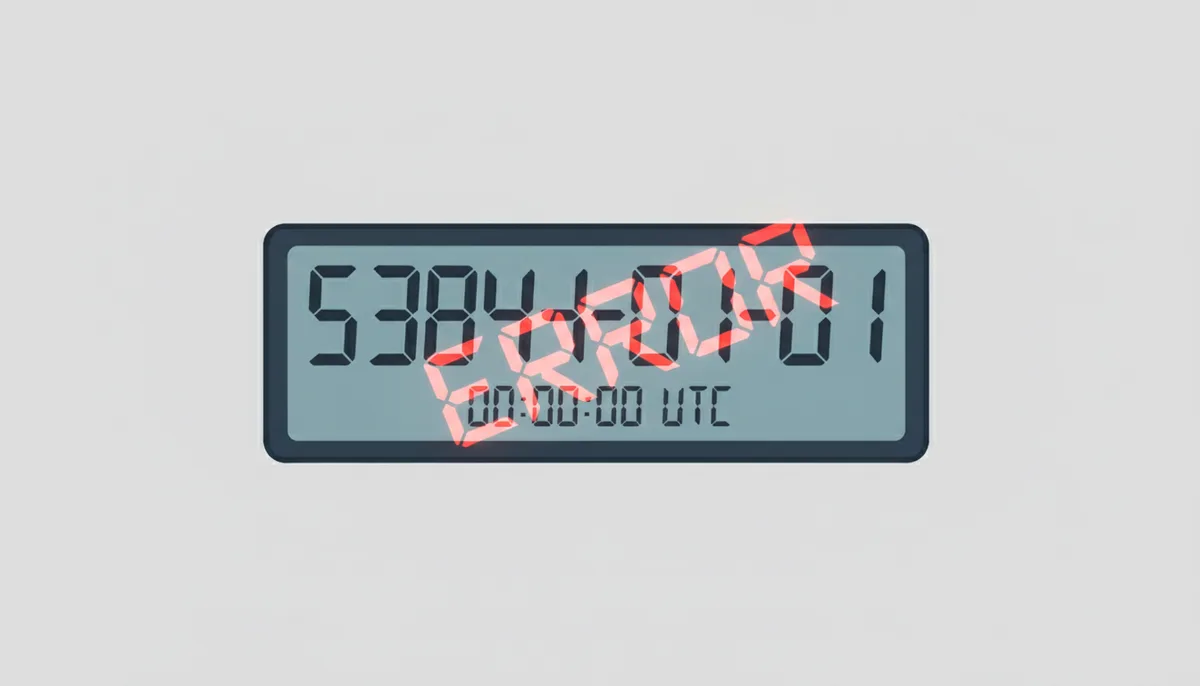
The ticket said a customer had created their account in the year 53841. Support assumed a display bug. It wasn't. A JavaScript service had called Date.now(), which returns milliseconds, and posted the result to an API that stored the value as seconds. Multiply a current timestamp by a thousand and you push the date roughly 53,000 years into the future. One character's worth of unit confusion, four hours to trace, and a column full of garbage that every downstream report now had to survive.
Notice what didn't happen: nothing threw an error at write time. The API accepted the value, the database stored it, the insert returned 200 OK. That's the pattern with bad timestamps — they almost never crash anything on the way in. They corrupt quietly, and the damage shows up weeks later in places you weren't looking:
- Analytics and dashboards. A "last 30 days" query silently excludes rows dated 50,000 years out. Your metrics don't look wrong; they just look slightly low, and nobody can say why.
- Retention and TTL policies. A negative timestamp that wrapped around to 1901 gets vacuumed as "ancient" data. A far-future one never expires at all, and your storage bill creeps up month over month.
- Tokens and sessions. JWT exp claims are seconds since the epoch per RFC 7519. Send milliseconds instead and the token effectively never expires — a real security hole. Send seconds where milliseconds are expected and every token dies in 1970, which at least fails loudly.
- Audit trails. When you're reconstructing an incident timeline, one out-of-order or impossible timestamp can make a legitimate sequence of events look like tampering, or make tampering look legitimate.
So here's the position I'll defend throughout: every timestamp that crosses a trust boundary — an API payload, a log line from another service, a message pulled off a queue — is untrusted input, and it deserves the same rigor you'd apply to any user-supplied string. A proper timestamp sanity check costs microseconds. The incident review for corrupted audit data costs days. This article is the checklist I run, from "is it even a number" up through precision detection, the Year 2038 problem, and the contextual rules that catch the errors range checks can't.
What Makes a Unix Timestamp "Valid"? A Multi-Layered Model
Strip away the tooling and a Unix timestamp is one thing: a count of seconds since the Epoch, defined as 1970-01-01 00:00:00 UTC. Two properties hide in that sentence and both matter for validation. First, it's always UTC — Coordinated Universal Time, the global reference clock. A Unix timestamp carries no time zone, ever; if someone hands you "an epoch in Pacific Time," they're handing you a bug. Second, Unix time pretends every day is exactly 86,400 seconds long, which means it ignores leap seconds entirely. Usually irrelevant. Occasionally a dealbreaker, and we'll get to that.
When people ask how to check if a timestamp is valid, they usually mean "is it a plausible number?" That's necessary and nowhere near sufficient. Real epoch time validation happens in three layers:
- Syntactic validity — is the value even the right shape? A number, not a string full of dashes, not scientific notation, not empty.
- Semantic validity — does the number decode to a plausible date given the precision and the limits of your storage? This is where range checks and the Y2K38 boundary live.
- Contextual validity — does the timestamp make sense for this record in this system? An updated_at earlier than created_at is syntactically perfect, semantically plausible, and contextually impossible.
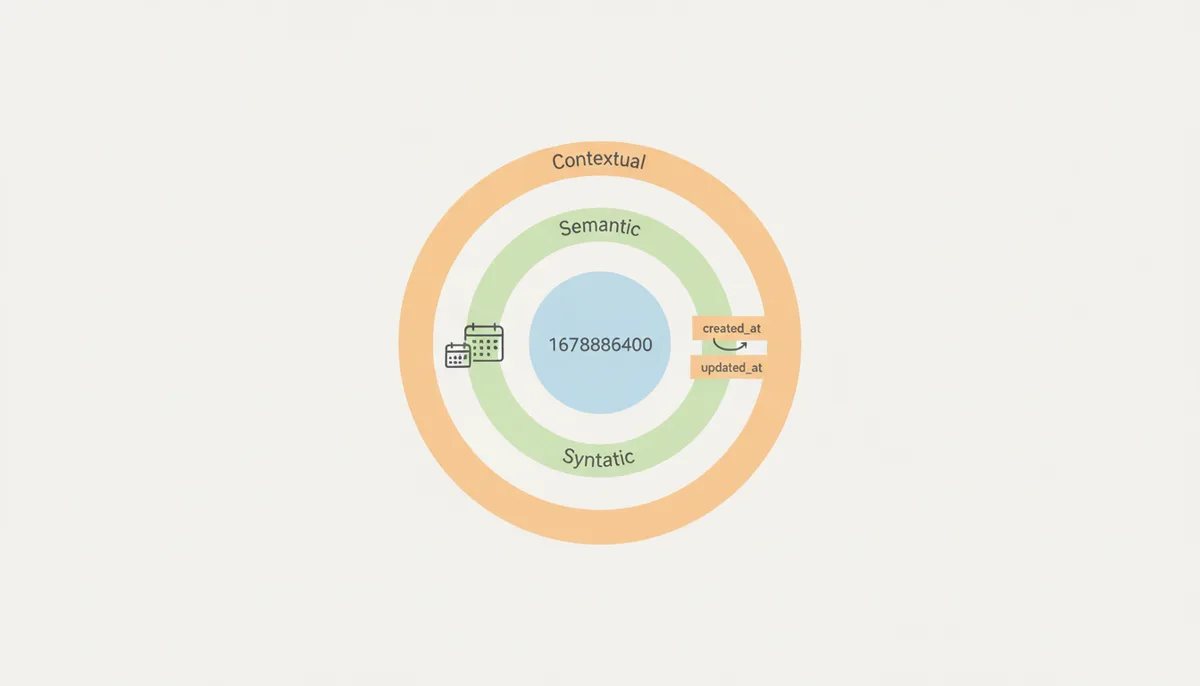
The key insight is that "valid" is relative to your system's contract. The integer 631152000 is a perfectly good encoding of 1990-01-01 — and a perfectly invalid signup_date for an app that launched in 2022. A validator that only checks the inner circle will wave that value through. Yours shouldn't.
The Pre-Flight Check: Foundational Syntactic Validation
Syntactic checks are cheap, deterministic, and catch a depressing share of production garbage. Run them before anything else, because every later check assumes they passed.
Check 1: Data type and format. A Unix timestamp should be purely numeric: an optional leading minus sign, one or more digits, and at most one decimal point. Reject anything else, including values that look almost right:
- Scientific notation like 1.7e9. Some JSON serializers emit this for large floats. Don't try to be clever and parse it — reject it and make the producer send a plain number, because accepting it hides a precision problem upstream.
- Whitespace, commas as thousands separators, or units glued on ("1700000000ms"). Trim surrounding whitespace if you must; reject the rest.
- ISO 8601 strings like 2023-11-14T22:13:20Z landing in an epoch field. This happens constantly when a service changes its output format and a consumer doesn't notice. Your pattern check catches it for free.
- Empty strings, nulls masquerading as the string "null", and JavaScript's NaN serialized into JSON by a library that shouldn't have allowed it.
Check 2: Integer versus float. A floating-point timestamp like 1700000000.999 is legitimate — that's sub-second precision. The danger is what you do with it. If you truncate toward zero, that value becomes 1700000000 and you've silently thrown away almost a full second; on a busy system, a second of skew reorders thousands of events. Round, never truncate, and ideally convert floats to an integer of a finer unit immediately: round(1700000000.999 × 1000) gives you 1700000000999 milliseconds with nothing lost. One more float trap: binary floating point can't represent most decimal fractions exactly, so float_seconds × 1000 can come out as ...9999999899. Rounding absorbs this; flooring amplifies it.
Check 3: Negative values. A negative Unix timestamp is not malformed — it's a date before 1970. The value -1 is 1969-12-31 23:59:59 UTC. Whether you accept negatives is a business decision, not a technical one: if your domain includes birthdates, historical archives, or backfilled legacy records, you must accept them; if it doesn't, rejecting negatives is a free tripwire for unit bugs, because a wrapped-around 32-bit overflow and several other failure modes produce negative numbers. My default: reject negatives unless the field's documentation explicitly says historical dates are in scope. One platform caveat — Python's datetime.fromtimestamp() raises an error for negative values on some platforms (older Windows builds especially) instead of returning a date, so "it worked on my Linux laptop" is not proof your validation is portable.
Sanity Checking the Range: Plausibility and System Limits
A number can be perfectly formatted and still be nonsense. Range checking is where you catch it, and it splits into two questions: is this date plausible for my application, and can my storage even hold it?
Check 4: Plausible boundaries. Define a window and enforce it. The lower bound is the earliest date your domain can legitimately produce — your company's founding, the application's launch, the start of the dataset you're ingesting. The upper bound is trickier because of clock skew (the drift between two machines' clocks): perfectly healthy servers disagree by tens of milliseconds, and a misconfigured one can be minutes off. Kerberos, a protocol that lives and dies by clock agreement, settled on a five-minute tolerance decades ago, and it's still a sane default for server-generated events. So a typical rule looks like: reject anything before 2020-01-01 (launch), and reject anything more than five minutes in the future. For genuinely future-dated data — scheduled posts, subscription renewals — set the ceiling to the furthest legitimate horizon, like now plus ten years, not "any future date."
Check 5: The Year 2038 problem. A signed 32-bit integer maxes out at 2147483647, which as seconds since the epoch is 2038-01-19 03:14:07 UTC. One second later, a 32-bit counter wraps to -2147483648 — December 1901. Systems that were "temporary" in 2005 are still running, and any of them storing epoch seconds in a 32-bit INT have a scheduled failure. The validation rule has two halves. First, if a value exceeds 2147483647, it cannot survive 32-bit storage — in Python the probe is literally one comparison, ts > 2147483647, and you can confirm the decode by calling datetime.fromtimestamp(ts, tz=timezone.utc) and treating a raised ValueError or OSError as a validation failure. Second, and this is the part people miss: MySQL's native TIMESTAMP type is 32-bit internally and stops accepting values after 2038-01-19 03:14:07 UTC. It's not just your integer columns that need auditing. Store epoch values in BIGINT (64-bit, max around the year 292 billion — not a practical concern) or use a native time-zone-aware type. If you need plain wall-clock dates in MySQL, DATETIME runs to the year 9999 and ignores time zones entirely, which is a different set of trade-offs.
| Data Type | Database | Storage | Max Value as a Date | Y2K38-Safe? | Time Zone Aware? |
|---|---|---|---|---|---|
| INT | PostgreSQL / MySQL | 4 bytes | 2038-01-19 03:14:07 UTC | No | No |
| BIGINT | PostgreSQL / MySQL | 8 bytes | ~292 billion years from now | Yes | No |
| DOUBLE / DOUBLE PRECISION | PostgreSQL / MySQL | 8 bytes | Effectively unlimited; loses integer exactness past 2^53 | Yes | No |
| TIMESTAMP | PostgreSQL | 8 bytes | 294276 AD | Yes | No |
| TIMESTAMPTZ | PostgreSQL | 8 bytes | 294276 AD | Yes | Yes — stores UTC, displays in session zone |
| TIMESTAMP | MySQL | 4 bytes | 2038-01-19 03:14:07 UTC | No | Yes — converts to UTC on write, back on read |
Read the last row again if you run MySQL. Every other option in that table survives 2038; MySQL TIMESTAMP does not, and the failure arrives whether or not anyone is still maintaining the schema.
Decoding Precision: Seconds, Milliseconds, or Something Else?
If I could keep only one section of this article, it would be this one. Precision confusion causes more timestamp bugs than every other category combined, because a bare number carries no unit. The value 1700000000000 is a Tuesday in November 2023 if it's milliseconds and the year 53841 if it's seconds. The database will happily store either interpretation. Timestamp precision validation is really unit identification, and you need a repeatable way to do it.
Check 6: Heuristic precision detection. For contemporary dates, digit count is a reliable fingerprint:
| Precision | Digits (current era) | Example (2023-11-14 22:13:20 UTC) | Common Sources |
|---|---|---|---|
| Seconds | 10 | 1700000000 | PHP time(), Linux date +%s, JWT exp claims |
| Milliseconds | 13 | 1700000000000 | JavaScript Date.now(), Java System.currentTimeMillis(), MongoDB BSON dates |
| Microseconds | 16 | 1700000000000000 | PostgreSQL now(), Python datetime conversions |
| Nanoseconds | 19 | 1700000000000000000 | Go time.Now().UnixNano(), Python time.time_ns(), Linux clock_gettime |
Digit counting has a hole you need to know about: it assumes the date is recent. A seconds timestamp from 1995 is only nine digits, and one from before 2001-09-09 (when the counter passed one billion) is nine digits too. So use digit count as a sanity hint, and magnitude thresholds as the actual decision rule. For contemporary production data, these thresholds are safe for the next few thousand years:
- Below 10^11 → seconds (10^11 seconds is the year 5138, far beyond any millisecond value a live system produces today)
- 10^11 to 10^14 → milliseconds
- 10^14 to 10^17 → microseconds
- 10^17 and above → nanoseconds
The exception runs backward, not forward. Millisecond timestamps from the Epoch through early 1973 also sit below 10^11 — 10^11 milliseconds is only about 3.2 years, landing in March 1973 — so magnitude detection will misclassify a 1971 millisecond value as seconds. The decode is subtly wrong, too: 86,400,000 (one day after the Epoch, in ms) read as seconds comes out as late September 1972, close enough to plausible to slip through a loose range check. Treat the heuristic as a rule for contemporary production timestamps, not all historical data. If you're backfilling archives or ingesting a dataset that reaches into the early 1970s, skip automatic detection entirely — require an explicit field contract or schema metadata from the producer that states the unit, and validate against that instead.
When you're staring at a mystery value in a log and want the fast answer, paste it into a Unix timestamp converter and look at the decoded date. If it comes out as the year 53841, you're holding milliseconds that something is reading as seconds. Ten seconds of eyeballing beats twenty minutes of arithmetic.
Check 7: Normalization. Detecting the unit is only half the job. Before storage, convert every inbound timestamp to one canonical precision — my default is integer milliseconds in a BIGINT column, which matches JavaScript, Java, and MongoDB's BSON date type natively and keeps arithmetic trivial. The conversions: seconds → milliseconds, multiply by 1000. Milliseconds → seconds, integer-divide by 1000. Float seconds → milliseconds, round(x × 1000). Whatever you pick, write it in the schema comment and the API docs, because the next engineer's default assumption will be whichever unit their language's standard library happens to return.
One hard limit to respect: do not store nanosecond timestamps as DOUBLE. A 64-bit float holds integers exactly only up to 2^53, about 9 × 10^15. That's 285 million years of seconds, 285 years of microseconds — and only about 104 days of nanoseconds. Every nanosecond timestamp from after April 1970 already exceeds it, so a float column will silently round your values to the nearest few hundred nanoseconds. Nanoseconds demand a 64-bit integer, full stop.
Context Is King: Validating Against Application Logic
The outer layer of the model is where validation stops being arithmetic and starts being judgment. These checks compare the timestamp against other data and against what your system knows about itself.
Check 8: Sequential integrity. Many timestamp fields only make sense relative to a sibling field, and cross-field rules catch corruption that no range check will:
- event_end_time must be greater than event_start_time. A zero or negative duration means one of the two is wrong — or the producer's clock jumped mid-request.
- updated_at must be greater than or equal to created_at. Equality is fine (a record written once and never touched); less-than is corruption.
- expires_at must be after issued_at. A session that expires before it's issued is usually a seconds-versus-milliseconds mixup on exactly one of the two fields — which is worse than both being wrong, because it survives casual inspection.
Decide in advance how these rules treat nulls. My rule: if the sibling field is null, skip the comparison rather than failing — a missing created_at is a data-quality problem, but it's a different problem, and conflating the two makes triage harder.
Check 9: System-level consistency. Anchor timestamps to facts your system knows. A user's created_at cannot precede your launch date. A login event cannot precede that user's signup. A log line from your payment service claiming to be from 2017, when the service was written in 2023, is either a unit bug or a clock that lost its mind. Both deserve rejection.
Clock skew is the reason all of this needs tolerance windows. Machines keep time via NTP — the Network Time Protocol, which syncs a server's clock against reference sources — and a healthy NTP client stays within tens of milliseconds over the public internet, often sub-millisecond on a well-run LAN. But VMs drift after suspend, containers inherit whatever the host believes, and some providers "smear" leap seconds by stretching a day instead of inserting a second, which means two machines can legitimately disagree by up to a second during a smear window. The practical rules: when comparing timestamps from different machines, measure your fleet's actual skew and set your tolerance to roughly twice the worst you observe; treat two events within that window as unordered rather than picking a winner; and if strict ordering matters to the business, don't derive it from wall clocks at all — use a monotonic sequence number from a single source and keep the timestamp for human consumption.
Assembling a Production-Grade Validation Pipeline
Individual checks are easy. The value is in running all of them, in order, every time, behind one function with one contract. Here's the validate_timestamp(ts, context) procedure I implement, as a sequence:
- Coerce and inspect. Convert the input to a string, trim whitespace, reject empty. Apply the syntactic pattern: optional minus, digits, at most one decimal point. Failure returns error code NOT_A_NUMBER.
- Detect the unit. If the caller declared a unit, trust but verify it against the magnitude thresholds. If not, infer from the 10^11 / 10^14 / 10^17 boundaries. If the value falls in a genuinely ambiguous zone, fail with UNKNOWN_PRECISION rather than guessing — a guessed unit is how you get the year 53841.
- Normalize. Convert to integer milliseconds: round floats, multiply seconds, divide micros and nanos. The function's output is always the same unit regardless of input.
- Range check. Compare against [min_allowed, now + skew_allowance] from your domain config. Too old returns OUT_OF_RANGE; too far ahead returns FUTURE_SKEW, because future dates deserve their own alarm — they usually mean clock problems, not bad clients.
- Contextual checks. If the context carries sibling fields (created_at alongside updated_at), enforce ordering rules. Violations return CONTEXT_VIOLATION with the rule named.
- Return a structured result. Success: {is_valid: true, value_ms: 1700000000000, unit_detected: "seconds"}. Failure: {is_valid: false, error: "OUT_OF_RANGE", detail: "decodes to 1963-04-02, before min_allowed 2020-01-01"}. The detail string is what turns a 2 a.m. page into a five-minute fix.
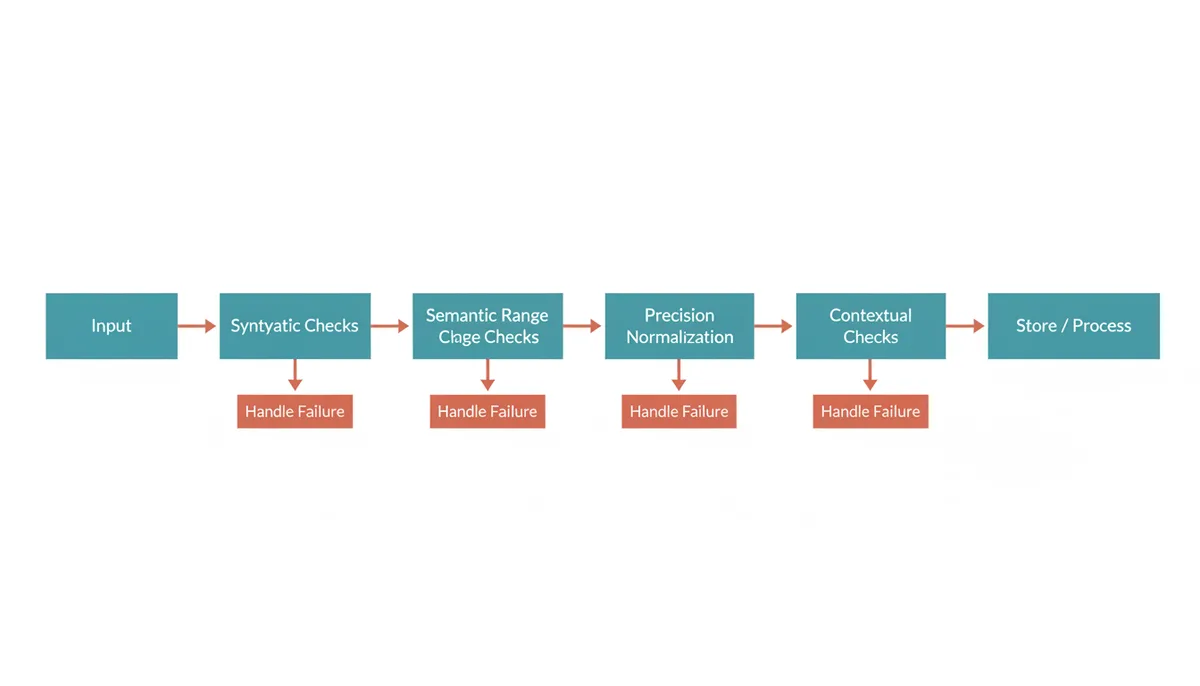
Where you run this matters as much as how. In practice you want it at up to three depths:
- At the API edge for synchronous writes, where a failure can become a 400 response and the producer finds out immediately.
- In the consumer for queue- and stream-based pipelines, where the producer is long gone and your options are quarantine or repair (next section). If you ship logs through Logstash, its date filter already tags unparseable values with _dateparsefailure — route anything carrying that tag out of your main index instead of letting it land with a wrong or missing timestamp.
- In the database as a last line, with CHECK constraints: CHECK (created_at <= updated_at), CHECK (event_time >= 0) where negatives are illegal. Constraints can't do unit detection, but they guarantee that even a hand-written SQL fix can't reintroduce the bug.
And don't forget the data you already have. A one-time audit of existing columns pays for itself: pull min, max, and a histogram per timestamp column, and for anything suspicious, export a sample and run it through a batch converter to see the decoded dates side by side. Columns that "have always been fine" have a way of containing exactly one row from the year 53841.
Strategies for Handling Validation Failures
Detecting a bad timestamp is half the job. Handling invalid timestamps well is a design decision, and there are exactly three honest options:
- Reject. Refuse the write and tell the producer — a 400 with a specific error code. Right for synchronous APIs where the caller can fix and retry. Wrong for fire-and-forget producers, who will never know and never resend; you just lose the data.
- Quarantine. Accept the record, park it in a dead-letter queue or a quarantine table with the failure reason attached, and alert on volume. Right for streams and log pipelines, where one poisoned message must not block the million behind it, and where the quarantined records are your evidence when you confront the team whose service emits garbage.
- Repair or default. Substitute now() or null and carry on. Tempting, and dangerous. A replaced timestamp is a lie your system tells itself, and in security logs or billing data that lie can be worse than a gap — you've fabricated evidence of when something happened. Reserve repair for low-stakes telemetry where a data point's existence matters more than its time, and always mark it: a boolean repaired flag or a separate original_value column, so the record admits what you did.
Choosing between them comes down to two questions. Can the producer resend? If yes, reject — correctness is free. If no, is the record's value in its content or its timing? Content, quarantine and fix later. Timing, think very hard before repairing, because repair destroys the one thing the record was for. When in doubt, quarantine. It's the only option that preserves both your pipeline's throughput and your ability to reconstruct what actually happened.
Beyond the Epoch: When Unix Timestamps Aren't the Answer
Unix time has one structural blind spot worth knowing before you standardize on it: leap seconds. Because Unix time insists every day is 86,400 seconds, the 27 leap seconds inserted since 1972 simply don't exist in it — some Unix days were, in reality, a second longer, and the clock absorbed the difference by repeating or smearing. For logging and CRUD applications, this is noise. For applications that price or measure exact elapsed time across a leap event — certain financial settlement windows, scientific data acquisition — it's a real error term, and those domains use time scales like TAI instead of pretending the Earth cooperates.
The more everyday limitation is readability and self-description, and that's where ISO 8601 (and its internet profile, RFC 3339) earns its place. A string like 2023-11-14T22:13:20Z states its date, time, and UTC offset explicitly; a human can read it in a log at 3 a.m. without opening a converter; and unlike a bare integer, it announces its own precision. The cost is real too: it's 20-plus bytes of text instead of an 8-byte integer, parsing it takes actual work, and a naive string with no offset is its own flavor of ambiguity.
| Attribute | Unix Timestamp (BIGINT) | ISO 8601 / RFC 3339 String | Database TIMESTAMPTZ |
|---|---|---|---|
| Human readability | None without conversion | High | High on output |
| Time zone handling | UTC by definition | Explicit offset (Z or ±hh:mm) | Stored as UTC, shown in session zone |
| Storage size | 8 bytes | ~20–32 bytes of text | 8 bytes |
| Parsing cost | Trivial integer read | Requires a real parser | Handled by the database |
| Ambiguity risk | Unit (s/ms/µs/ns) is external knowledge | Low with offset; naive strings are dangerous | None once stored |
| Leap second awareness | Ignored — day is always 86,400 s | Can represent 23:59:60 | Ignored (POSIX time) |
My working rule, and I'd defend it in a design review: store internally as BIGINT milliseconds UTC or TIMESTAMPTZ, expose RFC 3339 strings at public API boundaries and in config files, and pick exactly one format per log pipeline — epoch milliseconds if machines are the audience, RFC 3339 with offset if humans are. The failure mode to avoid is the mixed pipeline, where service A logs epoch seconds, service B logs ISO strings, and the person debugging a cross-service incident gets to do unit forensics during an outage. Whatever you choose, the validation checklist above is what makes the choice stick: syntactic checks at the door, range and precision checks before storage, contextual checks before trust, and a failure strategy decided before the first bad value arrives — not during the incident it causes.
Frequently Asked Questions
Is a negative Unix timestamp ever valid?
Yes. Negative values count seconds backward from the Epoch, so -1 is 1969-12-31 23:59:59 UTC and -2147483648 lands in December 1901. They're fully valid in the standard, and systems handling birthdates or historical archives need them. But if your application only deals with events after its own launch, rejecting negatives is a cheap tripwire — several overflow and unit-conversion bugs produce negative values, and you'd rather catch them at validation than in a report.
How should I handle time zones during validation?
By remembering that a true Unix timestamp has no time zone — it's always UTC by definition. Your validator should assume UTC and normalize to it. If an upstream system sends you local times or strings with offsets, convert those to epoch UTC before validation and storage, and treat any "epoch with a time zone" as a category error worth flagging to the producer. Storing local wall-clock times alongside epoch values is how you get a twice-a-year daylight-saving incident.
What's the difference between a Unix timestamp and an ISO 8601 string?
A Unix timestamp is a single number: seconds (or milli/micro/nanoseconds) since 1970-01-01 00:00:00 UTC, like 1700000000. An ISO 8601 string is a human-readable encoding like 2023-11-14T22:13:20Z that states the date, time, and offset explicitly. The number is compact and trivially sortable but carries no unit; the string is self-describing and readable but bigger and slower to parse. Use numbers inside systems, strings at the boundaries where humans and third parties read them.
Can a Unix timestamp be a float or have a decimal?
Yes — 1700000000.5 is a legitimate timestamp with half-second precision. The risks are in the handling: truncating a float toward zero can silently discard almost a full second, and binary floating point can't represent most decimal fractions exactly, so multiplying by 1000 can yield ...9999. The safe pattern is to convert immediately with rounding — round(x × 1000) to integer milliseconds — and store the integer. Never store nanosecond values as floats; a 64-bit float can't represent them exactly past about 104 days after the Epoch.
Why is a 10-digit number a valid timestamp but an 11-digit one is not?
Because of what each decodes to as seconds. Ten digits gets you to 9999999999, the year 2286 — plausible enough to accept. An 11-digit value like 10000000000 as seconds is also only the year 2286, but that's exactly the trap: real 11-digit values are almost always milliseconds being misread as seconds (10000000000 ms is April 1970). Digit count isn't a validity rule by itself — it's a precision signal. Validate the unit first, then the range, and an "invalid" 11-digit number usually turns out to be a valid timestamp in the wrong unit.
What is the maximum value for a Unix timestamp?
It depends on the storage, not the standard — Unix time itself defines no ceiling. A signed 32-bit integer in seconds maxes out at 2147483647, which is 2038-01-19 03:14:07 UTC, and wraps to 1901 one second later. A signed 64-bit integer reaches roughly 292 billion years from the Epoch, so epoch seconds in a BIGINT are effectively unlimited for any real application. Native database types carry their own documented limits: PostgreSQL's TIMESTAMP and TIMESTAMPTZ run to 294276 AD, while MySQL's TIMESTAMP is 32-bit internally and stops at that same 2038 instant. The practical answer is to check the column type, not just the value.
Sources
- The Open Group Base Specifications (POSIX) — The official definition of 'Seconds Since the Epoch' and the concept of UTC as its basis, including the handling of leap seconds (by ignoring them).
- IETF RFC 3339 (Date and Time on the Internet: Timestamps) — The specification for the ISO 8601 format, used as the primary alternative to Unix timestamps, especially in APIs.
- PostgreSQL Documentation: Date/Time Types — Authoritative information on storing time-series data in PostgreSQL, including the ranges and precision of `TIMESTAMP`, `TIMESTAMPTZ`, and `BIGINT`.
- MySQL Documentation: Date and Time Data Types — Authoritative information on the behavior of `TIMESTAMP`, `DATETIME`, and integer types for storing epoch values in MySQL.
- Mozilla Developer Network (MDN): Date — Canonical documentation for how JavaScript handles dates, including `Date.now()` which returns milliseconds since the epoch, a common source of precision errors.
- NTP.org — Information on the Network Time Protocol, which is the standard for synchronizing clocks across systems, relevant to the discussion of clock skew in contextual validation.